What is a Hyvä compatibility module and when do I need one?
A Hyvä compatibility module is a small companion Magento 2 module. It rebuilds a third-party extension’s storefront code so it runs on the Hyvä theme. You need one when an extension renders storefront UI with RequireJS or KnockoutJS and the vendor ships no Hyvä version. Backend and admin-only extensions usually work without one.
Quick answer
A Hyvä compatibility module makes a Luma-based Magento 2 extension work on the Hyvä theme. Hyvä ships no RequireJS, KnockoutJS, or jQuery, so extensions built on them break or render blank on a Hyvä storefront. The compatibility module rewrites the extension’s frontend in Alpine.js and Tailwind CSS. The original extension keeps running the PHP logic. If neither the vendor nor Hyvä’s Compatibility Module Tracker lists Hyvä support for a storefront extension, you need one.
How a Hyvä compatibility module works
Hyvä replaces the frontend stack of Luma, Magento 2’s default theme. Luma extensions typically ship RequireJS configs, KnockoutJS templates, jQuery widgets, and LESS styles. None of these load on a Hyvä storefront, which uses only Alpine.js and Tailwind CSS.
The compat module sits beside the original extension and overrides only what touches the storefront: templates, layout XML, and JavaScript. The original module still handles models, observers, configuration, and API calls. Hyvä’s compatibility module documentation describes it as a re-implementation of whatever parts don’t work on Hyvä out of the box.
Shared compat modules follow a naming pattern. The module for Smile ElasticSuite, for example, is Hyva_SmileElasticSuite, published under the hyva-themes Composer namespace. The hyva-themes/magento2-compat-module-fallback package checks the compat module for each template before falling back to the original. A Luma store view on the same install keeps the original templates.
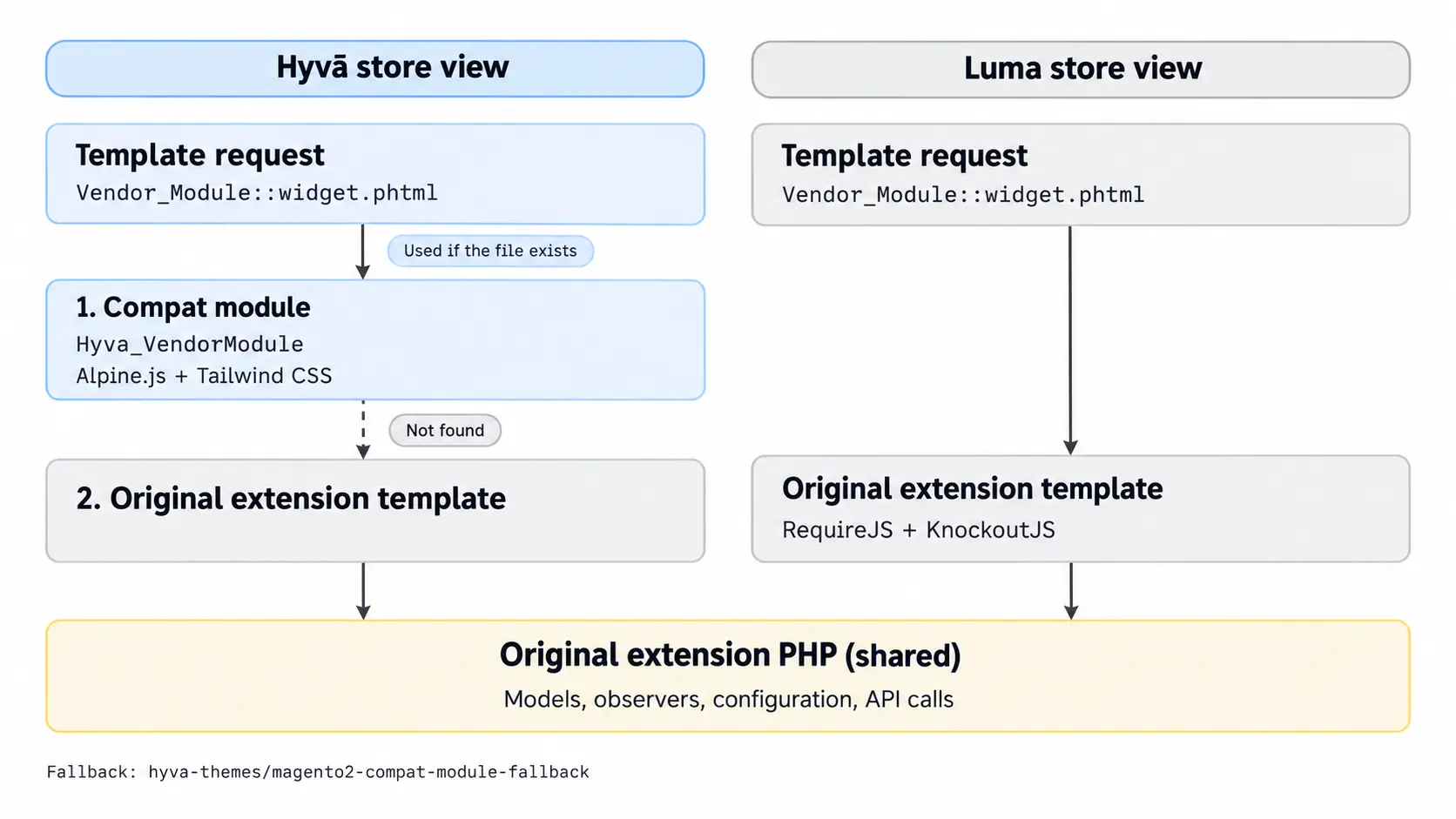
When you need a Hyvä compatibility module
Whether an extension needs a Hyvä compatibility module depends on what it does on the storefront:
| Extension type | Needs a Hyvä compatibility module? | Example |
|---|---|---|
| Storefront UI on product, category, or cart pages | Yes, unless the vendor ships Hyvä support | Swatches, product configurators |
| Header or minicart widgets | Yes, unless the vendor ships Hyvä support | Free-shipping progress bar |
| Checkout changes | Yes on Hyvä Checkout. No on the Luma checkout fallback. | Payment method, delivery date picker |
| Admin-only | No | Order grids, import tools |
| Backend integrations | No | ERP or PIM connectors syncing via PHP and cron |
| Vendor ships Hyvä support | No separate build. Install the vendor’s Hyvä package. | my-org/magento-hyva-integration |
Checkout needs extra attention. Hyvä Checkout is a separate product built on Magewire. A payment extension can need support for both Hyvä Checkout and Hyvä Theme. Stay on the Luma checkout fallback, hyva-themes/magento2-luma-checkout, and Luma-based checkout extensions keep working as before.
When an extension doesn’t need a Hyvä compatibility module
Admin-only extensions and backend integrations such as ERP connectors never render on the storefront, so they need no compat module. Extensions whose vendor already ships Hyvä support need no separate build either. Look for a separate Composer package with “hyva” in its name, which Hyvä’s naming conventions recommend for vendor-hosted compat modules. Hyvä’s Compatibility Module Tracker also lists extensions that work on Hyvä natively.
Before you rely on a Hyvä compat module
- Test every feature your store uses, because some compatibility modules cover only what their author needed.
- An extension update can break its Hyvä compatibility module. Pin both versions in composer.json and upgrade them together.
- Template overrides in your own child theme may also need rewriting for Hyvä.
How to check if a Magento extension is Hyvä compatible
The Hyvä Theme itself has been free and open source since November 10, 2025, under OSL 3.0 and AFL 3.0. a free key from your hyva.io account also gives Composer access to third-party compatibility modules. Individual accounts get up to 5 free keys, and agency partner groups up to 50.
Vendor-built compat modules vary in price. Some vendors include them free with an active extension license, while others sell them as paid add-ons.
Run these four checks on each frontend extension:
- Check the vendor’s documentation: look for a Hyvä section or a separate Hyvä Composer package on the extension’s install page.
- Search Hyvä’s Compatibility Module Tracker: the tracker shows which compat modules are published and which extensions already work natively.
- Inspect the extension’s frontend files: run this from your Magento root.
Any result means the extension uses Luma JavaScript on the storefront. No view/frontend folder at all usually means it runs backend only.
find vendor/vendor-name/module-name/view/frontend \( -name "requirejs-config.js" -o -path "*/web/template/*.html" \) - Test on staging: switch a store view to Hyvä and check the browser console for
require is not definederrors.
To scan a whole store at once, the community-built Hyvä Compatibility Checker lists the modules that need Hyvä compatibility. It’s a Node.js tool you clone into your Magento root. It writes JSON and CSV reports to a hyva-compatibility-analysis folder.
git clone https://github.com/rossmc/hyva-compatibility-checker.git
npm --prefix hyva-compatibility-checker install
npm --prefix hyva-compatibility-checker startAudit every frontend-facing extension before the Hyvä build starts. Some stores have native support or a published Hyvä compatibility module for each one. For them, the extension work is mostly install and test. Every extension without one adds custom development, so count them early.
Our Hyvä theme development team can review your extension list and scope any compat modules you’ll need.
Related Answers

Still need help?
Not sure which of your extensions work with Hyvä?
Send us your extension list and we’ll point out which ones need a compatibility module before you plan your build.