Will Hyvä support my existing extensions?
Yes, most existing Magento 2 extensions work with the Hyvä Theme, though some need extra work first. Hyvä replaces only Magento’s storefront theme, so admin features, cron jobs, and API integrations keep running unchanged. Extensions that add storefront features, such as layered navigation or product labels, are where that work sits. Hyvä extension compatibility comes down to the frontend code each module ships.
Quick answer
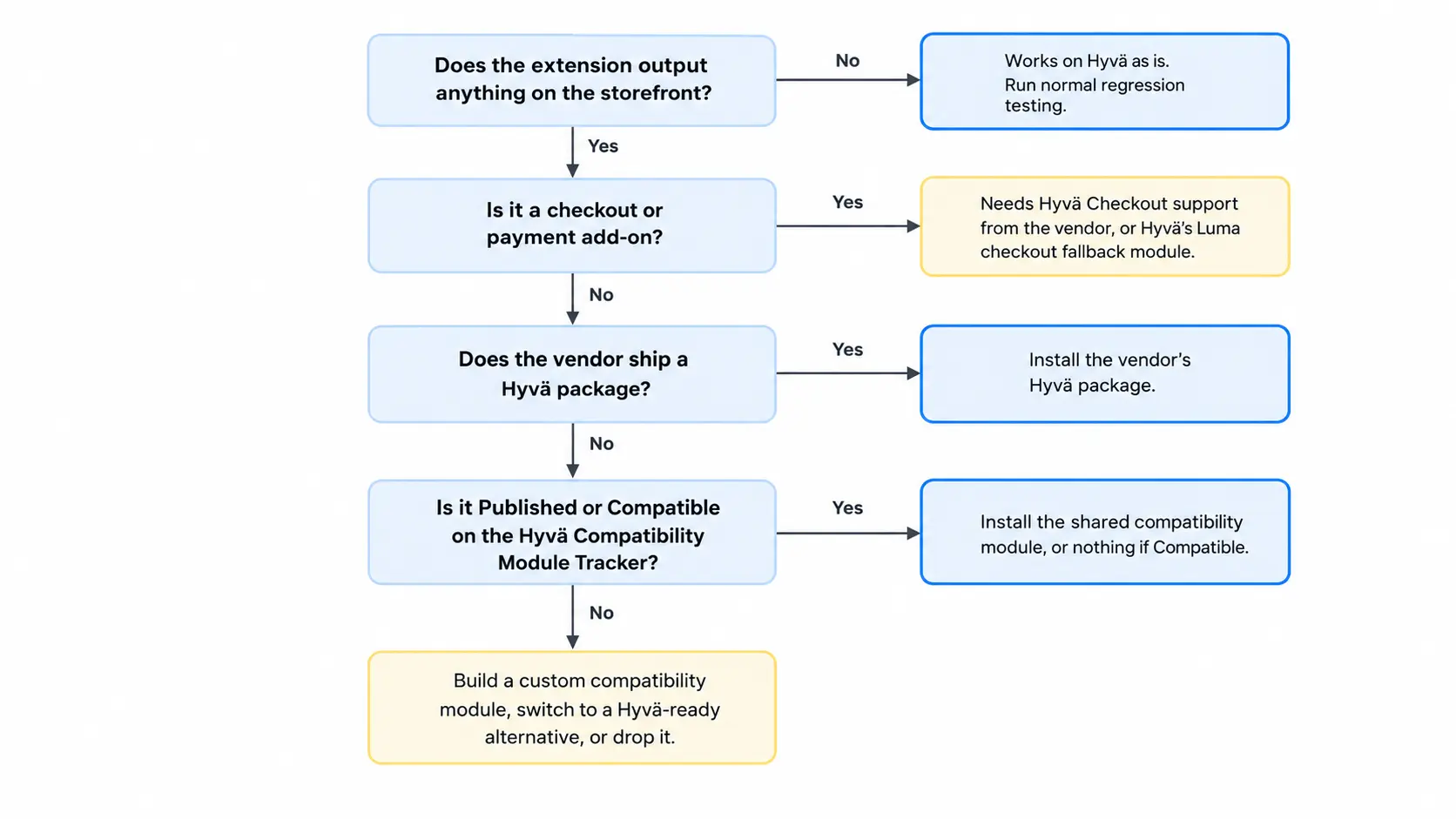
How much work a Magento 2 extension needs on the Hyvä Theme depends on its storefront code. Backend-only modules, such as ERP sync or order export, need no changes. Anything with Luma-based storefront code needs a Hyvä compatibility module, from the vendor or the Hyvä Compatibility Module Tracker. Checkout add-ons need Hyvä Checkout support or Hyvä’s Luma checkout fallback module.
What decides Hyvä extension compatibility
Luma, Magento’s default theme, builds its storefront with RequireJS, Knockout.js, and jQuery. Hyvä drops all three and uses Tailwind CSS and Alpine.js instead. Because RequireJS never loads, an extension’s Luma widgets simply don’t run. The feature disappears or throws console errors.
Hyvä’s compatibility module documentation states that modules built on the Luma or Blank themes need a compatibility module to work with Hyvä. That module rewrites only the parts that break on a Hyvä storefront. Your extension’s business logic stays as it is.
| Extension type | Works on Hyvä as is? | What it needs |
|---|---|---|
| Admin and backend only (ERP sync, order export, product feeds, cron jobs) | Yes | Normal regression testing |
| API-only integrations (REST, GraphQL) | Yes | Normal regression testing |
| Storefront features (layered navigation, product labels, popups, sliders, reviews) | Usually not | A Hyvä compatibility module or a Hyvä-ready version |
| Checkout and payment methods | Depends on your checkout | Hyvä Checkout support or the Luma checkout fallback |
| Adobe Commerce features (B2B, company accounts) | No | A separate Hyvä Enterprise license |
On Adobe Commerce, the Hyvä Theme doesn’t cover Commerce-only features such as B2B. Those need a separate Hyvä Enterprise license.
Where to find a Hyvä compatibility module
Start with the extension vendor’s changelog or product page. Many vendors now ship Hyvä support as a separate Composer package that installs alongside the original extension. Check that the package matches your extension version, since support can be tied to specific releases.
Next, search the public Hyvä Compatibility Module Tracker. Its board columns tell you where each module stands:
- Requested modules that nobody has made compatible yet.
- Published modules, where a shared compatibility module already exists.
- Compatible modules, which work with Hyvä natively and need nothing extra.
Hyvä Theme became free and open source on November 10, 2025. Shared compatibility modules install with Composer from Hyvä’s packagist.com repository. According to Hyvä’s installation docs, the access key is free from your hyva.io account dashboard.
If neither the vendor nor the Hyvä Compatibility Module Tracker has one, a developer builds a custom compatibility module.
Do checkout and payment extensions work with Hyvä?
Hyvä does not force a single checkout on you. Its checkout documentation lists three options:
- Hyvä Checkout is a separate paid product with the tightest Hyvä integration. Each checkout and payment add-on needs Hyvä Checkout support from its vendor.
- The Luma Checkout uses the
hyva-themes/magento2-luma-checkoutmodule to switch checkout pages back to a Luma theme. Most Luma-based third-party checkouts work this way. - React Checkout is an open source, community-supported option for teams with React experience.
Vendor support for Hyvä Checkout is often partial. A shipping extension’s main module may work in Hyvä Checkout. Its add-ons, such as in-store pickup or delivery date selectors, may not. Confirm support for every add-on you use.
How to check your extensions before migrating to Hyvä
- List modules with storefront code: run
ls -d vendor/*/*/view/frontend app/code/*/*/view/frontendto see every module that ships frontend templates or JavaScript. - Match each one to a source: note which have a vendor package or a Hyvä Compatibility Module Tracker entry. The rest are your real workload.
- Test on staging:Hyvä’s docs suggest running a Luma store view next to the Hyvä store view to compare features side by side.
- Decide on the gaps: for each unsupported module, ask whether it earns a custom compatibility module. Often a Hyvä-ready alternative, or dropping the feature, costs less. Effort scales with the module: a simple popup is quick, while layered navigation or search takes far longer.
What can go wrong with a Hyvä compatibility module
- Some compatibility modules cover only part of the original module’s features. Test every setting your store actually uses.
- Pages served through Hyvä’s Luma theme fallback module load RequireJS and the full Luma stack, so they lose Hyvä’s speed. They also need their own styling.
- Custom modules from a previous agency won’t appear in any tracker. Review their templates by hand.
- Your current theme’s template overrides were written for Luma, so plan to rebuild each one in the Hyvä child theme.
Audit your extensions against Hyvä before you commit to a launch date. Backend modules almost always carry over. The real effort sits in a handful of storefront and checkout modules, and that’s where Hyvä extension compatibility gets decided. Want a second opinion on your module list? Our Hyvä theme development team can mark which modules are ready and which need work.
Related Answers

Still need help?
Talk to our Hyvä experts
Not sure which of your extensions will break on Hyvä? We can review your module list and tell you what carries over and what needs work.