What are my options when an extension is not Hyvä compatible?
If a Magento 2 extension isn’t compatible with the Hyvä theme, the fastest fix is usually a Hyvä compatibility module. Use one that already exists, or have a developer build one for your store. When that doesn’t make sense, run the extension’s pages on Hyvä’s Luma theme fallback, or replace or remove the extension. Admin-only and backend extensions, such as an ERP sync or an order export, aren’t affected. Hyvä replaces the storefront theme only.
Quick answer
When a Magento 2 extension isn’t Hyvä compatible, check Hyvä’s Compatibility Module Tracker and the vendor’s site for an existing module. If neither has one, a developer can build a module that rewrites the extension’s frontend in Alpine.js and Tailwind CSS. Hyvä’s Luma theme fallback can keep a Luma-based checkout running while the rest of the store uses Hyvä. Replace or remove the extension when its frontend is large and its value is low.
Your five options for an extension that is not Hyvä compatible
Extensions break on Hyvä because Hyvä drops RequireJS, jQuery, Knockout.js and LESS in favor of Alpine.js and Tailwind CSS. Any extension that ships Luma-style widgets, Knockout templates or LESS files will render broken or not at all. The Hyvä theme has been free and open source since 10 November 2025, starting with Hyvä Theme 1.4. Your real cost now sits in the extensions.
1. Install an existing Hyvä compatibility module
Hyvä’s public Compatibility Module Tracker shows which modules already have a published compatibility module and which ones are in progress. Many established Magento extension vendors publish their own Hyvä packages. These usually ship as a separate Composer package that adds a -hyva suffix to the original package name. Check feature coverage before you rely on one, because some compatibility modules only implement the features their author needed.
If neither source has one, ask the vendor directly whether a Hyvä version is on their roadmap. Vendor packages aren’t always free. Some vendors offer their Hyvä compatibility packages only on a paid subscription. Confirm the licensing before you plan around one.
2. Build a custom Hyvä compatibility module
A compatibility module rewrites only the parts a shopper sees, usually the .phtml templates and any RequireJS or Knockout code. The backend logic stays untouched.
Hyvä’s compatibility module documentation covers the structure. The hyva-themes/magento2-compat-module-fallback package lets your module override the original templates without extra layout XML. Effort scales with the frontend footprint: one product page widget is a small job. Multi-step product configurators are projects in their own right.
3. Run the extension’s pages on Hyvä’s Luma theme fallback
The Luma theme fallback (hyva-themes/magento2-theme-fallback) switches chosen routes back to a Luma-based theme. Checkout is the usual case. If you run a Knockout.js one-step checkout, it keeps working while catalog and category pages still get Hyvä’s speed.
Fallback routes load RequireJS and the full Luma stack again, so they lose the speed gain. You also maintain a second set of styles so those pages still match your brand.
4. Swap it for a Hyvä compatible extension
If a competing extension already supports Hyvä, switching can cost less than building compatibility for the old one. Budget for data migration and admin retraining. Test the replacement’s Hyvä support on a staging copy before you buy a license.
5. Remove the extension and rebuild the feature
Some extensions exist only to add one frontend element, such as a product tab or a newsletter popup. Rebuild that element as an Alpine.js component in your Hyvä child theme, provided the extension has no other storefront output. That costs less than a full compatibility module. Removing the extension also cuts your maintenance load and Magento upgrade risk.
How to choose the right fix for your Magento store
Match your situation to the cheapest fix for a Magento 2 extension that isn’t Hyvä compatible. Run the checks in this order: storefront impact, an existing module, checkout, business value, then frontend size.
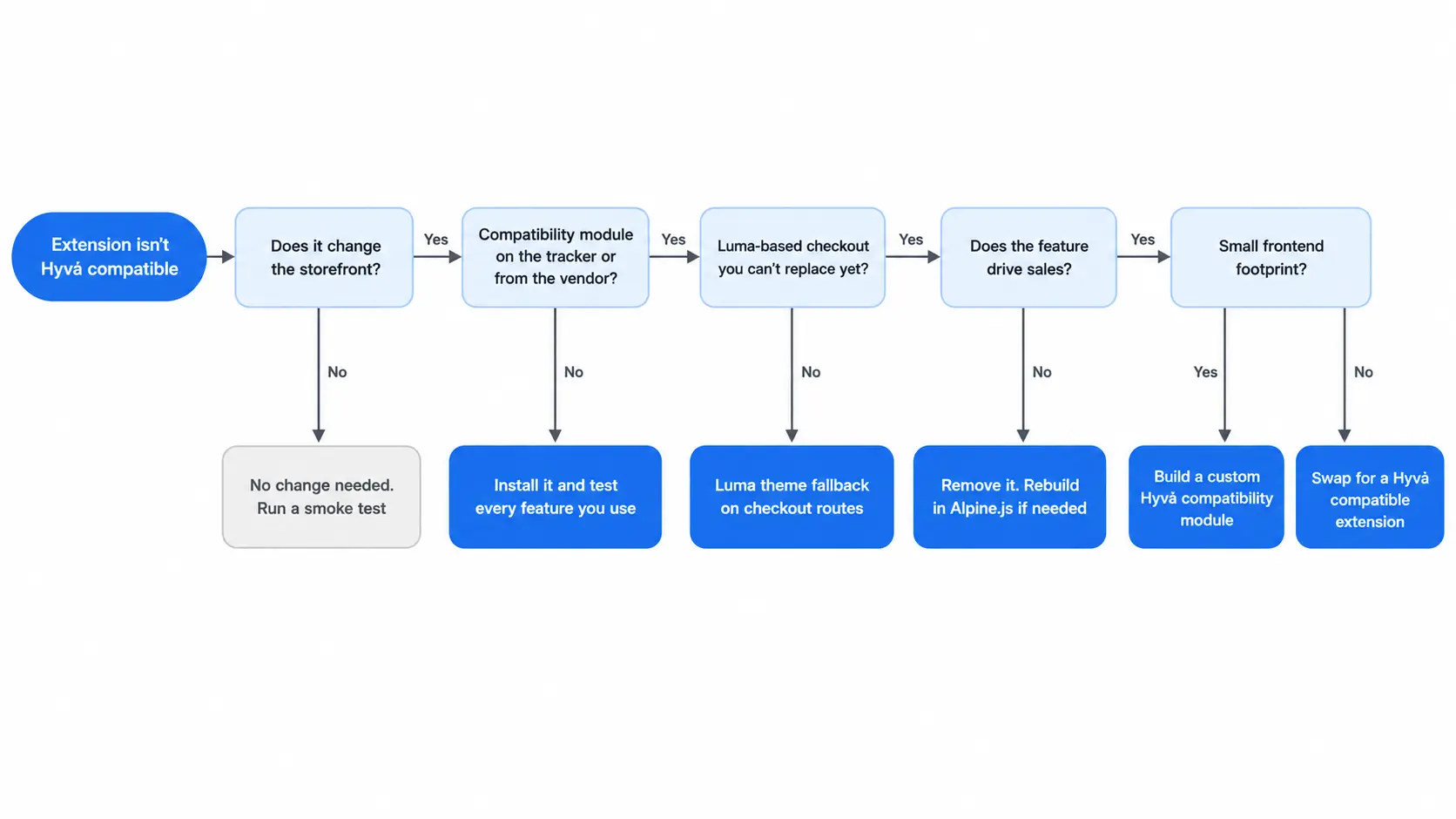
| Your situation | Best starting option |
|---|---|
| A compatibility module exists on the tracker or from the vendor | Install it, then test every feature you use |
| Small frontend footprint, and the feature drives sales | Build a custom compatibility module |
| Luma-based checkout you can’t replace yet | Luma theme fallback on checkout routes only |
| Heavy frontend, and the vendor has no Hyvä plans | Swap for a Hyvä compatible alternative |
| Cosmetic or rarely used feature | Remove it |
| Admin-only or backend-only extension | No change needed beyond a smoke test |
What to check before fixing a non Hyvä compatible extension
- List every template, JavaScript file and layout handle the extension adds to the storefront. That footprint drives the cost of every fix, from a compatibility module to a full replacement.
- Confirm which features your store actually uses. A compatibility module only needs to cover those.
- Before commissioning a custom build, get a release date from the vendor if they have Hyvä support in progress. If it ships next month, building your own is wasted money.
- Use a staging copy of production data, and place a full order through checkout before going live.
For a non Hyvä compatible extension, look for an existing module first, and build one if it earns its keep. Save the Luma fallback for checkout or for routes you’ll migrate later. Working through a long extension list? Our Hyvä theme development team can audit each module and tell you which path costs least.
Related Answers

Still need help?
Talk to our Hyvä experts
Send us your extension list, and we’ll scope which ones need a compatibility module, a Luma fallback or a replacement.