How do I find and remove abandoned extensions before an upgrade?
On Magento 2, an extension is abandoned when its vendor stops shipping releases for your target Magento or PHP version. To find them, list every third-party module and run a dry-run Composer update against the target version. To remove one, disable it on staging first, then delete its code and the database records it leaves behind. The vendor’s release history settles any borderline case.
Quick answer
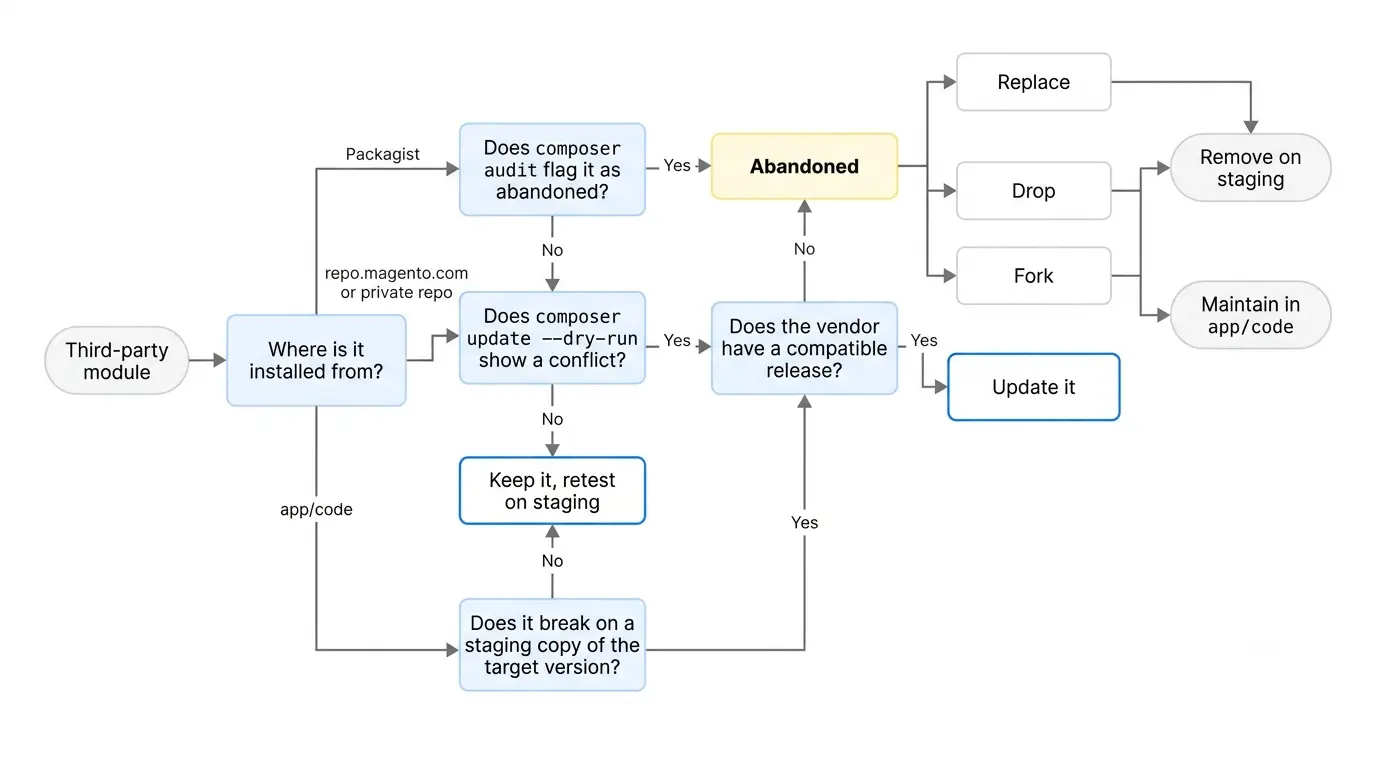
For Magento 2 stores, composer audit flags extensions marked abandoned on Packagist, but private-repository modules need a version test. A composer update --dry-run against your target Magento version, such as 2.4.9, lists every package whose constraints block the upgrade. It won’t catch code that installs cleanly and then breaks at runtime. Remove each blocker with module:disable, composer remove, and setup:upgrade, then delete its leftover config and attribute references.
How to find abandoned Magento extensions
- Inventory every third-party module: Run
bin/magento module:status. Anything outside theMagento_namespace is third-party, apart from the few vendor modules bundled with core, such asPayPal_Braintree. Cross-check withcomposer show --direct, and also look inapp/code, because modules installed there never appear in Composer output. - Check the abandoned flag: Run
composer audit. Since Composer 2.7, the audit fails on abandoned packages by default. Duringcomposer installorupdate, the same flag shows up as “Package vendor/name is abandoned, you should avoid using it.” Composer names a replacement package when the maintainer has set one. - Know where the flag stops working:Packagist only sets the abandoned flag when a maintainer marks the package or archives its GitHub repo. Extensions installed from repo.magento.com or a vendor’s private repository sit outside Packagist, so they rarely carry this flag. A clean audit proves little on its own.
- Test against the target version: Run
composer require magento/product-community-edition=2.4.9 --no-update, thencomposer update --dry-run -W, using your real target version. Any conflict in the output names a package that blocks the upgrade. Modules inapp/codehave no Composer constraints, so test them on a staging copy running the target version. Adobe Commerce projects can also run the Upgrade Compatibility Tool, which scans module code for breaking changes. Adobe doesn’t offer it for Magento Open Source. - Confirm with the vendor: Read the vendor’s changelog and note when the last release shipped. If the vendor has shipped a compatible release, update to it instead of removing the module. A module with no compatible release and no reply from the vendor is abandoned for planning purposes.
Removing abandoned Magento extensions without breaking the store
- Back up and move to staging: Take a full code and database backup. Never do this on production first.
- Check what depends on it:
module:disablerefuses to run if other modules declare a dependency.module:uninstallonly checks dependencies declared incomposer.json, so a search is the only way to catch theme references. Search your theme and custom modules for the vendor namespace too, because layout XML and templates can reference its blocks. - Disable it: Run
bin/magento module:disable Vendor_Module, thensetup:upgrade. Test checkout, the admin product grid, and order views before you delete any code. - Remove the code: For Composer packages, run
composer remove vendor/package. If the module ships an Uninstall class,bin/magento module:uninstallwith--remove-dataruns that cleanup and thecomposer removetogether. Forapp/codemodules, delete the directory manually. - Clean the leftovers: Delete the module’s row in
setup_moduleand its paths incore_config_data. Drop its custom tables only after you export anything you still need. Finish withsetup:upgrade,setup:di:compile, and a static content deploy.
What breaks when you remove abandoned Magento extensions
- Product attributes whose source, backend, or frontend model points to the deleted module break the admin product edit page. Opening the page throws a “class does not exist” error.
- Old orders keep the method code of a removed payment module, so they can fail to open in the admin.
- Some modules keep business data, such as product Q&A or subscription records, in their own tables. Export that data before you drop anything.
- Rows the module wrote to
patch_liststay behind. If you reinstall the same module later, Magento skips the patches already listed there.
When to replace, fork, or drop an old module
An unmaintained Magento extension leaves you with a short list of options.
| Option | Use it when | What it costs you |
|---|---|---|
| Replace | The feature still earns its place and a maintained extension covers it | A data migration from the old module’s tables |
| Fork | The module is small and its licence allows forking | You maintain it in app/code from now on |
| Drop | Nobody uses the feature | Only the cleanup steps above |
Run the extension audit before you scope the Magento upgrade itself. Each abandoned Magento extension turns into replace-or-rewrite work, which belongs in the estimate from the start. Want a second pair of eyes on your module list? Our Magento development team can review it with you.
Related Answers

Still need help?
Talk to our Magento experts
Stuck on an extension that blocks your upgrade? We can audit your module list and plan safe removals or replacements.