How do I upgrade the PHP version on a Magento 2 store without breaking it?
A Magento 2 PHP upgrade is safe when you stay inside the PHP range your Magento release supports. Confirm that range first. Then clear any extensions that block the new version and test it on staging before production.
Magento core and every installed extension declare the PHP versions they accept in composer.json, and Composer enforces them. Step outside that range and Composer refuses to install. Force it with –ignore-platform-reqs and the errors move to the storefront instead.
Quick answer
Adobe supports PHP 8.5 on Magento 2.4.9, PHP 8.3 or 8.4 on 2.4.8, 8.2 or 8.3 on 2.4.7, and 8.1 or 8.2 on 2.4.6. Run composer why-not php with your target version, such as 8.3, to find blocking extensions. Then install the new PHP version inside that range on staging and rerun setup:di:compile. Switch production only after test orders and cron pass, and keep the old PHP installed for rollback.
Which PHP versions does each Magento 2 release support?
Adobe lists the tested combinations on its Adobe Commerce system requirements page.The latest patch of each release line supports these PHP versions. The last column shows when Adobe’s regular support for that line ends:
| Magento release | Supported PHP versions | Regular support ends |
|---|---|---|
| 2.4.9 | 8.5 | May 31, 2029 |
| 2.4.8 | 8.4, 8.3 | May 31, 2028 |
| 2.4.7 | 8.3, 8.2 | May 31, 2027 |
| 2.4.6 | 8.2, 8.1 | Ended August 11, 2026 |
| 2.4.5 | 8.1 only | Ended August 12, 2025 |
| 2.4.4 | 8.1 only | Ended April 12, 2025 |
If your target PHP version isn’t listed for your release, you need a Magento upgrade first. A store on Magento 2.4.6 cannot move to PHP 8.3 on its own.
According to Adobe’s released versions page, regular and extended support have both ended for Magento 2.4.4 and 2.4.5. Regular support for Magento 2.4.6 ended on August 11, 2026. Stores on any of these lines should plan a platform upgrade alongside the PHP change.
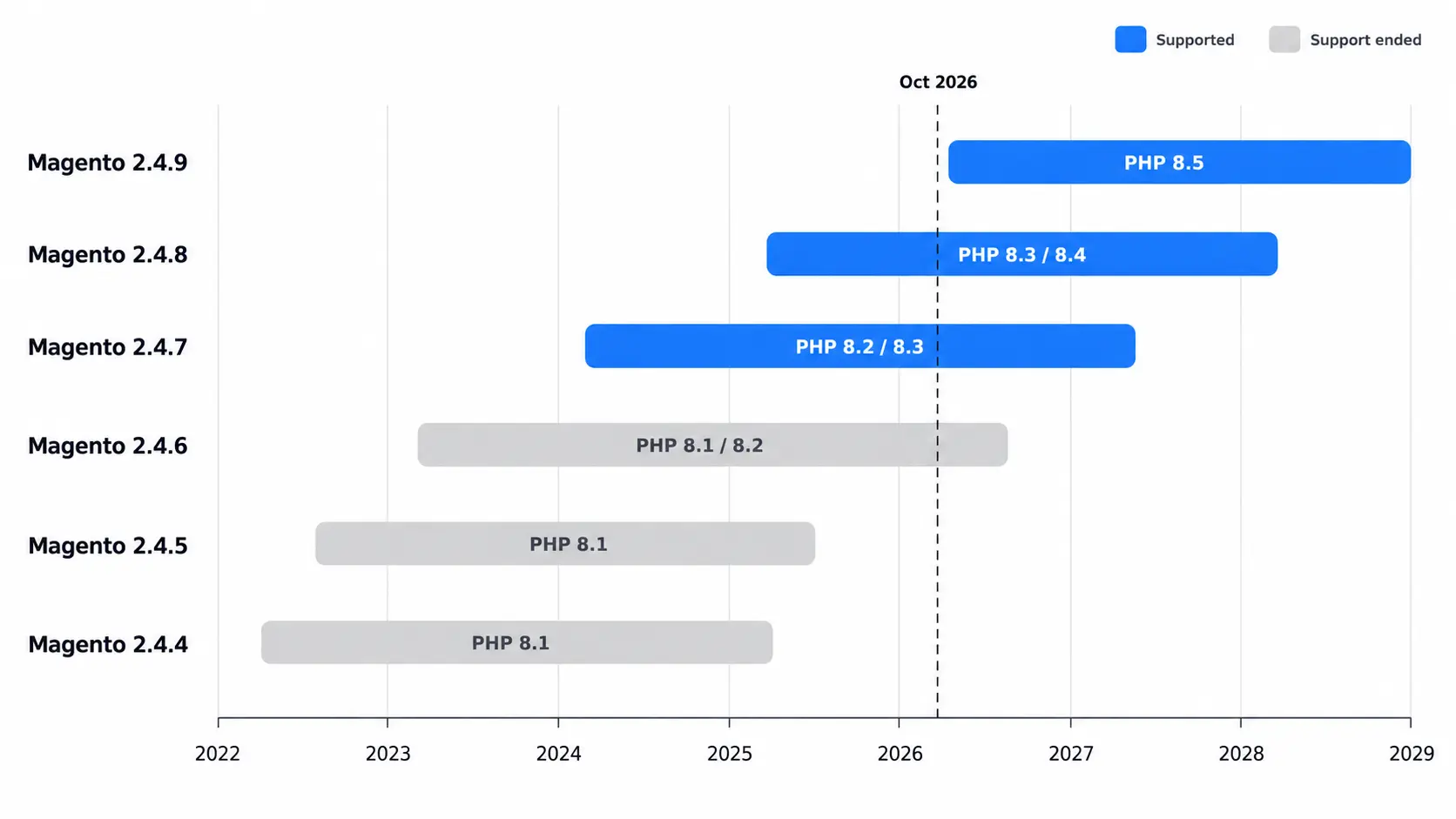
How to upgrade PHP on Magento 2 step by step
1. Record your current Magento and PHP versions
Run these from the Magento root:
php bin/magento --version
php -vThen confirm which PHP version the web server uses, through your PHP-FPM pool config or a temporary phpinfo page. The CLI and PHP-FPM often run different versions on the same server.
2. Find extensions that block the new PHP version
Ask Composer which installed packages block the PHP version you’re moving to. This example checks PHP 8.3:
composer why-not php 8.3The output lists every installed package whose PHP constraint excludes 8.3. Each vendor’s changelog should name a release that supports your new PHP version. If none does, that extension blocks the upgrade.
Custom modules in app/code need a static scan. PHPCompatibility for PHP_CodeSniffer flags removed functions and deprecated syntax before they reach staging.
3. Install the new PHP version on staging
Use a staging copy with recent production data and the same extensions. Install the new PHP alongside the old one rather than replacing it. Then:
- Install every PHP extension Magento requires for the new version, including intl, bcmath, soap, sodium, and xsl.
- Carry over your php.ini values, since each PHP version reads its own file. Adobe’s PHP settings page recommends memory_limit=2G and realpath_cache_size=10M. It also requires you to enable opcache.save_comments.
- Copy the old PHP-FPM pool’s process settings, such as pm.max_children, into the new pool.
- Point both PHP-FPM and the CLI at the new binary.
4. Recompile Magento 2 under the new PHP version
composer install
php bin/magento setup:upgrade
php bin/magento setup:di:compile
php bin/magento setup:static-content:deploy -f
php bin/magento cache:flushIf composer.json pins config.platform.php, update it before running Composer. Composer itself has a minimum version. Adobe’s system requirements list Composer 2.9.3 or newer for 2.4.7 and 2.4.8. Magento 2.4.9 and the newest patches, 2.4.7-p10 and 2.4.8-p5, list Composer 2.10.
5. Test checkout and cron on the new PHP version
Cover the flows that take money and the background jobs behind them:
- Place test orders with every active payment and shipping method.
- Confirm cron runs on the new PHP CLI and indexers stay valid.
- Run queue consumers and any ERP or PIM sync at least once, then open the main admin grids.
- Watch var/log/exception.log, var/log/system.log, and the PHP-FPM error log.
6. Switch production and keep a rollback path
Enable maintenance mode and deploy the build you compiled and tested on staging. The PHP-FPM socket and the cron binary should switch in the same deploy step. Keep the old PHP version installed until a full day of orders and cron runs has passed cleanly. If something breaks, point both back at the old version and redeploy the previous build.
What breaks most often after a Magento 2 PHP upgrade
- Cron on the old PHP: the crontab often calls a hardcoded binary like /usr/bin/php8.2, so background jobs keep running the old version.
- Encoded extensions: ionCube-encoded modules need a loader built for the new PHP version, and some vendors ship separate builds per version.
- Deprecation noise:PHP 8.1 deprecates passing null to many built-in functions, and PHP 8.2 deprecates dynamic properties. Older modules can flood the logs, and some fail outright.
- Missing PHP extensions: a missing intl or sodium module stops Composer and setup commands with a requirement error.
- Stale OPcache: restart PHP-FPM after deploying, or old compiled code keeps serving requests.
Plan your Magento 2 PHP upgrade as a release
Adobe tests core code against every PHP version in its table. A failed switch usually traces back to your own stack, starting with cron and encoded extensions. Give a PHP switch the same treatment as a release. Run a staging pass first, and have a rollback ready before production. If your target PHP version needs a newer Magento release, scope both changes together so you rebuild and test once. Our Magento development team handles combined PHP and platform upgrades. The related answer on upgrading Magento 2 to a newer release covers the platform side.
Related Answers

Still need help?
Stuck on a PHP upgrade for Magento 2?
Send us your Magento and PHP versions and we’ll tell you what’s blocking the upgrade and how to clear it.