How do I handle core file overrides discovered during an upgrade?
Move Magento 2 core file overrides out of the core and into your own module before the upgrade goes live. Composer replaces package files whenever it installs or updates them, so edits inside vendor/ vanish during an upgrade. Audit every changed file, then rebuild what you still need in a custom module or composer patch.
Quick answer
During a Magento 2 upgrade, find modified core files by diffing against a clean copy of your current version. For each change, confirm what it does and drop it if the version you’re upgrading to already fixes the issue. Rebuild the rest as a plugin, observer, theme override, or composer patch in a custom module. Then reinstall vendor/ and regression test on staging before you deploy.
Why Magento core file overrides break upgrades
Overrides usually turn up in four places:
- Direct edits inside
vendor/magento/, which composer overwrites without any warning. - Patch files someone applied by hand, which leave no record of what changed or why.
- Templates and layout files copied into a custom theme under
app/design/, which keep rendering old markup after the core version moves on. - Edits to root-level files such as
pub/get.php,lib/web/requirejs/require.js, or anything undersetup/src/. Themagento/magento2-basepackage deploys these files into the project root, so upgrades overwrite them too.
Plugins and observers survive upgrades because they live in your own module. Composer patches survive too, since composer reapplies them on every install.
Fixing Magento core file overrides step by step
1. Find every core code change
On Adobe Commerce, run the Upgrade Compatibility Tool‘s core:code:changes command against a clean vanilla install. On Magento Open Source, build a clean copy of your current version and diff it yourself:
composer create-project --repository-url=https://repo.magento.com/ magento/project-community-edition=YOUR_CURRENT_VERSION /tmp/vanilla
diff -rq vendor/magento /tmp/vanilla/vendor/magento
diff -rq lib/web /tmp/vanilla/lib/web
diff -rq setup/src /tmp/vanilla/setup/src
diff -rq --exclude=static --exclude=media pub /tmp/vanilla/pubAlso compare any theme template copies against the originals they came from.
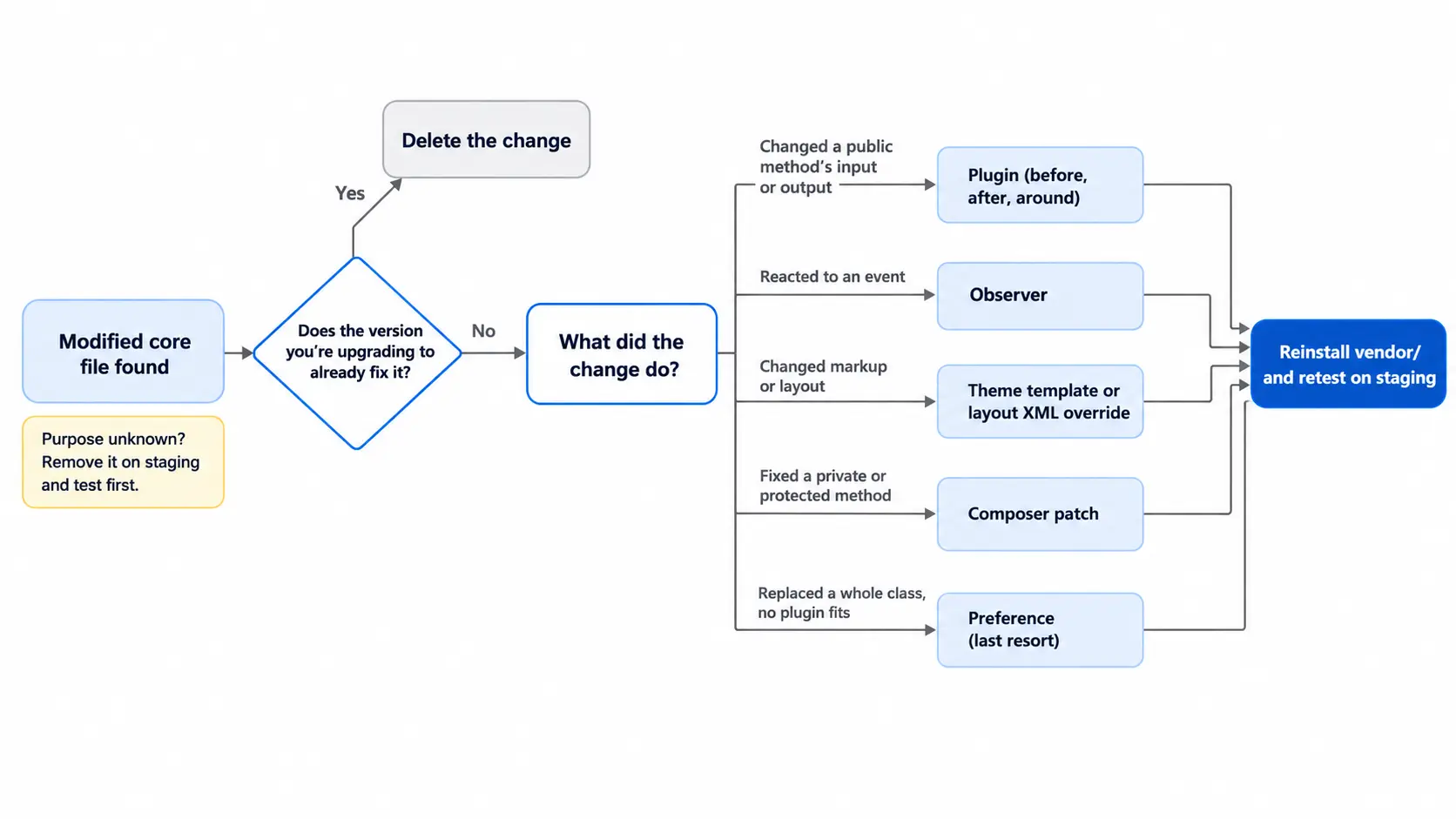
2. Work out what each core change does
For every modified file, record the method touched and the behavior it changes. If the file is tracked in git, git log -p shows who changed it and when. That usually leads back to the original ticket. When nobody can say why a change exists, remove it on staging and test before deciding.
3. Check if the new Magento release already includes the fix
Many hand edits patch core bugs that Magento later fixed. Magento Open Source 2.4.3 alone shipped over 370 new core code fixes, per its release notes. Read Adobe’s release notes for every version between yours and the one you’re upgrading to. Delete any change the new version makes redundant instead of porting it.
4. Rebuild each change as a plugin, observer, or patch
Plugins only intercept public methods, per Adobe’s plugin documentation, so fixes inside private or protected methods need a composer patch. Use cweagans/composer-patches so the patch reapplies on every install and fails loudly if the target code changes.
| Change made in core | Rebuild it as | Why |
|---|---|---|
| Altered a public method’s input or output | A before, after, or around plugin | Runs in your module with no core edit |
| Reacted to an event, such as an order being placed | An observer | Hooks the event without touching core code |
| Replaced a whole class | A preference, as a last resort | Use only when no plugin can reach the logic |
| Changed markup or layout | A theme template or layout XML override | Copy it fresh from the new version |
| Fixed a private or protected method | A composer patch | Plugins can’t reach non-public methods |
5. Reinstall vendor/ and retest the upgrade
Require the target version, delete vendor/ and generated/, then run composer update, bin/magento setup:upgrade, and bin/magento setup:di:compile. Regression test every flow the old overrides touched, starting with checkout and payment.
What can break when you move core code changes
- Third-party extensions sometimes declare a preference for the same class as yours, and only one of them wins.
- A composer patch can stop applying because the target file changed. Rework it against the new file, since skipping it brings back the bug it fixed.
- An around plugin that never calls
$proceedsilently disables the core method and every plugin after it. Adobe recommends after plugins over around plugins unless you need to stop execution. - Template overrides copied from the old version can miss new blocks, ViewModels, or output escaping.
- Back up the database and code before running
setup:upgradeon any environment with real data.
How to keep core file overrides out of future Magento upgrades
Once the current overrides are cleaned up, keep vendor/ out of git. Every core fix then has to go through a module or a composer patch. Configure composer-patches so a patch that fails to apply stops the build. Some audits turn up more changes than anyone on the team can trace. Our Magento development team can review those and plan where each one belongs.
Related Answers

Still need help?
Talk to our Magento experts
Found core edits you can’t trace mid-upgrade? We can audit them and move each one into a safe, upgrade-proof extension point.