How do I apply a Magento security patch without a full version upgrade?
To apply a Magento security patch without a full upgrade, stay on your current 2.4.x release line, for example 2.4.7. If you are behind, update to that line’s latest -p security release, such as 2.4.7-p10, with Composer. Once you are on it, add Adobe’s monthly isolated patch files, which only apply on the latest -p version. Neither path moves your store to a new minor version like 2.4.8 or 2.4.9. Magento Open Source and Adobe Commerce share the same patch process.
Quick answer
For Magento Open Source or Adobe Commerce, update with Composer to your 2.4.x line’s latest -p release, such as 2.4.7-p10. Next, apply each monthly isolated patch file Adobe has published since that release, oldest first. Within each month, apply the Community Edition (CE) file, then the Adobe Commerce (EE) file, then B2B. Use patch -p1 on-premises, or the m2-hotfixes folder on Adobe Commerce on Cloud infrastructure. Confirm coverage with Adobe’s Commerce Version Tool: php vendor/bin/patch-status. The tool only exists after you apply the July 2026 CE isolated patch file.
Which Magento security patch method fits your version
Check your exact version first. You can run php bin/magento --version or look up the core package in composer.lock. Then compare the two methods:
| Method | -p security release | Isolated patch file |
|---|---|---|
| Delivered as | Composer package | .patch files in a ZIP |
| Use when | You are behind the latest -p for your line | You are already on the latest -p |
| Apply with | composer require, then setup:upgrade | patch -p1, or m2-hotfixes on Adobe Commerce on Cloud infrastructure |
| Earlier isolated fixes | Included, since Adobe folds them into the next release | Not included, so apply each month in order |
- On Adobe Commerce on Cloud infrastructure, check the latest Magento Cloud Patches release before adding files by hand.
- On 2.3.x or 2.4.0 to 2.4.3, no patch path exists. Adobe treats these versions as unsupported, so you must upgrade to a supported line first.
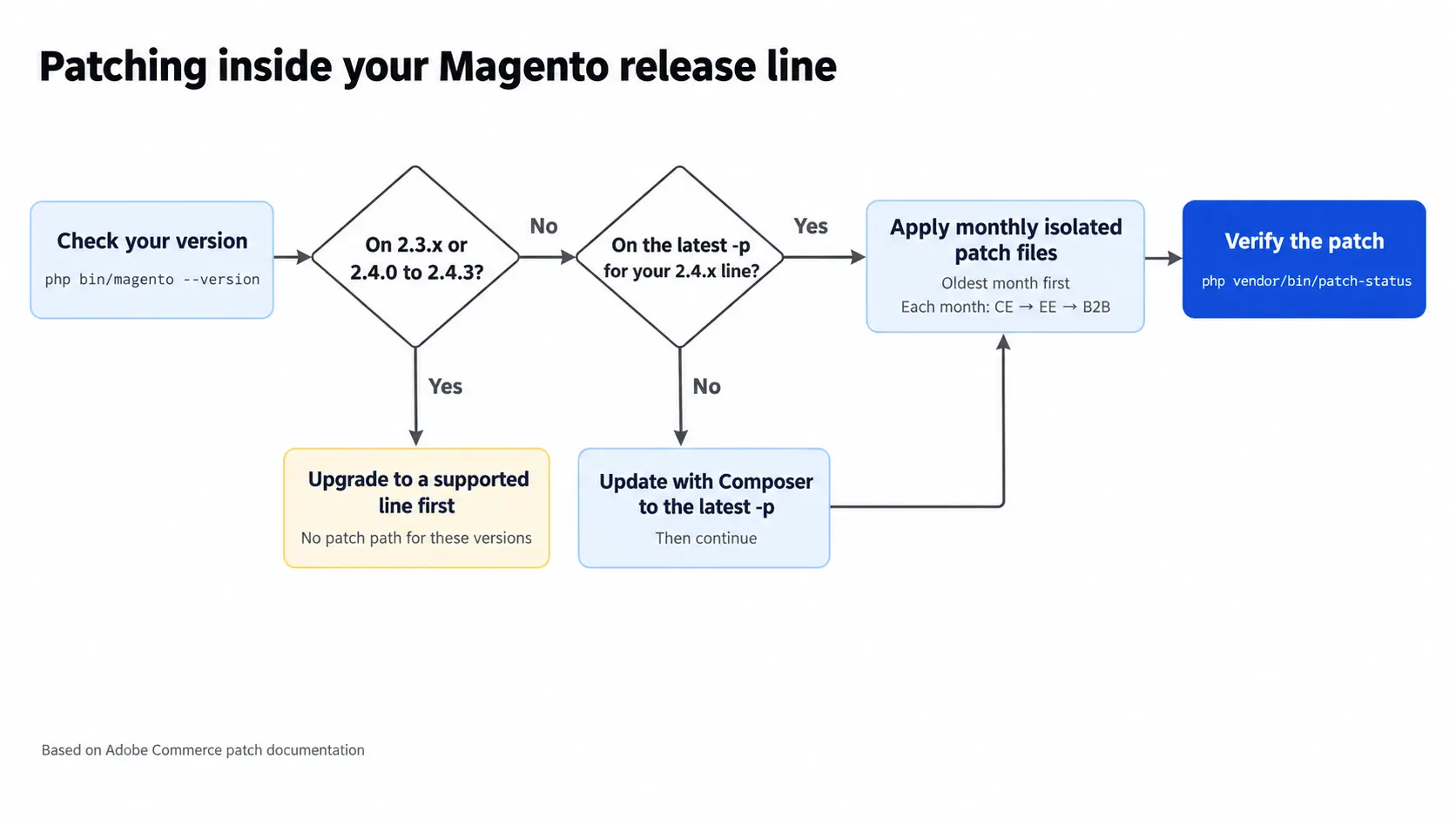
How to update Magento to the latest -p security release
- Back up and use staging: Take a database and code backup. Run every step on staging before production.
- Require the new -p version: For Magento Open Source, run the commands below. For Adobe Commerce, use
magento/product-enterprise-editioninstead.composer require magento/product-community-edition=2.4.7-p10 --no-update composer update magento/product-community-edition --with-all-dependencies - Run the deploy commands:
php bin/magento maintenance:enable php bin/magento setup:upgrade php bin/magento setup:di:compile php bin/magento setup:static-content:deploy -f php bin/magento maintenance:disable php bin/magento cache:flush - Match your B2B version:Adobe’s security release notes say B2B merchants must also update to the matching B2B security release.
Apply Adobe’s isolated Magento security patch files
Adobe’s Quality Patches Tool applies individual quality fixes. Monthly security fixes arrive as separate isolated files, applied in four steps.
Step 1: Download the ZIP for your exact version
Each monthly Adobe security bulletin has a knowledge base article with a ZIP per version. For example, APSB26-153, released October 13, 2026, has a matching article listing files such as 2-4-8-p5-oct-2026.zip. One ZIP can hold a separate file per component. Components include Community Edition (CE, the Magento Open Source code), Enterprise Edition (EE, Adobe Commerce) and B2B.
Step 2: Apply each Magento security patch file in release order
Filenames follow a version, date and component pattern, for example 248p5-2026-10-001-CE. Apply last month’s files before this month’s. Never applied an isolated patch before? Start with the July 2026 ZIP, because its CE file also installs the Commerce Version Tool. Within a month, apply CE first, then EE, then B2B. Skip any component you do not have installed. On-premises, do a dry run, then apply each file from the project root:
patch -p1 --dry-run < 248p5-2026-10-001-CE.patch
patch -p1 < 248p5-2026-10-001-CE.patchIf -p1 fails, Adobe’s isolated patch instructions suggest trying -p2. On Adobe Commerce on Cloud infrastructure, copy the files into an m2-hotfixes folder at the root, then commit and push. To roll a file back, run the same command with -R added. On Cloud, delete it from m2-hotfixes and push again.
Step 3: Stop Composer from removing the patch
A direct patch -p1 edits files inside vendor/. Any rebuild of vendor/ restores the originals and drops your fix. That includes a CI deploy, a new server, or a composer update that touches a patched package. To avoid this, commit the .patch files to your repository and reapply them in your build or deploy script. Another option is to split them per package and register them with cweagans/composer-patches.
Step 4: Check that the Magento security patch is applied
Adobe’s Commerce Version Tool is not part of Magento or Composer. It arrives with the July 2026 CE isolated patch file. Check that it exists first:
php vendor/bin/patch-status --versionIf this returns “Could not open input file: vendor/bin/patch-status”, you have not applied the July 2026 CE file yet. Apply it as in Step 2, then try again. Once the tool exists, flush the cache and run it from the project root:
php bin/magento cache:flush
php vendor/bin/patch-statusIt lists applied and missing patches and shows PROTECTED, VULNERABLE or UNKNOWN for each CVE.
Check these before you apply a Magento security patch
- Isolated patches assume you are on the latest -p release and already have every earlier monthly patch. Skip one and the later files fail to apply, or apply with gaps.
- Per Adobe’s October 2026 patch article, Magento Open Source merchants can only download isolated patches for 2.4.7 or later. Adobe Commerce on 2.4.6 or earlier needs Composer keys to download them.
- On Adobe Commerce on Cloud infrastructure, check the Magento Cloud Patches package first. Adobe warns that applying an isolated patch it already includes can cause installation failures.
- Emergency hotfixes can ship separately. The APSB26-146 hotfix for CVE-2026-75650, released September 2026, is still not in the October 2026 isolated patch file.
- If the Commerce Version Tool shows UNKNOWN on 2.4.8-p5 after the October 2026 patch, re-download the reissued file. Do not reuse an old copy.
- A custom module with a preference for a class the patch edits replaces that class entirely. The patched code then never runs, so port the fix into your override.
- After patching, place a test order and log in to the admin. Trigger one sync per integration too, such as your ERP feed or payment webhook.
To apply a Magento security patch quickly every month, keep your store on the latest -p release for its line. Once you do, each monthly security fix becomes a short file drop instead of a project. Fallen several -p versions behind, or hitting conflicts with custom code? Our Magento development team can apply and test the patch on staging first.
Related Answers

Still need help?
Talk to our Magento experts
A patch won’t apply cleanly, or a -p update broke an extension? We can patch, test and deploy it safely on your current version.