How do I run setup:upgrade and static content deploy in a CI/CD pipeline?
In a Magento 2 CI/CD pipeline, setup:upgrade and static content deploy run in different stages. Static content deploy belongs in the build stage, where it compiles theme assets once without touching a database. On release, run setup:upgrade only when bin/magento setup:db:status reports that the database needs it.
Quick answer
For Magento 2 CI/CD, split the work between the build job and the server:
- Run
bin/magento app:config:dump scopes themesand commit app/etc/config.php. - In the CI build job, run
setup:di:compileandsetup:static-content:deploy -fwith explicit locales. - On the server, run
bin/magento setup:db:status. - If setup:db:status exits non-zero, enable maintenance mode and run
setup:upgrade --keep-generated. Otherwise skip maintenance.
Where each Magento command belongs in a CI/CD pipeline
Adobe’s pipeline deployment documentation describes a build system that compiles code and generates static view files. It needs only the codebase, not a database connection. So static content deploy never runs on a server that is taking orders.
This workflow applies to Magento Open Source and Adobe Commerce 2.2 and later, checked against Adobe’s documentation. On Adobe Commerce on cloud infrastructure, ece-tools runs these build and deploy phases for you.
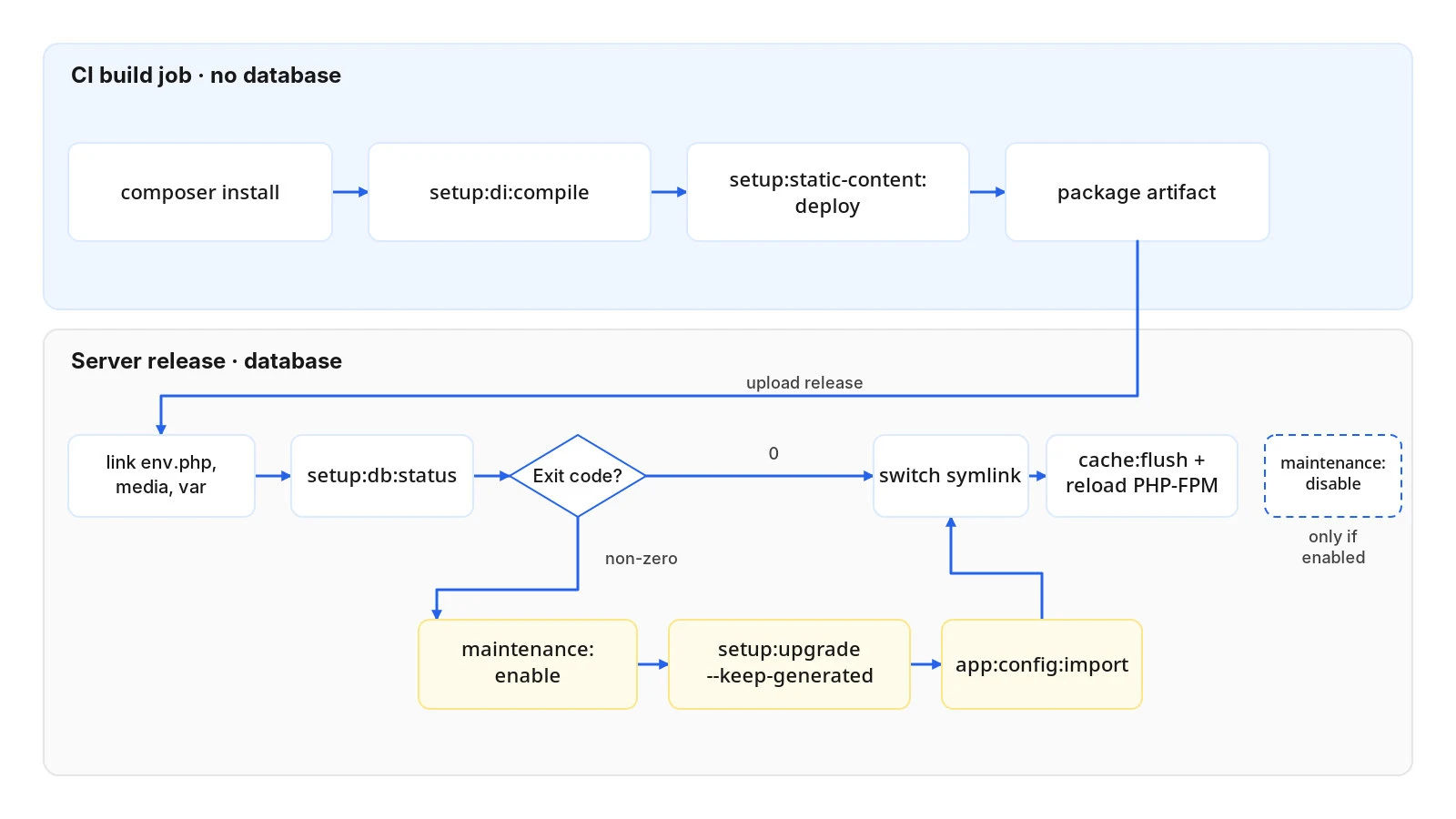
| Command | Where it runs | Needs a database? |
|---|---|---|
app:config:dump scopes themes | Development or staging, once per config change | Yes |
composer install | CI build job | No |
setup:di:compile | CI build job | No |
setup:static-content:deploy | CI build job | No, reads config.php |
setup:db:status | Server, every release | Yes |
setup:upgrade --keep-generated | Server, only when setup:db:status exits non-zero | Yes |
app:config:import | Server, after setup:upgrade | Yes |
Step 1: Commit config.php so the build needs no database
Magento static content deploy normally reads stores and themes from the database. The pipeline workflow in Adobe’s documentation writes that configuration to the file system with app:config:dump instead. On a development or staging system, run bin/magento app:config:dump scopes themes and commit app/etc/config.php.
Step 2: Run Magento static content deploy in the build stage
Store your repo.magento.com keys as a CI secret and expose them through the COMPOSER_AUTH environment variable. With dependencies in place, compile DI and run Magento static content deploy for every locale your store views use.
Pass only the locales you serve, plus --theme for each active theme. That keeps the build from compiling unused Magento/luma and Magento/blank assets. Include Magento/backend in that list, or the admin loses its styles.
Step 3: Package a Magento build artifact
Archive the codebase with vendor/, generated/, and pub/static/ included. Leave out app/etc/env.php, pub/media, and var/. The server links its own copies into each release. Nothing in the artifact should know which server it lands on.
Step 4: Check whether setup:upgrade is needed on release
Upload the artifact to a new release directory and link the shared env.php, pub/media, and var/ paths into it. Before touching maintenance mode, run bin/magento setup:db:status. Per Adobe’s database status reference, exit code 0 means no action is needed. Exit code 1 signals a version mismatch between code and database. Exit code 2 means this Magento CI/CD release needs setup:upgrade.
Step 5: Run setup:upgrade with –keep-generated
If setup:db:status returns a non-zero exit code, enable maintenance mode, run setup:upgrade --keep-generated, then run app:config:import. The –keep-generated flag from Adobe’s pipeline guide keeps your CI-built code and static files in place.
Step 6: Switch the symlink and flush caches
Point the live symlink at the new release, flush the Magento cache, and reload PHP-FPM so OPcache picks up the new code. If the release ran setup:upgrade in your Magento CI/CD pipeline, disable maintenance mode last.
Example Magento CI/CD build and release script
# Build job (no database)
composer install --no-dev --prefer-dist --optimize-autoloader
bin/magento setup:di:compile
bin/magento setup:static-content:deploy -f en_US nl_NL --theme Vendor/theme --theme Magento/backend --jobs=4
tar -czf release.tar.gz --exclude=app/etc/env.php --exclude=pub/media --exclude=var .

# Release job (on the server, inside the new release directory)
if ! bin/magento setup:db:status; then
  bin/magento maintenance:enable
  bin/magento setup:upgrade --keep-generated
  bin/magento app:config:import
  UPGRADED=1
fi
ln -sfn "$RELEASE_DIR" /var/www/current
bin/magento cache:flush
sudo systemctl reload php-fpm
[ "$UPGRADED" = "1" ] && bin/magento maintenance:disableReplace Vendor/theme and the locale codes in this Magento static content deploy line with your own. On Debian and Ubuntu, the PHP-FPM service name usually carries a version, such as php8.3-fpm. In GitHub Actions, the build block becomes one job. The release block becomes an SSH step in a second job that needs the first.
What breaks Magento setup:upgrade in CI/CD
- Without –keep-generated, setup:upgrade wipes the compiled code and static files from your build. Until the next build, the store loads with no CSS or JavaScript.
- A locale missing from the deploy command returns 404s on assets for that store view.
- On releases before 2.4.9, setup:db:status reports changes on every run when a third-party module declares
comment=""in its db_schema.xml. The fix for GitHub issue #40254 landed in December 2025 and first shipped in 2.4.9-beta1. On older versions, run setup:db:status on staging before using it as a deploy gate. - Committing env.php to Git or baking it into the artifact leaks your database credentials and the encryption key.
Get your Magento CI/CD build stage working before tuning setup:upgrade, since it moves static content deploy off production. Once that works, the setup:db:status gate skips setup:upgrade and maintenance mode on releases with no schema or data changes. If your current setup still compiles on production servers, our Magento development team can help restructure it.
Related Answers

Still need help?
Talk to our Magento experts
Stuck wiring setup:upgrade and static content deploy into your pipeline? We can review your build and release steps.