How do I keep a Magento 2 store patched when I cannot upgrade the version yet?
Not being able to upgrade usually means you can’t yet move to a new minor version, such as 2.4.6 to 2.4.8. You can still apply Magento 2 security patches to the version you have, in two layers. First, update to the newest -p security release for your 2.4.x version. Then layer Adobe’s monthly isolated patch files on top, oldest first. That option has an expiry date, and for Magento Open Source 2.4.6 it has already passed.
Quick answer
You can stay patched on your current Magento 2 version. Move to the latest security-only -p release for your release line, for example 2.4.6 to the newest 2.4.6-pN. Then apply Adobe’s monthly isolated patch files in release order. Commit the patches to your repository so deploys keep them, and confirm coverage with the Commerce Version Tool. This only works while your release line is supported. Adobe Commerce 2.4.4 to 2.4.7 get fixes until May 2027 or May 2028, depending on the line. Magento Open Source isolated patches now start at 2.4.7.
How to keep applying Magento 2 security patches without an upgrade
1. Update to the latest -p security release for your 2.4.x version
A security patch release keeps your minor version and adds a -pN suffix, as Adobe’s security patch release notes explain. Moving from 2.4.6-p4 to the newest 2.4.6 release keeps you on 2.4.6. You skip the feature changes a minor upgrade like 2.4.8 brings.
Some security enhancements can break backward compatibility, and Adobe says so in its release notes. Pin the new version with composer require magento/product-community-edition=2.4.6-pN --no-update. Adobe Commerce stores use magento/product-enterprise-edition instead. Then run composer update on staging, and place a test order through your payment gateway’s sandbox before you deploy.
2. Apply isolated security patches in release order
Between -p releases, Adobe publishes isolated patch files through its security bulletins. Adobe releases isolated patches monthly, and each month builds on the one before it. Apply them in release order. Each file assumes you are on the latest -p release for your release line. Update to that release before applying any isolated patch.
On-premises and Open Source stores apply each file from the Magento root with patch -p1 < file.patch. Adobe Commerce on Cloud projects place the files in an m2-hotfixes directory and deploy. Both methods are in Adobe’s guide to applying isolated patches.
3. Keep isolated patches after composer install
A patch applied by hand into vendor/ disappears the next time someone runs composer install on a clean build. Commit every Adobe isolated patch file to your repository. Then apply the patches automatically with cweagans/composer-patches or a scripted build step. Every environment, including a rebuilt server, then ends up with the same security fixes.
4. Check which Magento security patches are installed
Since the July 2026 isolated patch, the Commerce Version Tool lives at vendor/bin/patch-status. It reports which monthly patches you have installed, which ones are missing, and which CVEs you are covered for. The Commerce Version Tool appears only after you apply the Community Edition (CE) patch file for your release line. On Cloud, the Quality Patches Tool (vendor/bin/magento-patches status) can also confirm an individual patch.
Before you apply Magento 2 security patches
- Back up code and database, then apply each patch on staging before production.
- Check your exact version with
bin/magento --versionbefore applying anything. An isolated patch file built for the latest -p release won’t apply cleanly to an older one. On Cloud, re-applying a fix that Magento Cloud Patches already delivered can break the install. - Read Adobe’s full security bulletin (APSB), not just the patch file. The 2024 CosmicSting fix (CVE-2024-34102, bulletin APSB24-40) also required rotating encryption keys.
- Your third-party extensions get no fixes from Adobe’s patches, so watch each vendor’s own security releases.
When do Magento 2 security patches stop for my version?
Patching Magento 2 without upgrading has an end date. Adobe’s lifecycle policy sets these dates for each Adobe Commerce release line:
| Adobe Commerce version | Released | Standard support ends | Extended support ends | Last security-only fixes |
|---|---|---|---|---|
| 2.4.4 | April 12, 2022 | April 12, 2025 | April 14, 2026 | May 31, 2027 |
| 2.4.5 | August 9, 2022 | August 12, 2025 | August 11, 2026 | May 31, 2027 |
| 2.4.6 | March 14, 2023 | August 11, 2026 | August 31, 2027 | May 31, 2028 |
| 2.4.7 | April 9, 2024 | May 31, 2027 | May 31, 2028 | Not applicable |
| 2.4.8 | April 8, 2025 | May 31, 2028 | To be announced | Not applicable |
| 2.4.9 | May 12, 2026 | May 31, 2029 | To be announced | Not applicable |
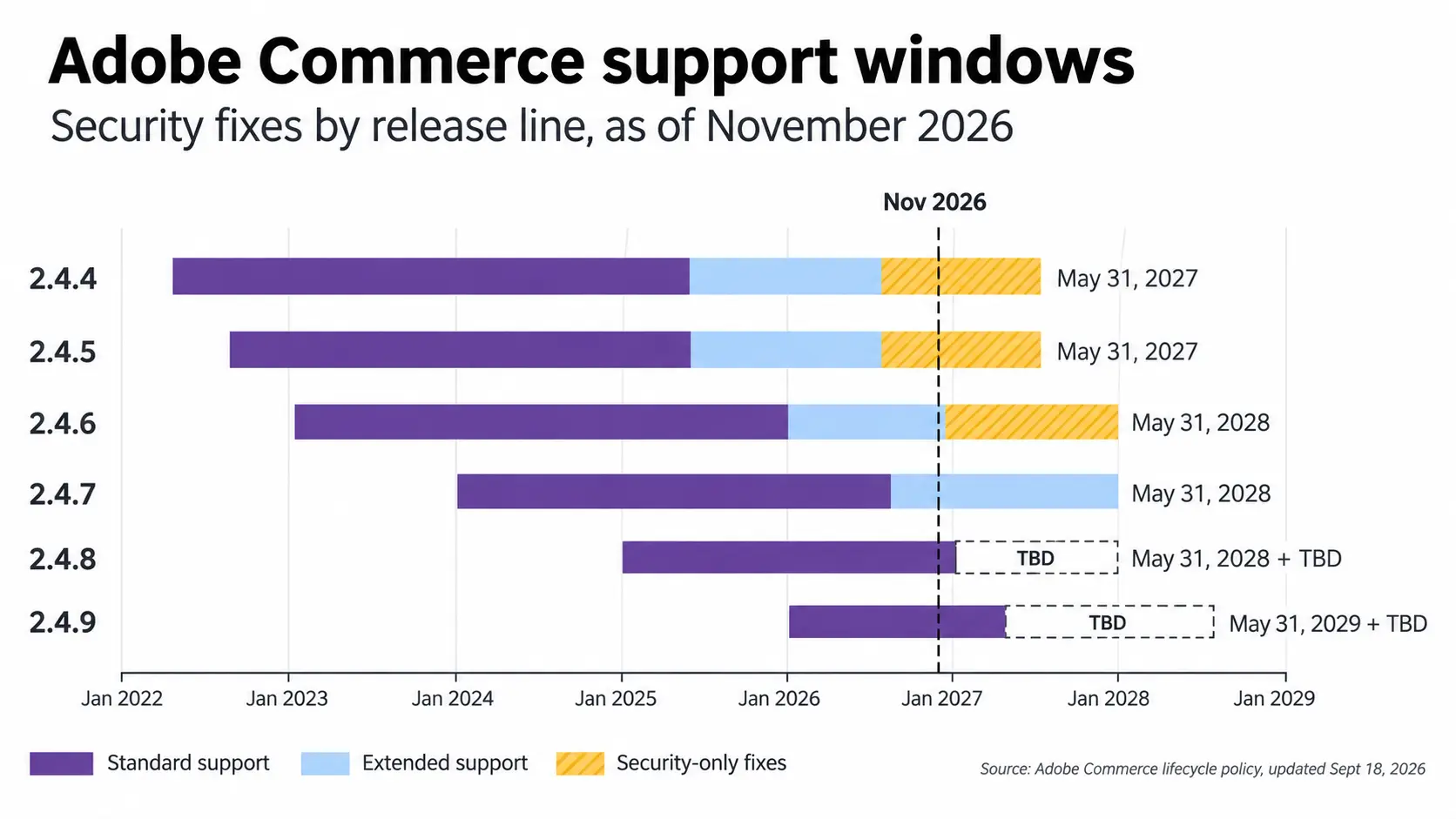
Extended support and the security-only period cover Adobe Commerce only. Separately, Adobe’s current security bulletin limits Magento Open Source isolated patch downloads to 2.4.7 and later.
Adobe doesn’t patch PHP, MariaDB, or OpenSearch. PHP 8.1 reached end of life on December 31, 2025, and PHP 8.2 follows on December 31, 2026.
Adobe Commerce on Cloud stores face a hard cutoff under the same lifecycle policy. From June 1, 2027, Adobe can suspend traffic to environments running unsupported versions.
While you plan the upgrade, reduce your exposure. Move the admin off /admin and limit it to known IPs. Check that Magento_TwoFactorAuth is still enabled, since it ships on by default in 2.4. Then run Adobe’s free Security Scan Tool against the store between patch releases.
On a supported line, reach the latest -p release this month. Then add Magento 2 security patches to your regular release cycle. Magento Open Source 2.4.6 and older is a different case. Adobe no longer publishes downloadable isolated patches for those versions. The upgrade needs a date on the roadmap now. Our Magento development team handles both the monthly patch cycle and upgrade planning.
Related Answers

Still need help?
Talk to our Magento experts
Not sure which patches your store is missing or how long your version has left? We can check your patch level and map out the upgrade.