How do I put Cloudflare in front of Magento 2 without breaking the cache?
Put Cloudflare in front of Magento 2 as a proxy and static-file CDN, and keep the HTML cache in Varnish. Four settings cause most breakage: Flexible SSL, an edge HTML cache rule, Rocket Loader, and purges routed through Cloudflare. Out of the box, Cloudflare skips HTML and Varnish keeps purging by cache tag, so the two coexist.
This applies to self-hosted Magento Open Source and Adobe Commerce 2.4.x. Adobe Commerce on cloud infrastructure uses Fastly instead of Varnish for full page caching. This setup does not apply there. Checked against Cloudflare and Adobe documentation.
Quick answer
On Magento 2, leave HTML caching to Varnish and let Cloudflare cache only /static/ and /media/ files. Set SSL/TLS to Full (strict), restore the visitor IP from the CF-Connecting-IP header, point Magento’s purge requests straight at Varnish, and turn off Rocket Loader. Skip any site-wide Cache Everything rule. Stock Magento can’t purge Cloudflare’s copy when a price or stock level changes.
Which layer caches what on Magento 2 with Cloudflare?
| Request | Cached by | How it gets cleared |
|---|---|---|
| Product, category and CMS pages (HTML) | Varnish | Magento purges by cache tag on every save |
| /static/ CSS and JS | Cloudflare | Signed URLs change on each static content deploy |
| /media/ product and CMS images | Cloudflare | Purge the URL in Cloudflare if you overwrite a file |
| /customer/section/load, cart and checkout | Neither | Never cached, data is per shopper |
| Magento admin | Neither | Never cached |
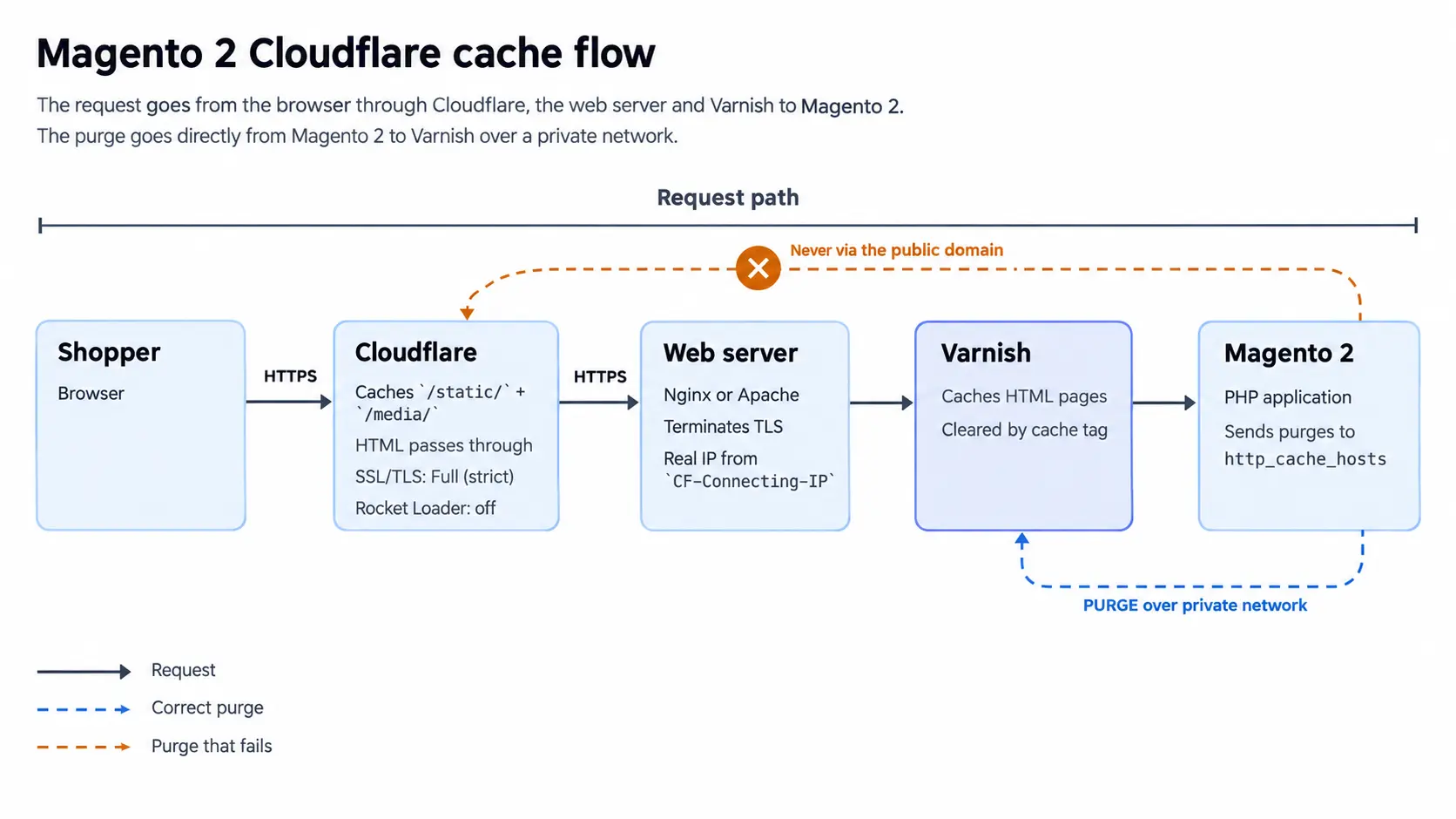
Magento 2 Cloudflare cache setup, step by step
1. Keep Varnish as the Magento 2 HTML cache
Leave Full Page Cache set to Varnish under Stores > Configuration > Advanced > System. Before HTML leaves Varnish, the VCL that bin/magento varnish:vcl:generate produces rewrites its Cache-Control header to no-store, no-cache, must-revalidate, max-age=0.
Cloudflare’s default cache behavior documentation confirms it won’t store a response marked no-store or max-age=0. Storefront pages pass straight through, and Varnish still purges them by cache tag on every save.
2. Set Cloudflare SSL/TLS to Full (strict)
With secure base URLs set, Magento redirects every HTTP request to HTTPS. In Flexible mode, Cloudflare reaches the origin over plain HTTP, so each request bounces and the browser shows ERR_TOO_MANY_REDIRECTS. Cloudflare’s redirect loop guide recommends Full or higher, which needs a valid certificate on the origin. A free Cloudflare Origin CA certificate works for Full (strict).
3. Restore the real visitor IP behind Cloudflare
Behind Cloudflare, every request reaches your server from a Cloudflare IP address. Maintenance-mode exceptions set with bin/magento maintenance:enable --ip stop matching, and admin IP allowlists lock out your own team. In Nginx, read the CF-Connecting-IP header and trust only Cloudflare’s published ranges:
real_ip_header CF-Connecting-IP;
set_real_ip_from <each range listed at cloudflare.com/ips>;Pull the current list from cloudflare.com/ips and recheck it whenever you update server config. On Apache, mod_remoteip does the same job with RemoteIPHeader CF-Connecting-IP and a RemoteIPTrustedProxy line per range.
4. Send Magento purge requests straight to Varnish
Varnish purge requests from Magento go to the hosts listed in http_cache_hosts. Point that setting at your public domain and every purge goes through Cloudflare. Varnish sees a Cloudflare IP and rejects the purge, so nothing gets cleared. Stale pages then survive every product save. Send purges to Varnish directly instead, using your own host and port, as Adobe’s Varnish purge guide describes:
bin/magento setup:config:set --http-cache-hosts=127.0.0.1:60815. Let Cloudflare cache static and media files
Cloudflare already caches the file types under /static/ and /media/, so you don’t need an extra rule. Static content signing (dev/static/sign) adds a version segment to every /static/ URL. Confirm it is on with bin/magento config:show dev/static/sign. Each static content deploy then changes that URL and busts the edge copy on its own. Media files have no such versioning, so purge the URL in Cloudflare if you overwrite an image at the same path.
6. Turn off Cloudflare Rocket Loader
Rocket Loader defers all JavaScript until after the page renders. Luma and Luma-based themes load RequireJS and Knockout in a strict order. Defer them and the mini cart and checkout steps stop working. Hyvä drops RequireJS, but Rocket Loader still changes when its inline Alpine.js scripts run.
Magento’s admin panel runs on RequireJS too, so turn Rocket Loader off zone-wide. Auto Minify needs no attention: Cloudflare retired it on 5 August 2024, per its API deprecations page.
7. Check Cloudflare and Varnish with curl
curl -sI https://www.example.com/some-category.html | grep -i cf-cache-status
curl -sI https://www.example.com/static/version123/frontend/Magento/luma/en_US/mage/calendar.css | grep -i cf-cache-statusCategory pages should return DYNAMIC. Cloudflare’s cache status reference defines that as not eligible for cache, so Varnish served the page. Static files should show MISS on the first request and HIT on the second.
What breaks if Cloudflare caches Magento HTML?
- Stale prices: Magento’s tag purges only reach Varnish, so Cloudflare serves old prices until the Edge TTL expires.
- Leaked customer data: if /customer/section/load lands in the edge cache, one shopper’s name and cart can appear for another.
- Useless cookie rules: a cookie bypass rule won’t protect you, because _ga sits on nearly every request, so everything bypasses.
Need HTML at the edge? Use a Magento module that purges Cloudflare by cache tag on every save, and test it on staging first.
Should Cloudflare or Varnish cache Magento 2 HTML?
Varnish should cache Magento 2 HTML, because it is the only layer stock Magento can purge by tag. Cloudflare earns its place through DNS, TLS, the WAF, and static-file delivery. Configure the six Cloudflare and Varnish settings once. After any DNS or VCL change, rerun the cf-cache-status curl checks. If you are planning a larger performance or hosting change, our Magento development team can review your Varnish and Cloudflare setup together.
Related Answers

Still need help?
Talk to our Magento experts
Seeing stale prices or redirect loops after moving DNS to Cloudflare? We can check your Varnish, purge, and Cloudflare settings side by side.