How do I configure Nginx correctly for Magento 2, including the sample config?
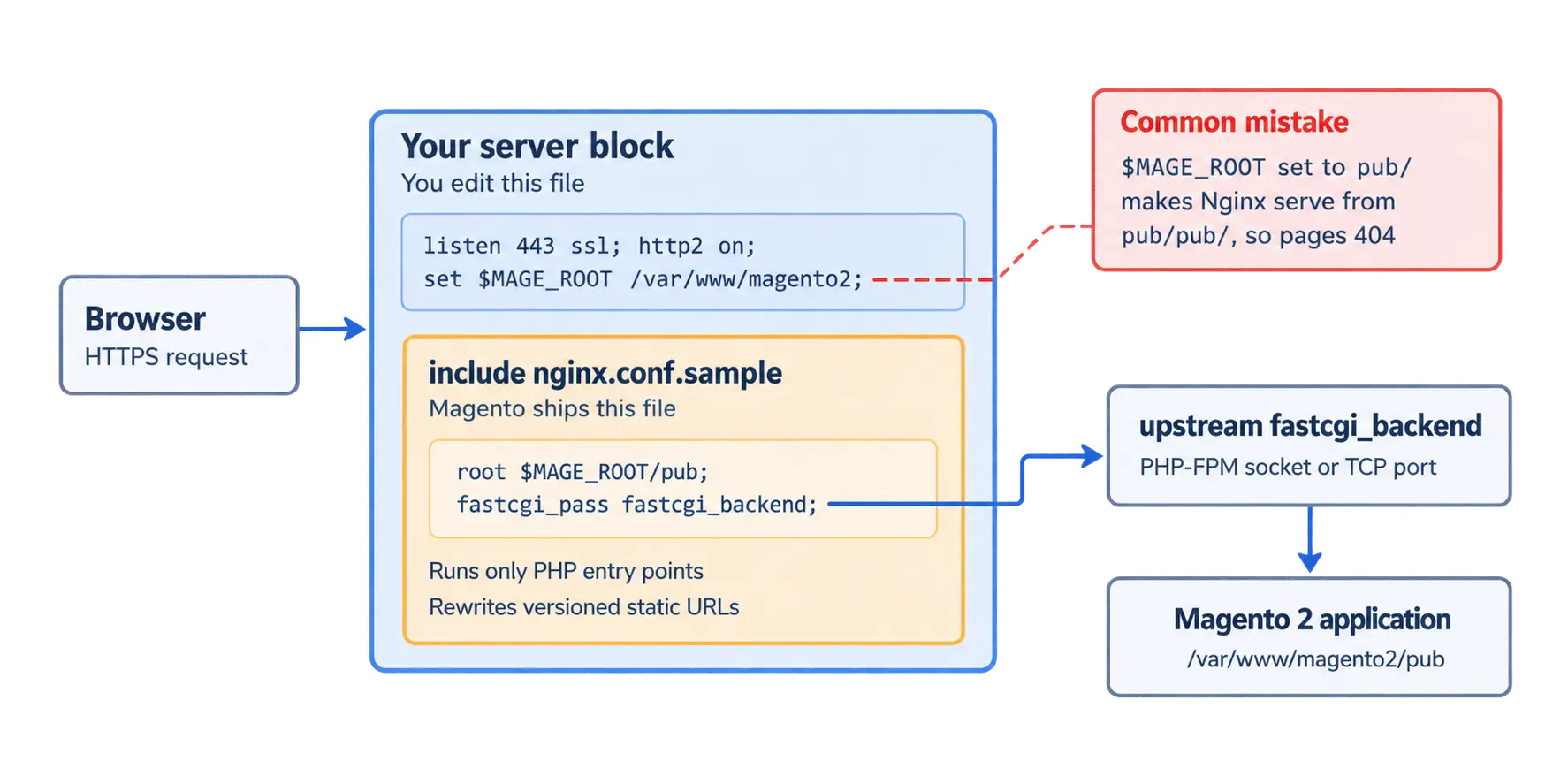
Magento 2 ships its own Nginx rules in a file called nginx.conf.sample, in the project root. You don’t write those rules, only a short server block around them. That block points an upstream called fastcgi_backend at your PHP-FPM socket and sets $MAGE_ROOT before including the sample file.
Quick answer
To run Magento 2 on Nginx, define an upstream named fastcgi_backend for your PHP-FPM socket. In your server block, set $MAGE_ROOT to the Magento project root, the folder above pub/. Include nginx.conf.sample, then test with nginx -t and reload. Adobe lists Nginx 1.30 for Magento 2.4.9.
What does nginx.conf.sample do in Magento 2?
The sample file holds Magento’s routing and security rules. It points the document root at $MAGE_ROOT/pub and rewrites versioned static URLs. It also runs PHP only through a short list of entry points, including index.php and health_check.php. Adobe’s Nginx installation guide notes that this restricts execution of harmful uploaded scripts. If you skip the file or rewrite its rules, you become responsible for equivalent security controls.
Step-by-step Nginx setup for Magento 2
1. Confirm supported Nginx and PHP versions
Check your Nginx and PHP versions against Adobe’s system requirements table. The table lists Nginx 1.30 for Magento 2.4.9 and 2.4.8-p5. Older patches list lower versions, such as Nginx 1.28 for 2.4.8-p4 and 1.26 for 2.4.8. Match the row for your exact patch.
nginx -v
php -v2. Define the PHP-FPM upstream
Magento’s rules pass every PHP request to an upstream called fastcgi_backend, so keep that exact name. Point it at the socket your PHP-FPM pool listens on. On Ubuntu, the listen setting in /etc/php/8.5/fpm/pool.d/www.conf shows the path. Docker setups often use TCP instead, and the sample’s own comments show the format: server 127.0.0.1:9000;.
3. Write the server block (sample config)
Set $MAGE_ROOT to the folder that contains app/, bin/, and pub/. Leave /pub off the path, since the include adds it. This config works on Ubuntu with HTTPS and a single domain:
upstream fastcgi_backend {
    server unix:/run/php/php8.5-fpm.sock;
}

server {
    listen 80;
    server_name example.com www.example.com;
    return 301 https://$host$request_uri;
}

server {
    listen 443 ssl;
    http2 on;
    server_name example.com www.example.com;

    ssl_certificate     /etc/letsencrypt/live/example.com/fullchain.pem;
    ssl_certificate_key /etc/letsencrypt/live/example.com/privkey.pem;

    set $MAGE_ROOT /var/www/magento2;
    include /var/www/magento2/nginx.conf.sample;
}That’s the whole file. Replace the domain, paths, and PHP version with your own. PHP 8.5 is the version Adobe lists for Magento 2.4.9. On 2.4.8-p5, Adobe lists PHP 8.4 and 8.3, so adjust the socket name to match. The http2 on; directive needs Nginx 1.25.1 or newer. On Nginx 1.22, use listen 443 ssl http2; instead.
Older guides also add set $MAGE_MODE here, but Magento’s sample file treats it as an optional override. Set it anyway, and you must also pass it into each PHP entry point block. Switching modes with bin/magento deploy:mode:set is simpler.
4. Keep custom rules outside the sample file
Composer can overwrite nginx.conf.sample during upgrades because the file belongs to Magento’s base package. Put redirects, headers, and SSL settings in your own server block. Need to change a rule inside the sample? Copy the file into /etc/nginx/ and include the copy. After every upgrade, diff your copy against the new sample.
5. Match the base URL and test
Your server_name and HTTPS setup must match Magento’s configured base URLs. Enable the site, test the syntax, reload, and confirm the stored URL:
ln -s /etc/nginx/sites-available/magento /etc/nginx/sites-enabled/
nginx -t
systemctl reload nginx
bin/magento config:show web/secure/base_urlCommon Magento 2 Nginx errors and their causes
- Setting
$MAGE_ROOTto thepub/folder makes Nginx look insidepub/pub/, and every page returns a 404. - If the upstream is missing or renamed,
nginx -tfails withno port in upstream "fastcgi_backend". - A 502 Bad Gateway usually means the socket path is wrong or the Nginx user cannot access the socket. Check
listen.ownerandlisten.groupin the FPM pool. - When CSS and JS return 404, check
pub/staticfirst. In production mode, it stays empty until you runbin/magento setup:static-content:deploy. - A redirect loop after you enable HTTPS often traces back to a base URL that still starts with http.
Keeping your Magento 2 Nginx config upgrade-safe
Treat nginx.conf.sample as Magento’s file and the server block as yours. That split lets you upgrade without losing Adobe’s security rules. If you add Varnish later, Nginx moves to a backend port such as 8080. The nginx.conf.sample include still works there. For a production review of your server stack, our Magento development team can audit the full config.
Related Answers

Still need help?
Talk to our Magento experts
Stuck on 404s or 502s after pointing Nginx at Magento? Our engineers can review your server block and PHP-FPM setup.