How do I transfer ownership of my Shopify store to someone else?
A Shopify store has one owner, so moving it to another account means changing who that owner is. You do not create a new store. The current owner starts the change, and the route depends on whether the new owner already has access to the store.
Quick answer
Only the current store owner can transfer a Shopify store. If the new owner already has a user account on your store, go to Settings, then Users, and change ownership from the Store owner section. If they are outside your business, enter their email under Transfer store in Settings, then General, and they accept the invitation. Check billing, Shopify Payments and store contact details before you confirm.
Transfer ownership to an existing user
If the new owner already has access to your store, you can change ownership directly from your Shopify admin.
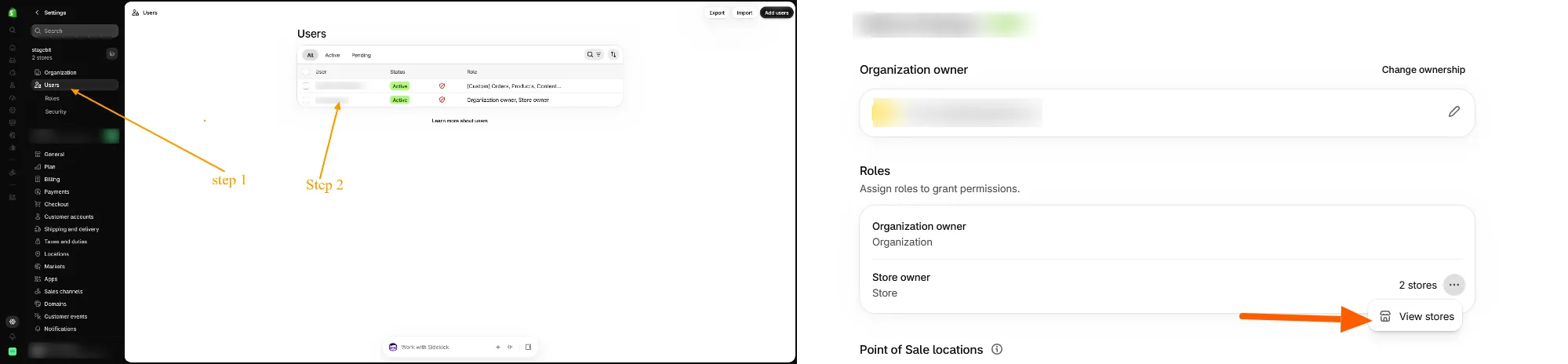
- Go to Settings > Users in your Shopify admin.
- Click the current store owner’s name.
- In the Roles section, click the three-dot menu beside the Store owner role, then select View stores.
- Select the store you want to transfer.
- In the Store owner section, click Change ownership.
- Enter the new owner’s email address. They must already be listed as a user.
- Click Change store ownership and complete any requested account verification.

Transfer ownership to someone outside your business
If the new owner does not have access to your store, you send them a transfer invitation.
- Go to Settings > General.
- Scroll to the Transfer store section at the bottom of the page and click Manage.
- In the Transfer store window, enter the new owner’s email address in the Email address field.
- Click Transfer. The button stays inactive until you enter an email.
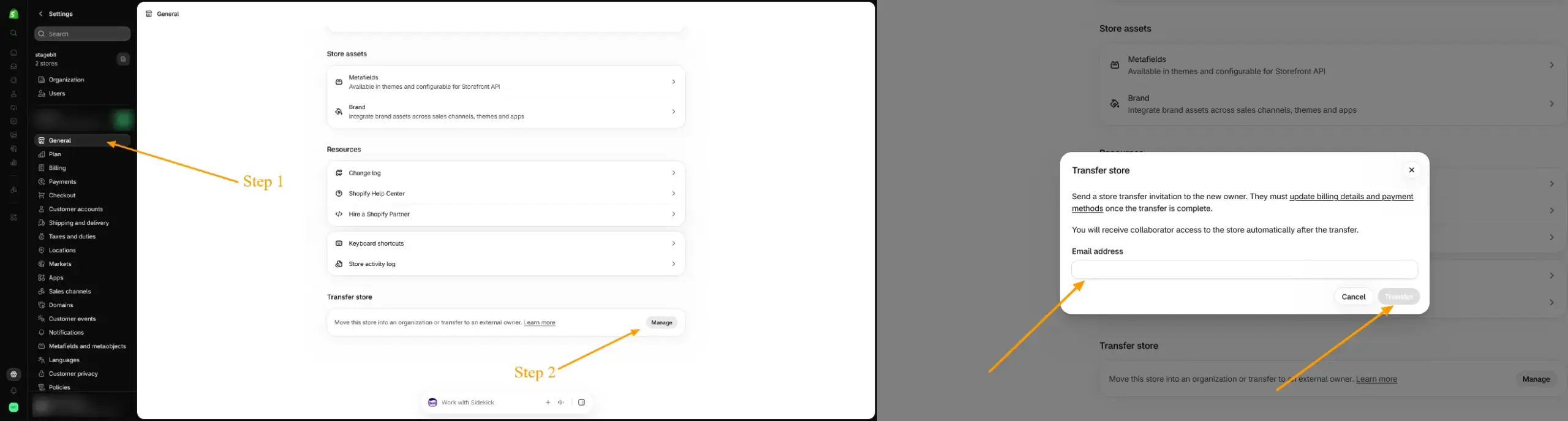
Shopify sends the new owner a store transfer invitation. The window states that they must update billing details and payment methods once the transfer is complete. You receive collaborator access to the store automatically after the transfer. Shopify’s Partner documentation says you can cancel until a new owner who is not yet a user accepts.
What can block or complicate a transfer
- If your billing threshold is unmet at transfer time, the new owner pays outstanding bills, according to Shopify’s organization documentation.
- Moving the only store out of an organization deletes that organization.
- Merchants report that an active Shopify Balance account can block a transfer until its funds are moved out and Shopify Support is contacted.
- Switching a development store to Shopify Plus before transferring makes you the organization owner, and Shopify says only Plus Support can change that. Transfer first, then upgrade.
Check the email address twice
Only the current owner can start a transfer. Afterward you keep collaborator access, not ownership, so the new owner must send the store back if you need it. Confirm the address before you click Transfer.
What to update around the transfer
- Store contact details: Update the business address, store email and phone number. Shopify warns a wrong address can add tax to the new owner’s invoice.
- Notifications: Update the email addresses used for order notifications and other store messages.
- Billing: The new owner must update billing details and payment methods after the transfer. Review third-party apps that bill separately.
- Shopify Payments: Shopify’s Partner documentation says to contact Shopify Support to update the Payments account. Review payout bank and tax details too. Update third-party accounts, such as PayPal, with their own providers.
- Custom domain: Transfer a custom domain separately at its registrar if needed.
- Permissions: Users keep store-level permissions, but organization-level permissions are removed when a store moves to a new owner. Review who still has access.
- Records: Export invoices, payout history and transaction records you need before your access changes.
Clear billing, Balance funds and the new owner’s account setup before you confirm. For the latest requirements, see Shopify’s guide: Change or transfer ownership. If you want a second review before a handover, Stagebit’s Shopify development team can go through the setup with you.
Related Answers

Still need help?
Planning to hand over a Shopify store?
If you’re getting ready to transfer a store and want to check billing, Shopify Payments and store settings first, we’re happy to walk through your setup and what to sort before you start.