How do I buy a new domain directly from Shopify?
You can buy a domain directly from your Shopify admin instead of using a separate registrar. Shopify handles the registration, sets up default DNS automatically, and issues an SSL certificate for the domain. Shopify charges the domain fee separately from your Shopify plan, and the price depends on the extension you choose.
Quick answer
In Shopify admin, go to Settings > Domains > Buy new domain, search for your name, pick an extension, and check the purchase summary before you confirm. Shopify registers the domain for one year, turns on auto-renewal by default, and connects DNS and SSL automatically. You must verify your registration email within 15 days or Shopify may suspend the domain. If this is your first custom domain, Shopify sets it live automatically. If you already have a primary domain, the new one redirects to it until you switch manually.
Before You Buy: What to Know First
- Registration lasts one year and Shopify renews it every year unless you turn off auto-renew.
- Shopify bills the domain fee separately from your Shopify plan, and the price varies by extension.
- You need a paid Shopify plan to buy a domain. Domain hosting isn’t available on a free trial.
- Shopify doesn’t sell every domain extension. If yours isn’t available, buy it from a third-party registrar and connect it instead.
- Once you buy a domain, you can’t rename it and Shopify won’t refund the purchase. Double-check the spelling before you check out.
- Shopify doesn’t include full email hosting. You get free email forwarding, but a real inbox (like [email protected]) needs a third-party service such as Google Workspace or Zoho Mail.
- WHOIS privacy comes free with most extensions, but some are on Shopify’s WHOIS exceptions list and don’t include it. Check the purchase screen, or see Shopify’s domain buying guide for the current list.
- Some country-code extensions require local residency or business registration. Shopify can suspend a domain that doesn’t meet these requirements.
How to Buy a Domain From Shopify, Step by Step
- From Shopify admin, go to Settings > Domains.
- Click Buy new domain.
- Enter the domain name you want.
- Compare available extensions and their prices, then click Buy next to the one you want.
- Review the purchase summary, including auto-renewal, contact details, and payment method, then click Buy domain to confirm.
- Check your inbox for a verification email from Shopify and follow the link to complete registration. Use an email address that isn’t on the new domain itself, since the domain may not be able to receive mail yet.
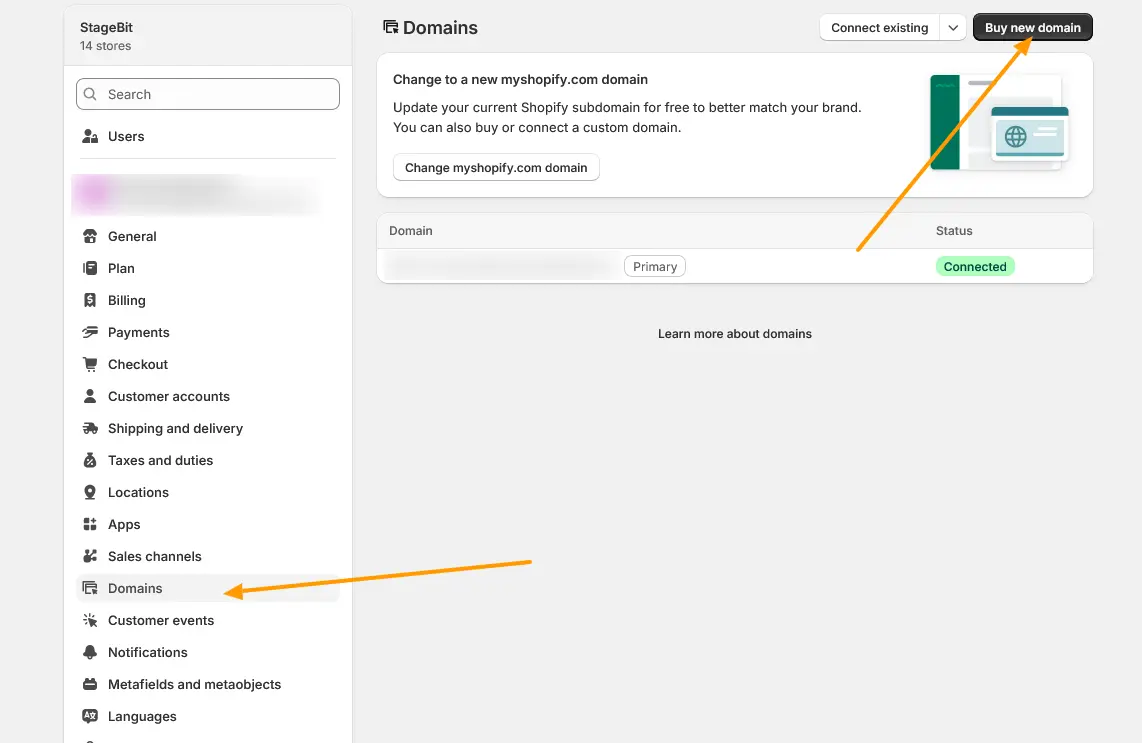
If this is the first custom domain you add, Shopify sets it as your storefront’s live address automatically. If you already have a primary domain, the new one connects but redirects to your existing primary. To switch it, go to Settings > Domains, click the new domain, select Change domain type, choose Primary domain, then click Change domain type again to save. Allow up to 48 hours for the domain to start resolving.
Before you click buy: the purchase is final. Shopify doesn’t offer refunds, and you can’t rename the domain afterward, so double-check the spelling before you confirm. Auto-renewal is on by default. Shopify charges the renewal 14 days before your registration period ends. Turn it off in Settings > Domains if you don’t want it to renew automatically. After you buy, verify your email within 15 days, or Shopify may suspend the domain. If you already own another Shopify domain registered under the same name and email, Shopify may verify you automatically, so you might not get a verification email at all.
What a Shopify Domain Costs
Price depends on the extension. A domain through Shopify typically runs $9 to $20 or more per year, often with a lower first-year rate that increases on renewal. Other extensions, like .store or country-code domains, carry their own pricing. Shopify shows the exact price for your chosen name and extension at checkout, so treat this range as a ballpark and confirm the number before you buy.
Managing the Domain After You Buy It
From Settings > Domains, you can manage subdomains, email forwarding, renewal settings, and DNS records without leaving Shopify admin. If you already own a domain elsewhere and want to point it at Shopify instead of buying a new one, that’s a different process covered in our answer on connecting an existing domain to Shopify.
Buying through Shopify is the simplest path when you want one bill and zero manual DNS work. The trade-off shows up later: if you deactivate your store or move the domain elsewhere, transfer a Shopify-managed domain out first. Otherwise it can keep renewing and charging you on a store you no longer use. If you’re migrating an entire store between platforms and the domain cutover is part of a bigger technical move, our Shopify development team can handle that transition with you.
Related Answers

Still need help?
Running into trouble buying or connecting your domain?
If DNS, verification, or a domain from another registrar isn't behaving the way this guide describes, we're happy to take a look at what you're seeing and help you sort it out.