Why is my Shopify store still showing the myshopify.com URL and how do I fix it?
Your Shopify storefront may still show its myshopify.com address because you have not added a custom domain, the custom domain is not set as primary, or its connection is incomplete. Open Settings, then Domains, and check two things. Look at the Status of your custom domain, and see which domain carries the Primary badge.
Quick answer
Work through the Domains page in order. The custom domain must show Connected, which can take up to 48 hours after a DNS change. If it is not marked Primary, open it, click Change in the Type row, and select Primary domain. If it will not connect, verify one A record at 23.227.38.65, one AAAA record at 2620:0127:f00f:5::, and a www CNAME at shops.myshopify.com. Your original myshopify.com address stays in use for admin login by design.
Why does Shopify still show the myshopify.com URL?
Every store gets a myshopify.com address at sign-up. Changing your store name does not replace it. Three causes are the most common.
- You have not added a custom domain yet.
- The custom domain is connected but is not marked Primary.
- The domain does not show Connected yet, or its DNS records are wrong.
One conditional case applies to stores that sell in several markets. If the domain’s type reads Market domain for a named market, Shopify shows View market settings instead of Change. Assign a different domain or subfolder to that market before using the domain as your primary domain.
How do I make my custom domain the primary domain?
- From your Shopify admin, go to Settings, then Domains. The domain with the Primary badge is the one customers see.
- If you have no custom domain yet, click Buy new domain, Connect existing, or Transfer domain at the top right.
- Wait until the Status column shows Connected for your custom domain. If it does not, use the DNS checks below.
- If your custom domain is already marked Primary, skip the remaining steps. Otherwise, click that domain.
- In the Type row, click Change.
- Select Primary domain, then click Change domain type.
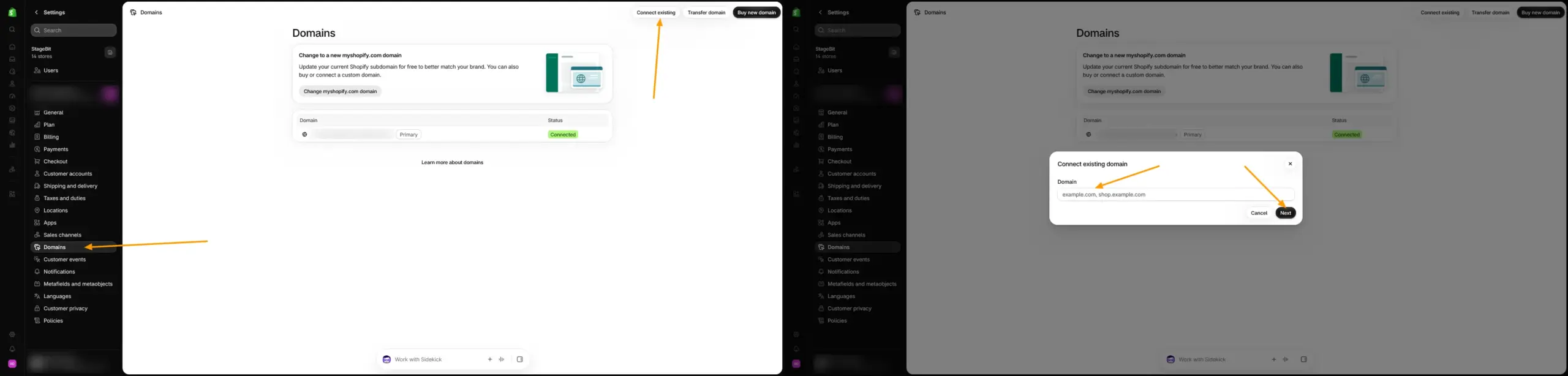
The old primary domain becomes a redirect domain and stays connected, as Shopify’s primary domain documentation explains. A domain bought through Shopify as your first domain is configured as primary automatically. If yours is already primary, test the store in a private window.
What if the domain will not connect?
Shopify’s domain troubleshooting guide lists the records it expects. These apply to a root domain and its www address connected directly to Shopify. For a subdomain such as shop.example.com, follow Shopify’s subdomain instructions instead. Leave unrelated records, such as email records, as they are.
- Use a single A record pointing to 23.227.38.65. A variant such as 23.227.38.32 is also valid in some regions.
- Use a single AAAA record pointing to 2620:0127:f00f:5::.
- Point the www CNAME to shops.myshopify.com. and keep the final period.
- Remove any wildcard record that points at Shopify.
- On Cloudflare, set every Shopify record to DNS only. Shopify does not support the Cloudflare proxy.
- If the domain shows SSL pending or TLS pending after 48 hours, recheck these records and contact Shopify Support.
If the records look right and the domain still will not connect, you can get hands-on help from our Shopify development team.
Do not keep editing DNS while you wait
DNS updates can take up to 48 hours to propagate. Shopify advises against unnecessary changes in that window because they can reset the timer. If you find an incorrect record, correct it rather than waiting.
Can you remove the myshopify.com URL completely?
No, but customers will not see it once a custom domain is primary. Shopify keeps your original myshopify.com address for admin login, Shopify Support identification, and some app connections. Record it somewhere safe.
Renaming the myshopify.com address does not replace it with a custom domain, and Shopify limits those changes. Browser caches and search results can also lag behind a domain change, so test your store in a private window before assuming the fix failed.
Most cases come down to two checks: Connected status first, then the Primary badge. Do them in that order and give DNS time to settle.
Related Answers

Still need help?
Custom domain still not showing on your store?
If you’re weighing whether the problem is DNS, Connected status, or the Primary setting, we’re happy to walk through what you’re seeing and what to check next.