How do I start a Shopify free trial and what happens when it ends?
To start a Shopify free trial, go to shopify.com and sign up with just an email, no credit card required, which puts you straight into the Shopify Admin. The trial itself is short by design: when it ends without a plan selected, Shopify pauses your store rather than deleting anything, and it stays paused until you pick a plan and add billing details.
Quick answer
Sign up at shopify.com with an email or a Google, Apple, or Facebook account to land in the Shopify Admin immediately, no card required. The current standard trial length shown at signup is 3 days, though Shopify notes this can vary by account, so confirm the exact length shown when you sign up. The storefront stays password-protected the whole time so no one can browse it or check out. When the trial ends without a plan selected, everything you built is preserved, and you can log back in anytime, pick a plan, and add billing details to reactivate.
What Is the Shopify Free Trial?
Shopify lets anyone sign up and build a fully working store before paying anything, with full access to the Admin: products, themes, settings, and apps. The current structure:
- A free trial period, no card required to start. The length shown at signup is currently 3 days, but Shopify’s own documentation states trial length can vary by account and region, so treat this as the current default rather than a fixed number.
- A possible promotional rate afterward (currently $1/month for 3 months on eligible plans, historically Basic, Grow, or Advanced). This is a promotional offer, not a guaranteed second phase. It doesn’t apply to every plan or every account, requires entering payment details to activate, and Shopify can change or discontinue it at any time.
Regional pricing on any promo can vary (shown in local currency in some markets), and trial length and promo terms are both subject to change. Always confirm current terms on shopify.com when you sign up rather than relying on a fixed number from an article.
How to Start Your Free Trial
- Go to shopify.com.”
- Enter your email and create a password, or sign up with Google, Apple, or Facebook.
- Answer a few quick questions about your business, or skip them.
- Land in your Shopify Admin. The trial clock starts here, not when you begin building.
You can add billing details right away or skip that step and add them later under Settings → Billing. Either way, entering card details is required once you’re ready to continue on a paid plan, whether or not a promotional rate is available to you.
Before your trial runs out, check these:
- Set a reminder for day 3. Once the trial ends, checkout stays off until you actively pick a plan, there’s no automatic grace period.
- Review any apps you installed during the trial. App subscription or usage charges are added to your first invoice once you’re on a plan, even if you never launched publicly.
- Uninstall anything you don’t plan to keep before your trial ends, since charges start accumulating from install, not from launch.
What You Can Do During the Trial
Everything needed to get a store ready to launch:
- Add products, descriptions, images, pricing, and variants
- Organize products into collections
- Choose and customize a theme
- Set up shipping zones and rates
- Configure Shopify Payments or a third-party gateway
- Install apps
- Set up navigation and legal pages
- Connect a custom domain
The one limitation: your store is password-protected by default during the trial, so visitors cannot browse it or place real orders. To open it to the public, you need to choose a paid plan and remove the password.
What Happens When the Trial Ends
| Scenario | What happens |
|---|---|
| You picked a plan and entered payment details | You’re billed for that plan, potentially at a promotional rate for a set period before standard pricing applies. Everything you built is preserved and carries over. |
| You did not pick a plan | Your store is paused. Nothing is deleted. You can log back in anytime and choose a plan to reactivate it. |
| You decided not to continue | No action needed. The account goes inactive and you are not charged. |
Not Ready to Launch? The Pause and Build Plan
If you need more time before going live and do not want to pay full plan pricing, Shopify offers Pause and Build:
| Feature | Details |
|---|---|
| Cost | $9/month |
| Admin access | Fully accessible |
| Storefront visibility | Visible and browsable to customers unless you turn on private mode |
| Checkout | Disabled. Customers can browse but cannot complete a purchase. |
| Eligibility | You must be the store owner, your store must be past the free trial period, and your store must be on a paid plan. Not available to Shopify Plus stores. If your store meets these requirements but the option still doesn’t appear, contact Shopify Support directly. |
| Apps | All apps stay active and continue billing on their normal cycle while paused. Uninstall anything you don’t need before or immediately after switching to avoid charges. |
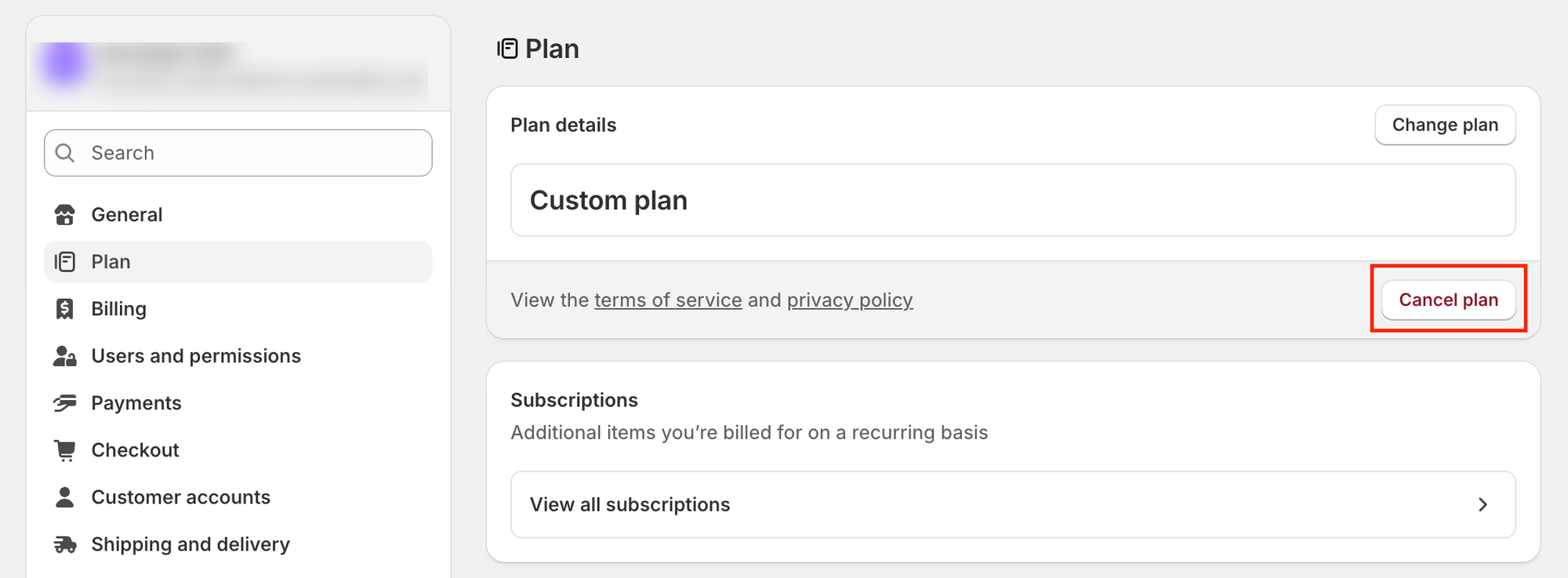
To switch: go to Settings → Plan → Cancel plan, then select Pause and Build. When you’re ready to sell again, log back in and choose a new paid plan, since your previous plan won’t carry over automatically.
If you’re unsure whether to commit to a paid plan now or buy more time with Pause and Build, our Shopify team can walk through the trade-off against your actual launch timeline rather than guessing.
Can You Extend the Trial?
The trial itself generally isn’t extendable through Shopify Support on request. Some account types, such as Shopify Partner or affiliate signups, have historically come with different trial terms, and Shopify periodically runs its own promotional variations. Availability of any of these changes over time, so the reliable way to get more runway is checking shopify.com directly rather than relying on a specific program name.
A Note on App Charges
Installing apps during the trial doesn’t make them free. Any app subscription or usage fees you rack up during the trial land on your first invoice once you commit to a plan, so it’s worth reviewing what you’ve installed before that bill arrives.
Quick Reference
| Scenario | What happens |
|---|---|
| Trial active, plan already selected | No charge until the free period ends; store then moves onto your plan, possibly at a promotional rate |
| Trial ends, plan selected | Billing begins; store stays live |
| Trial ends, no plan selected | Store is paused; all data preserved; reactivate anytime |
| Not ready to sell but want to keep building | Switch to Pause and Build at $9/month (requires being past the trial and on a paid plan) |
| Decided not to continue | No action needed; no charge |
| Can the trial be extended? | Not generally on request; some account types and promotions vary, confirm current options at signup |
| App charges during the trial | Billed on your first invoice once you’re on a plan |
The real decision point is what happens after the trial ends: keep going on a paid plan, possibly at a promotional rate if one’s available, pause at $9/month if you’re not ready to sell but want to keep building, or let the store go inactive at no charge if you’re stepping away. Whichever you pick, it doesn’t need to happen the moment the trial timer runs out.If you want to review the available plans and choose the right option, Our Shopify development team helps you.
Related Answers

Still need help?
Not sure what to do when your Shopify trial ends?
If you're weighing whether to commit to a paid plan, pause with Pause and Build, or walk away entirely, we're happy to talk through what actually fits your timeline and budget.