How do I set my store name and change it later in Shopify?
Store name and store web address are two different settings in Shopify, and most people asking this question mean the first one: the display name customers see. You set it during sign-up and can change it from your admin any time afterward, as many times as you want, without touching your products, orders, or the actual web address your store lives at.
Quick Answer
Go to Settings > General in your Shopify admin, open the Store contact details section, and edit the Store name field before clicking Save. The change is instant and applies everywhere the name displays, including the storefront header, checkout, and order confirmation emails. This does not change your myshopify.com URL or any connected custom domain, which are managed separately under Settings > Domains.
Can I Set My Store Name During Sign-Up?
Yes. You enter a store name as part of creating your Shopify account, and Shopify uses it to generate your initial myshopify.com subdomain. If that name is already in use by another store or you skip entering one, Shopify assigns a variant or a random string instead. It’s worth noting that it’s the myshopify.com subdomain that needs to be unique, not the store display name itself, so don’t expect a separate “name availability” check on the display name the way you’d see with a domain registrar.
How to Change Your Store Name Later
- Open Store contact details. From your Shopify admin, go to Settings, then General, then Store contact details.
- Find the Store name field. It’s listed alongside your store’s phone number, email, and business address.
- Edit the field. Type in your new store name.
- Save. Click Save. The update applies immediately, with no downtime.
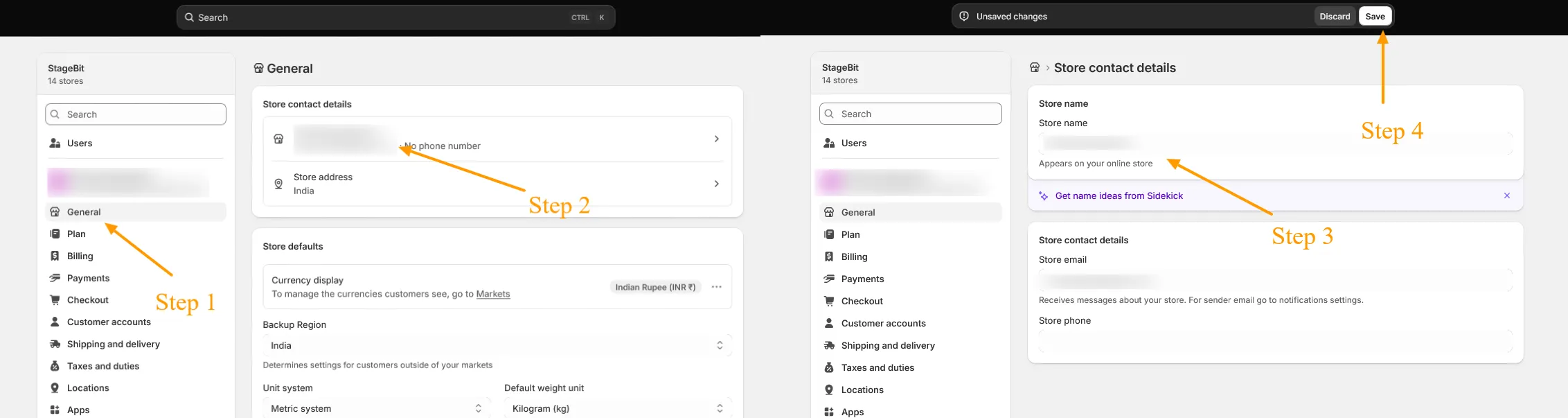
Check your storefront header or a recent order confirmation email afterward to confirm the new name is showing where you expect it.
What Changing Your Store Name Does and Doesn’t Affect
Changing the Store name field does not touch your products, orders, customers, or theme settings. It also does not change your myshopify.com subdomain or any custom domain connected to your store. For example, renaming your store from ABC Fashion to XYZ Fashion updates the display name everywhere it appears, but your existing myshopify.com address and any custom domain stay exactly as they were unless you change those separately.
Can I Also Change My myshopify.com Domain?
Yes, but it’s a separate setting from Store name, and it works differently: you can only do it once. Under Settings > Domains, look for the option to change to a new myshopify.com domain. Your original address will automatically redirect to the new one, but if you need to change it again after that first time, you’ll need to start a new store.
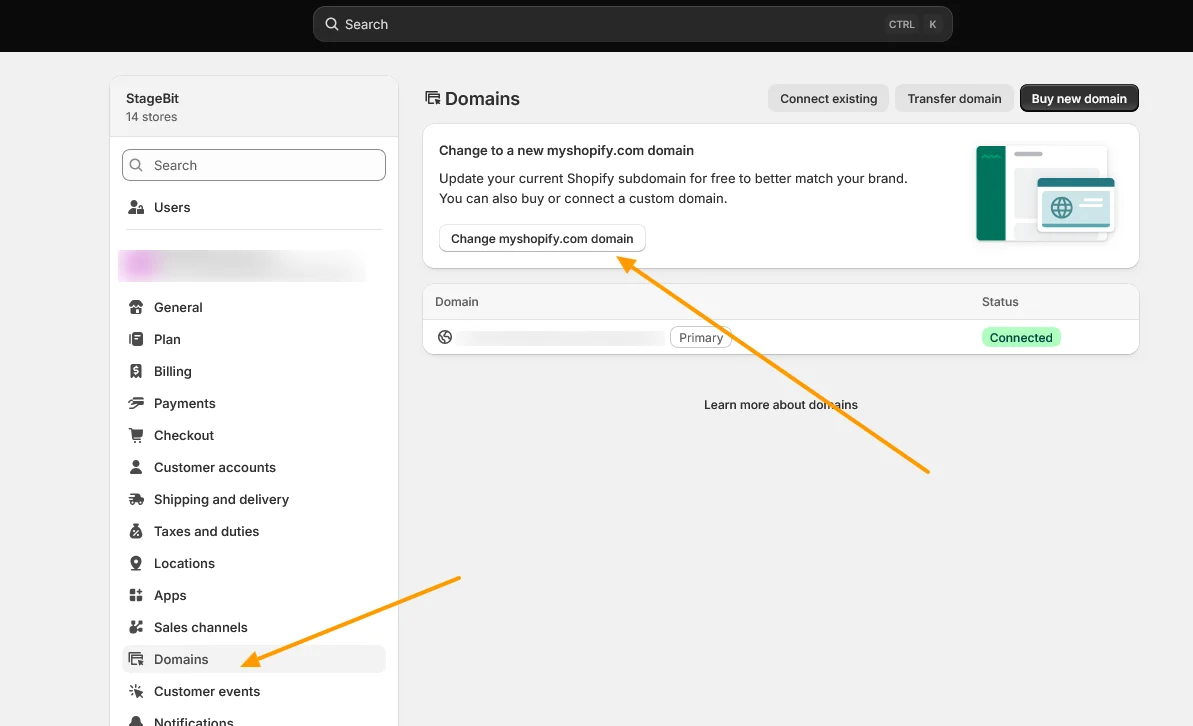
What About a Custom Domain?
If you’ve connected a custom domain such as www.example.com, changing your store name doesn’t change that either, your custom domain keeps pointing to your store as before. To reflect a new brand name in your website address, connect or change your domain separately under Settings > Domains, then set it as your primary domain. For the full process, see our answer on connecting a custom domain to Shopify.
Store Name vs. Legal Business Name
Your Shopify store name and your legal business name live in different sections of the same settings page. Store name sits under Settings > General > Store contact details, it’s what customers see. Legal business name sits under Settings > General > Business details, it’s tied to your registered business entity and used for invoicing and tax documents. Changing one does not automatically change the other. If you use Shopify Payments, keep in mind that some legal business entity details are locked once verified and may require contacting Shopify Support to update, so don’t expect that section to behave like a simple text field the way Store name does. If you’re unsure whether a legal entity change affects your live store or your Shopify Payments setup, our Shopify development team can take a look before you make the change.
In practice, renaming your store is one of the lowest-risk settings changes in Shopify. There’s no need to plan around it or notify customers in advance, it just updates in place the next time someone loads your store, and your domains stay untouched unless you go change those too.
Related Answers

Still need help?
Renaming your store as part of a bigger rebrand?
If the name change is one piece of a larger move, like a new domain, updated branding, or switching platforms entirely, we're happy to help you think through what else needs to change alongside it.