What does a Laravel service layer around an existing system actually look like?
A Laravel service layer around an existing system is a set of plain PHP classes, one per domain area. OrderService is a typical one. Each holds business logic that would otherwise sit in controllers and models.
The service class sits between a thin controller and the existing system. That system might be a legacy API, a SOAP client, an Eloquent model, or a database with its own schema. An external API usually needs an adapter behind an interface. A legacy database usually needs a DTO and a repository. Both patterns are covered below with real code.
Quick answer
A Laravel service layer around an existing system is a set of PHP classes, one per domain area. A thin controller calls the service, which reaches the legacy API, SOAP client, or database through an adapter or repository. DTOs carry typed data in, and an interface is worth adding only where an implementation must be swappable.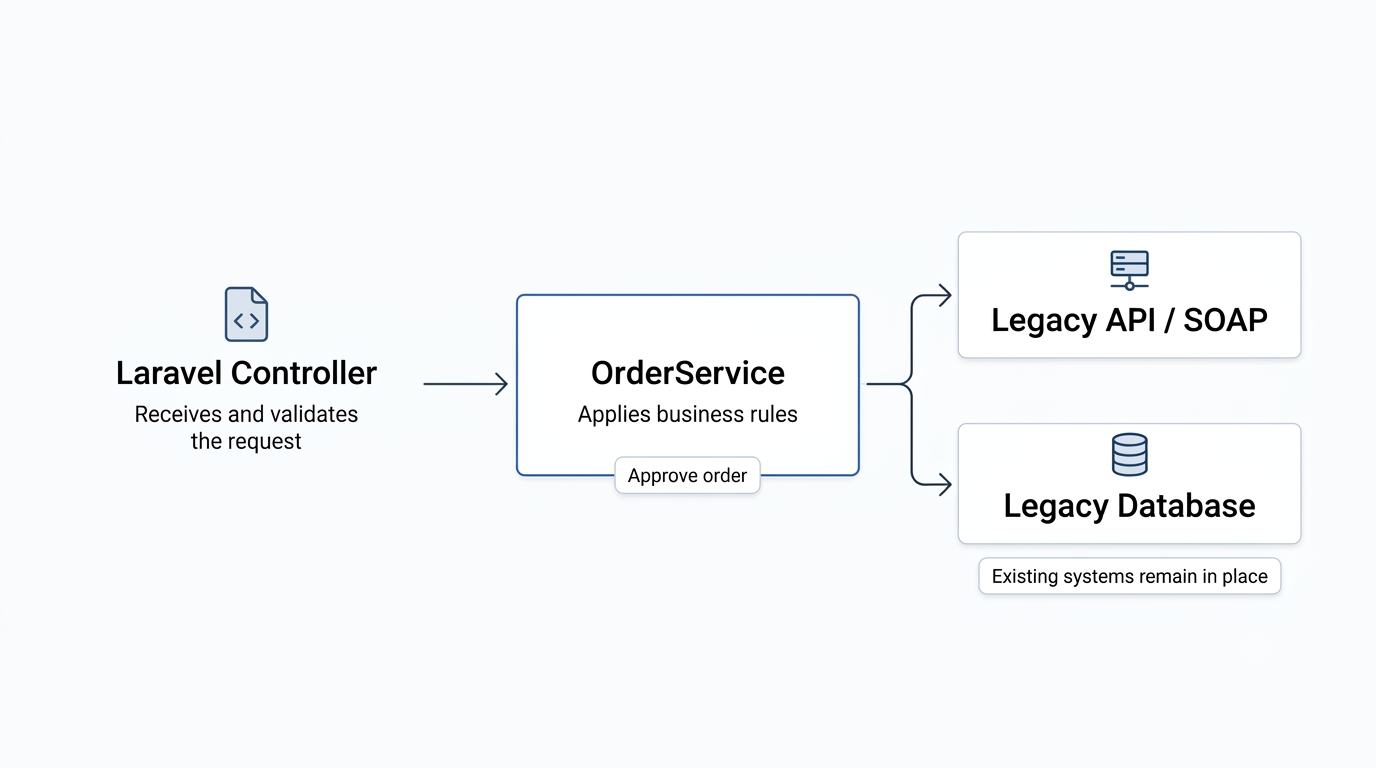
The core pieces of the service layer pattern in Laravel
Most Laravel service layers use the same four pieces, in a six-month-old codebase or a fifteen-year-old one:
- Service class: a plain PHP class named after the domain concept it owns, such as
OrderServiceorInvoiceService. - Interface or contract: defines what a dependency does and hides how. Add one only when that dependency needs to be swappable.
- DTO or value object: a small class that carries structured, typed data into or out of the service. It replaces loose arrays and full Eloquent models at boundaries that don’t need them.
- Thin controller: the controller’s job shrinks to validating the request and calling one method on the service. It stops knowing how approval, billing, or legacy sync logic works.
What a Laravel service layer looks like wrapping a legacy API
Here’s a typical starting point. The controller grew business logic over a few years and calls a legacy SOAP client directly.
class OrderController extends Controller
{
    public function approve(Order $order)
    {
        if ($order->status !== 'pending') {
            abort(422, 'Order is not pending.');
        }

        $order->status = 'approved';
        $order->approved_at = now();
        $order->save();

        $warehouseClient = new LegacyWarehouseSoapClient();
        $warehouseClient->notifyApproval($order->legacy_reference);

        return redirect()->route('orders.show', $order);
    }
}Here is the same logic as a Laravel service class example. The controller does almost nothing, and the SOAP call sits behind an interface:
class OrderController extends Controller
{
    public function approve(Order $order, OrderService $orders)
    {
        $orders->approve($order);

        return redirect()->route('orders.show', $order);
    }
}

class OrderService
{
    public function __construct(
        private WarehouseNotifier $warehouse
    ) {}

    public function approve(Order $order): void
    {
        if (! $order->isPending()) {
            throw new OrderNotPendingException($order);
        }

        $order->status = 'approved';
        $order->approved_at = now();
        $order->save();

        $this->warehouse->notifyApproval($order->legacy_reference);
    }
}

interface WarehouseNotifier
{
    public function notifyApproval(string $legacyReference): void;
}

class LegacyWarehouseSoapAdapter implements WarehouseNotifier
{
    public function notifyApproval(string $legacyReference): void
    {
        (new LegacyWarehouseSoapClient())->notifyApproval($legacyReference);
    }
}The WarehouseNotifier interface exists to isolate the legacy SOAP client, not to make the code feel more enterprise. If that client is ever replaced with a REST integration, only LegacyWarehouseSoapAdapter changes. OrderService, the controller, and every test written against the interface stay exactly as they are.
What it looks like wrapping a legacy database
A second common shape of “existing system” is a legacy database with its own naming conventions. Picture a SQL Server table called tbl_ord_hdr with columns like cst_mstr_id. Wrapping legacy code in a service layer works the same way here, but a repository replaces the adapter:
readonly class CreateOrderData
{
    public function __construct(
        public int $customerId,
        public array $items, // each: ['sku' => string, 'quantity' => int]
        public string $paymentMethod,
    ) {}
}

interface LegacyOrderRepository
{
    public function insert(CreateOrderData $data): string;
}

class SqlServerLegacyOrderRepository implements LegacyOrderRepository
{
    public function insert(CreateOrderData $data): string
    {
        $orderNumber = 'ORD-' . Str::upper((string) Str::ulid());
        $db = DB::connection('legacy_sqlsrv');

        $db->table('tbl_ord_hdr')->insert([
            'cst_mstr_id' => $data->customerId,
            'ord_num_ext' => $orderNumber,
            'pay_mthd_cd' => $data->paymentMethod,
            'created_at'  => now(),
        ]);

        foreach ($data->items as $item) {
            $db->table('tbl_ord_ln')->insert([
                'ord_num_ext' => $orderNumber,
                'itm_cd'      => $item['sku'],
                'qty'         => $item['quantity'],
            ]);
        }

        return $orderNumber;
    }
}

class OrderProcessingService
{
    public function __construct(
        private LegacyOrderRepository $repository
    ) {}

    public function process(CreateOrderData $data): string
    {
        return DB::connection('legacy_sqlsrv')->transaction(function () use ($data) {
            $orderNumber = $this->repository->insert($data);

            Log::info('Order created in legacy system', [
                'order_number' => $orderNumber,
            ]);

            return $orderNumber;
        });
    }
}Bind the interface to its implementation in a service provider:
public function register(): void
{
    $this->app->bind(
        LegacyOrderRepository::class,
        SqlServerLegacyOrderRepository::class
    );
}The header row and the line rows have to succeed or fail together. So the service opens the transaction on DB::connection('legacy_sqlsrv'), the same connection the inserts run on. That detail is easy to get wrong, and the mistakes section below explains why.
The readonly class syntax needs PHP 8.2 or later. On an older PHP version, use a regular class with typed public properties.
How much of this you actually need
A Laravel service layer does not require all four pieces every time. Scale it to the integration in front of you.
- A single legacy API call in one service method often needs no DTO or interface. Plain method arguments and one class are enough until there’s a real reason to swap something.
- Add an interface when a dependency, such as a SOAP client, must be replaceable. Callers stay untouched when it changes.
- Add a repository when the legacy schema is complex enough that its query logic needs its own home. Skip it for a table or two you can query directly.
- Use all four pieces together only for complex integrations. A multi-step workflow touching more than one legacy system is the usual case.
Common mistakes when adding this to an existing app
Most service layer problems come from overbuilding, or from getting one specific detail wrong.
- Adding an interface for every service: with one implementation and no second planned, the interface is pure indirection.
- Making services call other services directly: this rebuilds the tangled dependency chain you were escaping, one layer deeper.
- Opening a transaction on the wrong connection:
DB::transaction()without an explicit connection runs against Laravel’s default database connection. If the write runs on another named connection, it sits outside the transaction entirely. It commits immediately. Always open the transaction on the connection the write runs on. - Refactoring everything at once: extract one controller at a time, starting with whatever changes most often. That leaves a working checkpoint after every step.
- Skipping tests on the extracted logic: the point of the move is isolated testing. Without tests, the refactor hasn’t paid for itself yet.
None of this requires touching your routes, your existing database schema, or the legacy system itself. A Laravel service layer organizes code you already have. On an older app it is usually one of the lowest-risk refactors. You can do it one controller at a time. For a specific legacy integration, our Laravel development team can help you scope what to wrap first.
Related Answers

Still need help?
Questions about wrapping a legacy system in Laravel?
If you’re weighing how to wrap a legacy API or database in a service layer, we’re happy to walk through your setup and what to wrap first.