When should I build something in Laravel rather than extending an existing platform?
Build the application in Laravel when your business logic, workflows, data model, or integrations are important enough that you need direct control over how the system works. Extend an existing platform when it already provides most of the required business capabilities and your requirements can be implemented cleanly through its supported extension mechanisms. The decision isn’t whether Laravel is more flexible than a platform. It’s whether that flexibility is worth taking ownership of functionality a platform would otherwise provide for you.
Quick Answer
Choose Laravel when your application’s business rules, data model, or workflows don’t map to an existing platform’s core concepts, or when the software itself is the product rather than a tool supporting one. Extend the platform when most of what you need already exists and your remaining requirements fit through documented extension points, plugins, or modules. If developers keep working around the platform’s standard entities instead of with them, that’s the clearest signal it’s time to build custom.
Choose Laravel when your application is the product
Laravel is usually the better starting point when the software itself is a core business system, not primarily a way to manage a standard type of content or transaction. This matters most when your application has domain-specific workflows that don’t map naturally onto the concepts an existing platform provides. Laravel gives you control over routes, application code, database structure, background jobs, frontend approach, and integrations, rather than forcing those requirements into a platform’s existing model.
For example, a system involving warranty rules, dealer-specific pricing, claims processing, approval workflows, scheduled jobs, external payment services, and custom reporting is often a better fit for a dedicated Laravel application than for an e-commerce platform whose core model is built around products, carts, and orders.
Build in Laravel when the domain model doesn’t fit the platform
One of the strongest signals is a growing mismatch between your business model and the platform’s built-in concepts. If developers repeatedly represent domain concepts indirectly, add large numbers of custom fields, or maintain workaround logic around the platform’s standard entities, the extension is getting more expensive to reason about, not less.
A custom Laravel application lets you model the domain around actual business requirements instead. Laravel has a conventional structure for routes, configuration, migrations, models, and jobs, described in Laravel’s application structure documentation, while still allowing that structure to be reorganized when a project needs it. The same applies to the database layer: migrations, Eloquent models, and relationships, covered in Laravel’s database documentation and Eloquent’s API documentation, let you build a schema that matches the business rather than continually adapting a platform’s schema to represent something it wasn’t designed for. This isn’t automatically better than a platform’s schema. It matters when the business genuinely requires a different one.
Build in Laravel when workflows are substantially different from the platform
Standard platforms are valuable because they already solve common workflows. That calculation changes when the workflow itself is unusual. Consider a process like this:
- A customer or dealer submits information.
- The application evaluates eligibility against several business rules.
- Different pricing rules apply depending on the customer or dealer.
- An external service is called.
- The result enters an approval workflow.
- Long-running processing happens asynchronously.
- Different users see different views of the resulting data.
- The system records an audit trail and exposes it through custom reporting.
A platform can technically be extended to handle this. The real question is whether the platform is helping at that point, or getting in the way. Laravel’s queue system, described in Laravel’s queue documentation, gives you a common API for processing jobs across different backends, which is exactly the kind of asynchronous step this workflow needs and most platforms weren’t built to accommodate cleanly.
Build in Laravel when integrations are a first-class requirement
Laravel is also a strong choice when the application primarily orchestrates several external systems, for example payment providers, CRM systems, accounting software, identity providers, logistics services, and internal APIs. An existing platform may already support some of these integrations, so rebuilding them in Laravel isn’t automatically an advantage. The real question is whether the required integration behavior can be implemented cleanly through the platform’s supported APIs, extension points, and events. If integration logic becomes the core of the application, a Laravel service gives you a more direct place to own that orchestration.
Don’t choose Laravel just because the platform needs customization
Customization by itself isn’t a reason to replace an existing platform. If the platform already covers most of what you need and the rest can be handled through documented extension mechanisms, extending it is usually the simpler engineering decision. Adding a custom checkout rule, adjusting a product display, or introducing a small admin workflow rarely justifies a separate Laravel application on its own. Building custom also means taking on responsibility for functionality the platform may already provide, including admin interfaces, catalog or content management, user management, and operational tooling.
Extend the platform when its core model matches the business
| Requirement | Usually favor extending the platform | Usually favor Laravel |
|---|---|---|
| Core business model | Matches the platform’s existing entities and workflows | Requires a substantially different domain model |
| Customization | Implementable through supported extension points | Requires extensive workarounds or modifying platform internals |
| Business logic | Mostly standard platform behavior | Contains substantial domain-specific rules |
| Administration | Existing tools cover most requirements | Needs a substantially different operational interface |
| Integrations | Already supported or straightforward to add | Integration and orchestration are central to the product |
| Future direction | Requirements stay platform-aligned | Product needs to evolve independently of the platform |
Watch for the “platform within a platform” problem
A common warning sign is an extension that has grown so large it’s effectively a second application living inside the original platform: extensive custom entities, complicated state machines, substantial custom admin screens, independent reporting, and a growing pile of code whose only purpose is working around platform assumptions. Code size isn’t the real issue. Ownership is. If most of the important behavior already belongs to your custom logic rather than the underlying platform, the platform may no longer be earning its place as the application’s foundation.
Consider the operational cost before choosing Laravel
A custom Laravel application gives you more control, and that control comes with responsibility: architecture, deployment, upgrades, monitoring, security configuration, testing, backups, and ongoing integration maintenance. Laravel’s tooling and conventions help with these concerns, but they don’t remove the underlying operational work. That responsibility extends to the framework’s own release cycle, documented in Laravel’s release documentation: a major release roughly every year, with bug fixes for 18 months and security fixes for two years per release. Laravel 13 is the current major release, shipped in March 2026, and it requires PHP 8.3 or newer. Whoever owns the Laravel application also owns tracking that lifecycle and planning upgrades around it, work a SaaS platform typically absorbs for you.
A practical decision rule
Ask which system should own the business rules.
- If the platform should remain the system of record and your requirements mostly enhance its standard behavior, extend the platform.
- If your business rules, workflows, data model, and integrations are the actual product, build a dedicated Laravel application.
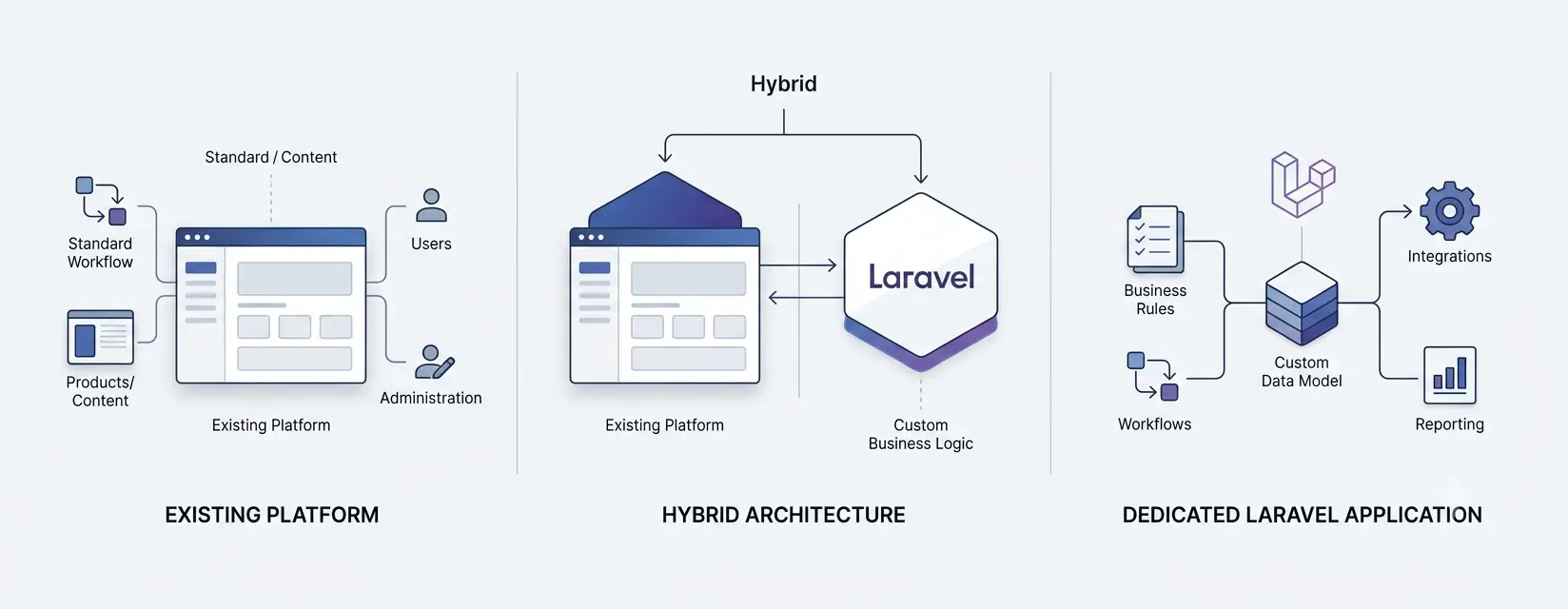
- If the answer is mixed, consider a hybrid architecture instead of forcing everything into either system.
A hybrid approach fits when an existing platform still handles one capability well but a separate Laravel application should own custom business logic elsewhere. Laravel can run as an API backend for other frontend applications as well as a full-stack application, described in Laravel’s frontend documentation, so choosing Laravel doesn’t mean every part of the user experience has to be built on Laravel’s server-rendered views.
Talk to a Laravel specialist
If you’re weighing this decision for a real project, talk to our Laravel team about mapping your actual requirements against your current platform before committing either way.
Most real decisions here aren’t as clean as “build” or “extend.” The pattern that shows up most often is a platform handling what it’s genuinely good at, while a separate Laravel service owns the one piece of business logic that platform was never built to represent. Before committing to either extreme, map your actual requirements against what your current platform assumes. The gaps that surface usually make the decision for you
Related Answers
 What does a Laravel service layer around an existing system actually look like?
How do I decide between custom Laravel middleware and an off-the-shelf integration platform?
Should integration logic live inside the store or in a separate Laravel service?
Should I build my SaaS multi-tenant from day one?
What does a Laravel service layer around an existing system actually look like?
How do I decide between custom Laravel middleware and an off-the-shelf integration platform?
Should integration logic live inside the store or in a separate Laravel service?
Should I build my SaaS multi-tenant from day one? Still need help?
Feeling like your platform is fighting your own business logic?
If the workarounds are piling up and you're wondering whether it's time for something custom in Laravel, we're happy to talk through what you're seeing and what your options actually are.