Shopware 6 is the better fit for small to mid-sized businesses that want a simpler, more manageable platform, while Magento 2 is the better fit for large enterprises with complex catalogs and international operations. The right choice depends on your business size and growth plans, here’s the full breakdown of why.
Magento has dominated the e-commerce landscape for years, and it is not likely to change anytime soon. The Magento eCommerce platform offers a wide range of features and proved to be a great choice for large projects. Shopware is a leading eCommerce PHP-based platform for creating modern and easy-to-use eCommerce shops for small and medium-sized businesses. Both are open-source and CMS-based eCommerce platforms having lots of features in common. With both Magento and Shopware, you will get countless customization opportunities to scale your business as it grows. Both platforms have a large community and many store owners worldwide. Choosing between Shopware 6 & Magento 2 is where most teams get stuck. This guide breaks down the comparison between Magento 2 and Shopware 6 so you can choose the right eCommerce platform for your online business
Before comparing the functionality of Shopware 6 and Magento 2, it’s very important to know each of them separately first.
About Magento 2
Magento 2 is one of the most widely used eCommerce platforms globally, currently holding around 7 to 8% of the global eCommerce platform market by store count according to BuiltWith’s usage tracking, with a disproportionate share of that footprint concentrated among large, complex enterprise catalogs rather than small stores.
Magento is best known for its flexibility, usability, and scalability to scale businesses as they grow. The Magento has two additions, namely Magento open-source and Magento commerce.
Magento Open Source: This is a free version of Magento that is used by most companies. A variety of extensions are available for the open-source version.
Magento Commerce (Adobe Commerce): A paid, enterprise-tier edition of Magento, now sold under the Adobe Commerce brand. Adobe doesn’t publish a public price list, license fees are quote-based and tied to your store’s annual Gross Merchandise Value (GMV). Adobe doesn’t publish list pricing, and quotes vary widely by deployment model and revenue tier. As a rough starting point, expect five figures annually at the low end and well into six figures for larger enterprise deployments. Get a quote scoped to your actual GMV rather than assuming a number from this article will match what you’re offered.
About Shopware 6
Shopware is an e-commerce platform founded in 2000 in Germany. Shopware is most popular in Germany but is rapidly gaining market share in other European countries.
Shopware6 provides complete flexibility for businesses to grow in various versions for both the B2B and the B2C markets. The latest Shopware 6 is available in the following version:
Open source: This is a free version of Shopware.
Rise: Shopware’s entry-level paid plan for professional B2C shops. In our experience quoting projects, this typically starts around €600 per month, though Shopware prices individually based on your store’s GMV so your actual quote may differ. It replaces what used to be called the “Professional Edition” under Shopware’s older one-time-license model, Shopware now runs entirely on subscription tiers with no perpetual license option.
Evolve and Beyond: Shopware’s mid-tier and top-tier plans, aimed at businesses with more complex B2B or enterprise requirements. Based on our project experience, Evolve typically starts around €2,400 per month and includes the full B2B suite; Beyond typically starts around €6,500 per month and adds 24/7 support and multi-inventory management for large-scale operations. Both are priced individually based on your store’s revenue and needs.
Shopware 6 vs Magento 2: Which is Better
We compared Shopware 6 and Magento 2 across seven criteria that matter most when choosing an eCommerce platform: hosting requirements, standard functionality, admin usability, scalability and flexibility, extension and community support, performance and security, and total ownership cost. Here’s how they stack up at a glance, with a deeper look at each one below.
| Criterion | Shopware 6 | Magento 2 |
|---|---|---|
| Hosting complexity | Simpler. MySQL, Elasticsearch optional | More complex. Elasticsearch mandatory on 2.4+ |
| Standard functionality | Leaner, more flexible for custom look and feel | Broader out-of-box feature set |
| Admin usability | Intuitive, manageable by non-technical staff | More powerful, steeper learning curve |
| Scalability / international | Strong for B2B and B2C at SMB to mid-market | Stronger for multi-currency, multi-region enterprise |
| Extension ecosystem | Smaller, growing | Larger, more mature developer community |
| Built-in Varnish caching | Enterprise edition only | Included in Open Source |
| Licensing cost | Free (Open Source), or subscription from ~€600/mo (Rise) | Free (Open Source), or GMV-based Commerce pricing on request |
| Best fit | Small to mid-sized businesses | Large enterprises with complex catalogs and global reach |
Hosting requirements
Hosting Shopware is more straightforward. It runs on MySQL, with Elasticsearch as an optional add-on rather than a requirement, though MySQL alone isn’t recommended for larger catalogs.
Magento has more moving parts. Elasticsearch is mandatory as of Magento 2.4, and Shopware requires APCu PHP where Magento doesn’t. One clear win for Magento: it ships with Varnish configuration built in, so setting up full-page caching is mostly a config job rather than custom development, on every edition. You still need to install and run Varnish itself separately. Magento bundles the support for it, not the caching server itself. Shopware only bundles Varnish in its Enterprise tier, so smaller stores on the Professional or Open Source editions need a separate caching setup.
Functionalities
Magento 2 offers more standard functionality out of the box than Shopware. More isn’t automatically better, though. What matters is whether those extra features match what your business actually needs, not whether the platform has more of them on paper.
Shopware, on the other hand, offers full flexibility to adjust the entire look and feel of the site. It comes with an intuitive, easy-to-use admin panel that a non-technical person can manage without help.
The free version of Shopware already has various “drag & drop options” and customizable features. In Magento 2, you will gain more flexibility regarding the product types, price rules, promotions, and the way you work with roles and rights within the system.
For B2B specifically, both platforms offer dedicated tooling, customer-specific pricing, quote requests, and account hierarchies, but they package it differently. Magento’s B2B suite is bundled into Adobe Commerce and is deep but comes at the Commerce-tier price point. Shopware’s B2B features are available starting from the Professional edition, which can make B2B functionality more accessible at a lower cost tier if your B2B requirements aren’t highly complex.
Ease of use of the system
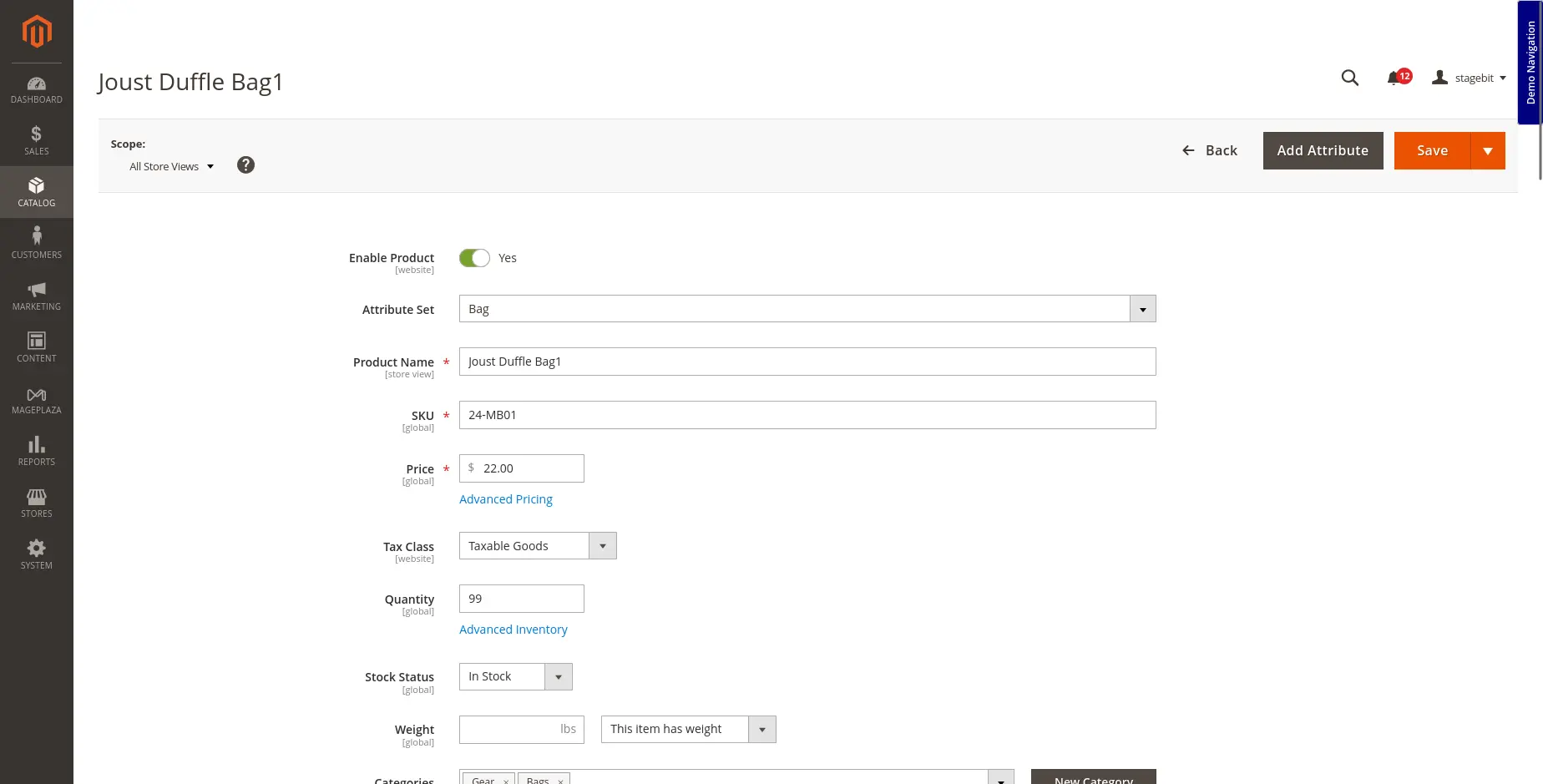
Here’s what that difference actually looks like in practice:
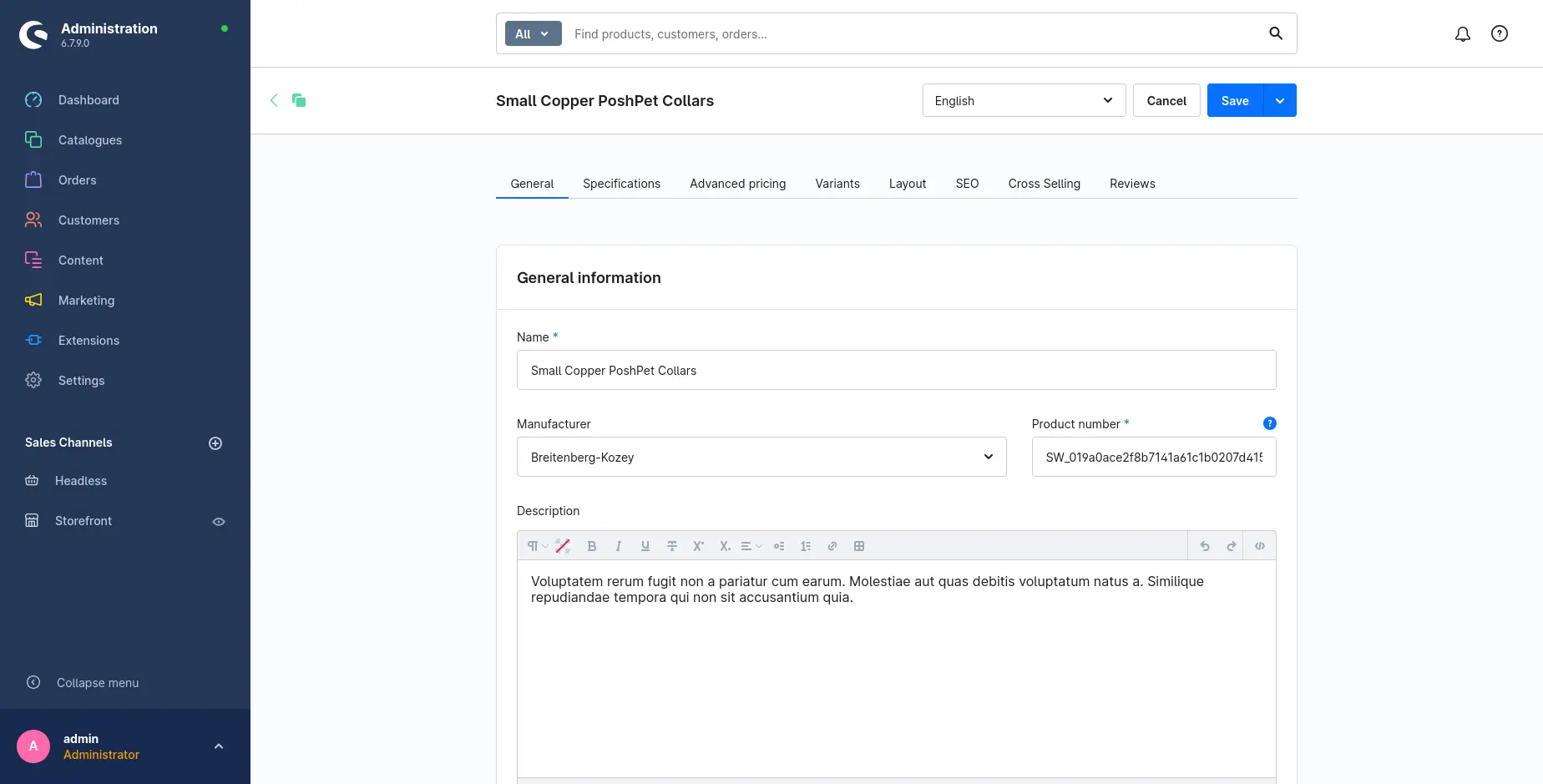
Shopware 6 comes with an easy-to-use, intuitive, and manageable admin. Because the platform has a leaner standard feature set, it stays transparent even for a non-technical site owner. It also includes a visual editor, so changing the look and feel of the storefront doesn’t require a developer.
- Non-technical staff can manage day-to-day storefront changes without developer support
- Visual editor handles layout and design changes directly in the admin
- Fewer standard features means less to learn up front
Magento 2, by contrast, is built for teams that need to manage and adjust complex product features, pricing rules, and catalog structures directly in the admin, which comes with a steeper learning curve but far more control.
Scalability and flexibility
Both platforms grow with your business through extensions and plugins. But when it comes to international scale, Magento 2 pulls ahead:
- More extensive VAT and tax structure handling across regions
- Broader multi-currency support out of the box
- Better suited to complex, multi-region catalog structures
Shopware 6 can be extended to cover similar ground, but Magento’s international feature set is more mature and requires less custom work to reach the same result.
If you’re planning a headless or PWA storefront down the line, Magento’s ecosystem has more mature tooling for that transition today, though Shopware’s API-first architecture in Shopware 6 is built with headless use cases in mind from the ground up.
Extensions and community
Both platforms are extensible, so if you need something that isn’t there out of the box, you can usually add it through an extension or custom development instead of waiting for a core update. That’s true for Magento 2 Open Source and for Shopware’s Open Source edition specifically. Once you move up to Adobe Commerce or one of Shopware’s paid tiers, you’re on commercial, closed-source software with a support agreement attached, not just a free, extensible codebase.
Magento also has the larger developer community, with more certified Magento developers available than certified Shopware developers. That’s partly a function of geography: Magento has built out a global presence, while Shopware’s strongest footprint is still concentrated in the DACH region and wider Europe.
Shopware 6 has matured significantly since its initial release, and Shopware continues to add new features with each release. Even so, its extension marketplace remains smaller than Magento’s, simply because Magento has had more years and a larger developer base to build out its ecosystem.
In real terms, this means Magento’s marketplace has a deeper bench of ready-made extensions for things like ERP connectors, tax and shipping integrations, and B2B pricing rules, so a common requirement is more likely to already exist as a plugin rather than custom code. Shopware’s store covers the same categories but with fewer competing options per category, which can mean more custom development for edge-case requirements, but also less time spent evaluating and vetting multiple overlapping extensions for the same job.
Performance and security
Both Magento 2 and Shopware 6 are best known for robust security. But, Magento has more flexibility and a lot of options one can take to scale up in terms of performance and security.
Both platforms ship with comparable baseline defenses: role-based admin access, input sanitization, and regular patch cycles from their respective maintainers. Neither has a documented history of being materially less secure than the other. The real differentiator isn’t the platform, it’s operational discipline: how quickly a store applies security patches and how carefully third-party extensions get vetted before installation
Both Shopware vs Magento use Varnish caching and enable the merging of JS and CSS files with compression. With the Shopware eCommerce platform, you will get a slightly slower speed because of its marketing & shopping worlds tool that is made to run after the page is loaded completely.
In practice, the biggest performance differences you’ll notice come from configuration, not platform choice. Both Shopware and Magento benefit heavily from a properly tuned Varnish or equivalent full-page cache, a CDN in front of static assets, and keeping the extension count lean since every installed module adds page-render overhead. A well-configured Shopware store and a well-configured Magento store will typically land in a similar performance range. A poorly configured store on either platform will underperform regardless of which one you picked.
Ownership cost
The ownership cost is the total cost spent while developing a web store using the platform. The ownership cost includes the costs of development, management, implementation, updates, and maintenance.
Considering the development and implementation cost alone can’t help you determine the total cost of a website, but it requires some improvements, maintenance, support, and updates after the development.
Shopware’s smaller standard feature set means less custom development work up front, and its simpler admin panel means non-technical staff can manage day-to-day operations without a dedicated developer on retainer. That’s where most of the cost savings come from, not from a cheaper license, but from lower ongoing labor cost.
While Magento has thousands of features and functionalities with tons of free and premium Magento extensions, the cost of implementation and maintenance is pretty high in Magento 2. Therefore, Shopware is best suitable for small and medium-sized businesses.
Ownership cost breaks down into four buckets worth budgeting for separately: the license or edition fee itself, initial development and customization, hosting and infrastructure, and ongoing maintenance or a support retainer. For most small to mid-sized stores, the license fee is the smallest of the four, development and long-term maintenance make up the bulk of total cost regardless of which platform you choose. This is why a cheaper license doesn’t automatically mean a cheaper project: a Magento store with heavy customization can end up costing less over three years than a Shopware store built on top of extensive custom extensions, and vice versa.
Not sure what your project would actually cost?
Get a scoped estimate based on your catalog size, integrations, and timeline, not a generic price range.
Migration considerations
If you’re already running Magento 1, which reached end of life in 2020, migration is worth planning for regardless of which platform you land on next. Moving to Magento 2 keeps you in a familiar ecosystem and preserves most of your existing extension logic, but it’s still a full re-platform since Magento 1 and 2 don’t share a codebase. Moving to Shopware 6 instead means a bigger shift in admin workflow and available extensions, but can simplify long-term maintenance if your catalog and requirements are a good fit for Shopware’s leaner feature set. Either path requires careful handling of historical order data, customer accounts, and SEO redirects to avoid losing search rankings during the switch.
Choose Shopware 6 if:
- ✓ You’re a small or mid-sized business
- ✓ You want a leaner admin non-technical staff can run
- ✓ Your catalog and tax/currency needs are mostly single-region
- ✓ You’d rather pay less up front and accept more custom dev later if you scale
Choose Magento 2 if:
- ✓ You’re a large enterprise with a complex catalog
- ✓ You operate across multiple regions, currencies, or tax jurisdictions
- ✓ You need the deepest possible extension ecosystem
- ✓ You have, or plan to have, dedicated technical staff or an agency on retainer
Shopware 6 vs Magento 2: Which one is better for your business
Choosing the right eCommerce platform mainly depends on your business, the number of products & services, the global presence, and targeted customers.
The choice usually comes down to one question: are you optimizing for flexibility and lower overhead now, or for enterprise-scale features you’ll need later? Shopware wins the first case, Magento wins the second. Before you decide on choosing any of them, first consider your business requirements.
Try to evaluate what features and functionalities suit better for your business and once analyzed, you may go ahead. Keep in mind, that the best platform is one that suits all your business needs and requirements in a better way.
One thing worth saying plainly: we build and sell development services for both platforms, so we have a business reason to want you to pick either one. That doesn’t change the recommendation above. Here’s why we can say that with a straight face.
We’ve built and migrated stores on both platforms. One recent example: we moved Macrovet.nl off an aging Magento 1 setup onto Shopware 6 Evolve, preserving 100% of the catalog, customer accounts, and order history, with zero downtime during the switch, and came out the other side with a frontend scoring 90+ on mobile and desktop performance. You can read the full breakdown here
If you still can’t decide which one to choose between Magento 2 and Shopware 6, feel free to get in touch with our experts
Shopware 6 vs Magento 2: Frequently Asked Questions
Which platform is better for SEO?
How long does a typical Shopware or Magento build take?
Do both platforms support multi-store and multi-language setups?
Which platform integrates better with ERP or PIM systems?
Can I migrate from Shopware back to Magento?
Adobe Commerce Certified Developer at Stagebit, working across Magento 2, Hyvä, Shopware 6, Shopify Plus, and Laravel projects.