TL;DR
- App Builder moves your custom code out of Adobe Commerce, so upgrades stop breaking it.
- Use events for async work, and webhooks only when Commerce must wait.
- Hard limits shape the design. A blocking action stops at 60 seconds, so long jobs must run async.
Do this next: List your three most upgrade-fragile modules, then score each one for fit.
Every Adobe Commerce upgrade starts the same way, with someone wincing at the module list.
That wince is the real cost of in-process code, and App Builder for Adobe Commerce removes it.
Adobe now ships a full out-of-process toolkit. Its developer docs, updated through 2026, push you toward it by default. Still, those docs rarely say where the model stops working.
So this guide covers both sides. You get the real platform limits, plus the cases where you should stay in-process.
What is App Builder for Adobe Commerce?
App Builder for Adobe Commerce is Adobe’s serverless platform for out-of-process extensions. You write JavaScript that runs on Adobe I/O Runtime, not inside Commerce. Your code talks to Commerce through events, webhooks, and APIs, so upgrades stay clean.
In practice: your logic leaves the Commerce codebase, becoming an app you deploy yourself.
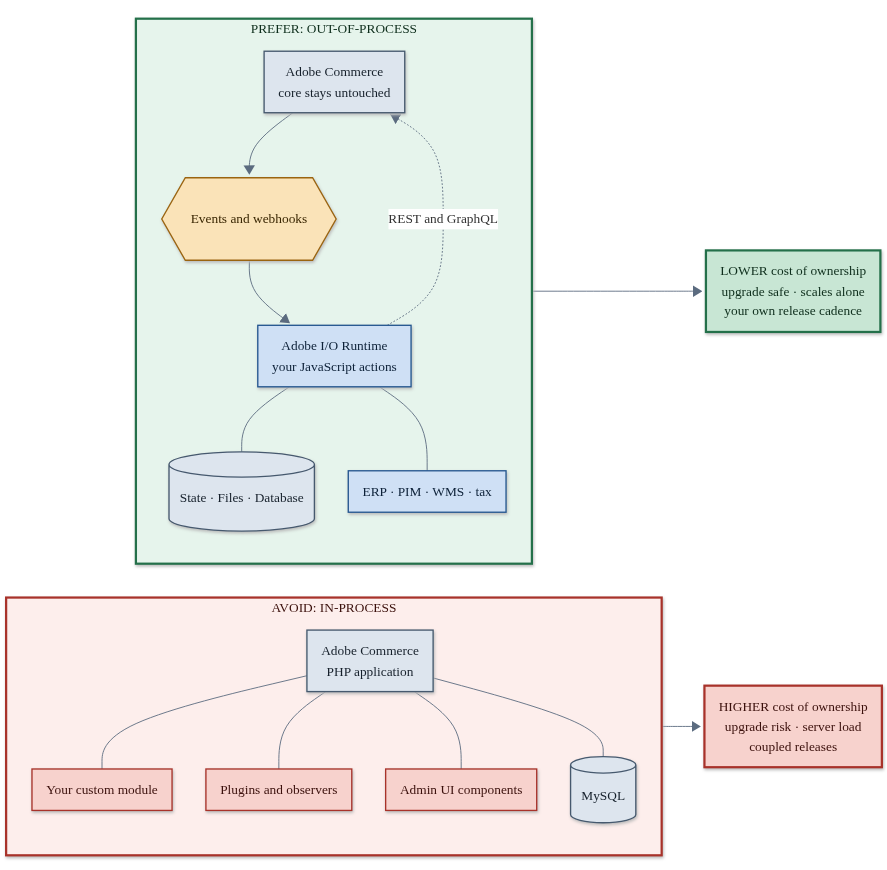
Adobe calls the older model in-process extensibility. Your PHP runs inside Commerce, so it must match the PHP version and every service around it.
The Adobe Commerce extensibility docs name three main uses. Middleware work connects outside systems, and core services work changes default behavior. User experience work builds new screens.
Why in-process code keeps costing you money
In practice: the bill for in-process code arrives at upgrade time, not at build time.
Adobe is blunt in its own docs, and its May 2026 comparison guide is direct. The in-process model raises maintenance costs, lowers stability, and adds server load.
Here is where that shows up on a real project:
- The upgrade tax means testing every custom module against each new release.
- Shared server load means your logic competes with checkout for resources.
- Coupled releases mean a small fix waits for the next Commerce deploy.
- Version lock means your code inherits Commerce’s PHP version, like it or not.
Moving that work out of process fixes all four at once. Your app scales on its own, you ship when you want, and upgrades stop touching your code.
How App Builder for Adobe Commerce fits together
In practice: App Builder is five separate pieces (Runtime, Events, Webhooks, the Admin UI SDK, and API Mesh), and most projects only ever need two or three of them.
App Builder is not one product, but a set of pieces you combine.
- Adobe I/O Runtime is the serverless layer where your JavaScript actions run.
- Adobe I/O Events is the async pipe carrying Commerce events to your app.
- Commerce Webhooks make sync calls to a system that Commerce waits on.
- Admin UI SDK adds React pages to Commerce Admin, where SDK means software development kit.
- API Mesh combines many APIs into one GraphQL endpoint for your storefront.
You get three storage services, and State handles small key-value data with an expiry. Files handles large blobs, and Database gives you document storage with real queries.
Work happens inside a project on the Adobe Developer Console. Each project holds workspaces with their own Runtime namespace, so Stage never touches Production.

Events or webhooks? Choose the right door
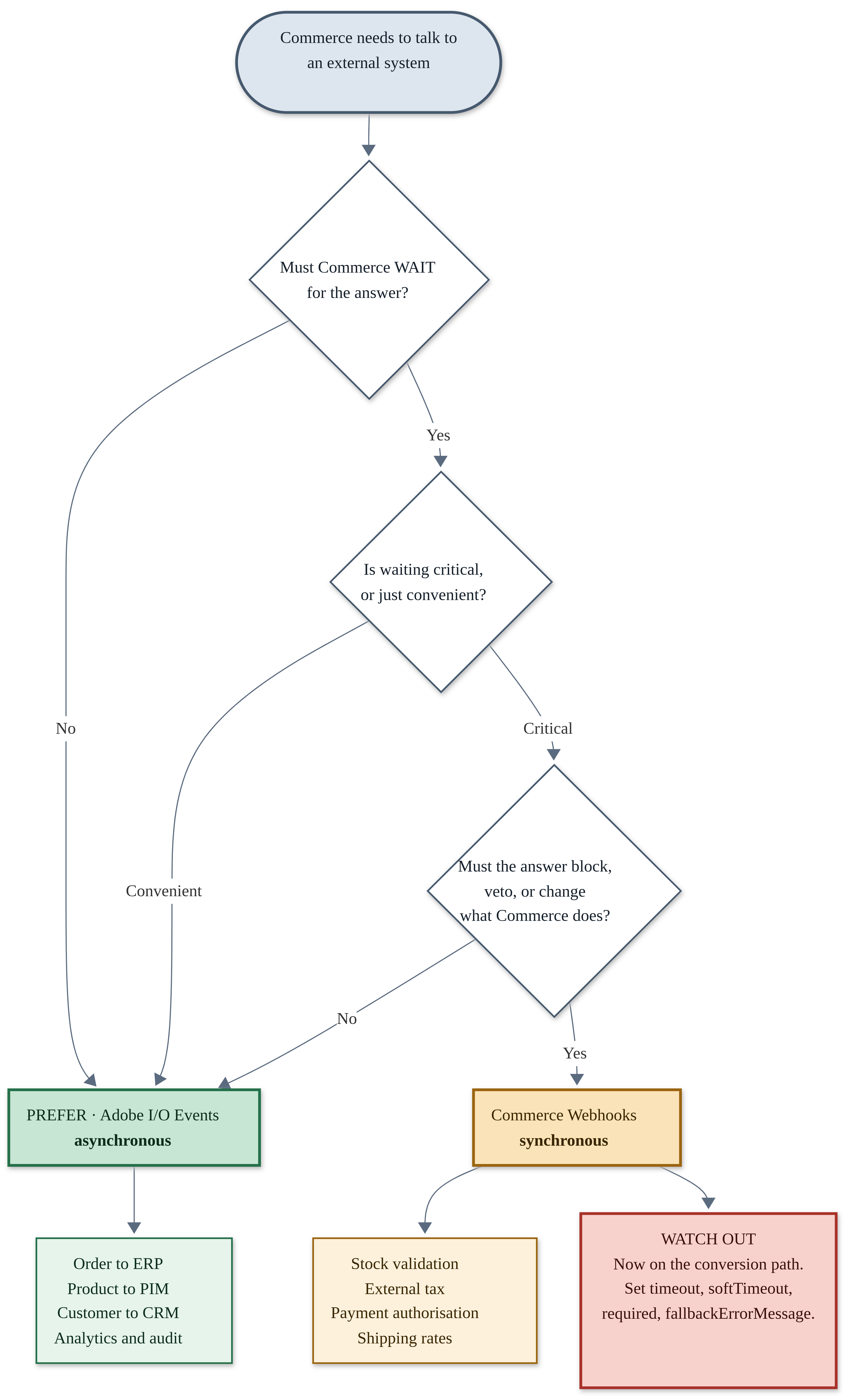
In practice: if Commerce needs the answer before it can continue, use a webhook. If it doesn’t, use an event.
This call decides your architecture, and getting it wrong loses data or slows checkout.
Events are asynchronous, so Commerce fires and forgets and the shopper waits for nothing. The Adobe I/O Events docs walk through the full delivery flow.
Webhooks are synchronous, so Commerce waits, then throws an exception or changes the payload. The Adobe Commerce Webhooks docs say to use them only when sync talk is critical.
| Question | Adobe I/O Events | Commerce Webhooks |
|---|---|---|
| Does Commerce wait? | No | Yes |
| Can it block the action? | No | Yes, it throws an exception |
| Can it change the data? | No | Yes |
| If the endpoint is down | Nothing breaks for the shopper | The action fails and shows your fallback message |
| Can you replay it? | Yes, through the journal | No |
| Typical speed | Under a second with priority set | Your timeout, often 2 seconds |
| Good fit | Order to ERP, product to PIM | Tax, payment, shipping, stock checks |
One detail catches teams out, because unprioritized events can take up to 59 seconds. During a manual test that looks like a dead integration.
The platform limits you must design around
In practice: the number that catches most teams off guard is the 60-second blocking timeout, since a slow third-party API call inside a webhook will blow past it silently.
Most guides skip this part, yet these numbers shape your whole approach. All of them come from Adobe’s Runtime system settings page, updated January 2026.
| Limit | Value | What it means for you |
|---|---|---|
| Blocking (web) action timeout | 60 seconds, hard | Confirmed against Adobe’s own Runtime docs. The caller gets an error, but your action keeps running in the background until it finishes. |
| Action payload and result | 1 MB each | Stage bulk data in Files and pass a link instead. |
| Action code size | 22 MB zipped | Watch your npm packages, because heavy SDKs add up. |
| Actions per minute | 6,000 per namespace | A bulk catalog update can trip this, so batch it. |
| Concurrent activations | 100 per namespace | Plan for back pressure on big imports. |
| Activation log retention | 7 days | Not an audit trail, so ship logs somewhere else. |
| State value size | 1 MB, expiry to 365 days | Good for cache and sessions, but not a database. |
One more thing worth checking before you build: Commerce or any fronting CDN in front of Runtime can sometimes cut a web action off sooner than the 60-second limit above. We could not confirm an exact figure for this in Adobe’s public docs, so treat 60 seconds as the outer ceiling, not a guarantee, and load test your specific deployment before you commit to that number.
Two more traps deserve a line each before you build.
Adobe keeps warm containers only for common memory sizes like 256 MB, 512 MB, and 1024 MB. Pick an odd number and you invite cold starts on every call.
Your process.env values work locally but vanish once deployed, so pass them as inputs. Our PHP development team hits this on almost every first build.
When App Builder is the wrong choice
In practice: stay in-process for sub-100ms storefront logic, real cross-table transactions, full-text search, and anything on Magento Open Source, since App Builder does not cover any of these well.
Out-of-process is a strong default, but it is not a rule. Stay in-process when any of these cases apply:
- You need sub-100ms sync logic on the storefront, where a cold start will hurt.
- Your logic needs real transactions across tables, and no managed SQL database exists here.
- You need full-text search, which App Builder does not ship at all.
- You run Magento Open Source, since several of these tools are Adobe Commerce only.
- The module is small and stable, so if it survived three upgrades, leave it.
One more caution matters if you handle tax in-house. The out-of-process Tax module replaces a core class through a di.xml preference. So it clashes with any extension overriding that same class.
Your 7-step rollout plan
In practice: the seven steps below take you from an empty Developer Console project to a live, monitored integration, and the pilot you pick in step two decides how smoothly the rest goes.
- Score your modules by upgrade pain and by the load they add to Commerce.
- Pick one pilot that runs async rather than checkout, like order sync to an ERP.
- Set up the project and workspaces in the Adobe Developer Console, one per developer.
- Name your event fields explicitly, because a blank list sends the whole payload.
- Build and test locally with
aio app devfor hot reload, then deploy to Stage. - Wire up logging early and route it off platform, since seven days is not enough.
- Load test against the limits by pushing peak volume at the 6,000 per minute ceiling.
One thing the list above skips over: how your action actually talks back to Commerce. Every Runtime action authenticates using an IMS service account, set up once per project in the Developer Console. You create a technical account, scope it to only the APIs your action needs, then store those credentials as action parameters rather than environment variables, since environment variables vanish once you deploy. Budget half a day for this step the first time through. It catches almost every team on their first project, mostly because the scoping part is easy to rush past.
On timing, a single async pilot, something close to the order sync case below, usually runs two to four weeks from an empty Developer Console project to a stable production integration, for a team that is new to the platform. A team that has already shipped one App Builder project tends to move faster on the next one, often inside two weeks, since the project setup and event registration steps stop being new.

Not sure which module to pilot first?
Send us your extension list and we will score each one for upgrade risk and fit, free, before you commit engineering time.
Get a free module review →Mini-case: moving order sync out of process
In practice: the win is not speed, it is that upgrades leave your integration alone.
Here is a realistic shape for a first project. A B2B seller syncs orders to an ERP, which stands for enterprise resource planning. Today that logic sits in a PHP module with a queue consumer.
You register plugin.magento.sales.api.order_management.place in an io_events.xml file. You list only the fields you need, so no payment data leaves Commerce.
Then choose your consumer, and the Journaling API suits this case because it is replayable. For an order feed, replay matters more than latency.
Your Runtime action reads the event, calls Commerce over REST, then posts to the ERP. Failures go to State with a retry count, and State expiry keeps that queue tidy.
The constraint that shaped this design was payload size. A large B2B order with 200 lines will not fit the 1 MB limit. So the action writes the request to Files and passes a link.
A quick glossary of App Builder terms
In practice: most confusion comes from the word webhook, which Adobe uses three ways.
- Action is one serverless function on Adobe I/O Runtime, and your unit of deploy.
- Activation is one run of an action, with a log you keep for seven days.
- Workspace is an environment inside your project, with its own credentials and data.
- Namespace is the Runtime boundary tied to a workspace, and it keeps data apart.
- Journaling API is a pull-based and ordered way to read Commerce events.
- Admin UI SDK is the kit that puts your React pages inside Commerce Admin.
Frequently asked questions
Is Adobe Commerce App Builder included in my license?
Does out-of-process extensibility mean no PHP modules at all?
How does Adobe Developer App Builder handle GDPR and EU data rules?
Can I keep my existing Magento extensions while adopting App Builder?
What skills does my team need for Adobe Commerce extensibility work?
Plan your Adobe Commerce extensibility work with StageBit
App Builder for Adobe Commerce pays off when upgrade friction is real. It costs you time when you apply it to the wrong problem.
That call needs someone who has shipped both models. Our Adobe Commerce and Magento development team scores your modules and picks the pilot. We then build the first integration with you.
Book a free extensibility review. We audit your custom modules, flag the fragile ones, and rank a move-out plan. Talk to our team to set up a slot.
Not ready for a call yet? A performance review often shows which custom code loads your servers hardest. You can also explore our custom eCommerce development work.