A Magento to Shopware 6 migration moves your catalog, customers, orders, and SEO assets from Magento 1 or Magento 2 to Shopware 6, an open source commerce platform built in Germany, through data mapping, plugin replacement, and SEO-preserving redirects. It is not a “one-click move.” In 2026, the safest path for this kind of eCommerce replatforming is a structured migration with a controlled cutover, often run alongside a parallel build.
What a Magento to Shopware 6 migration actually involves
Magento 1 stores should treat this as a replatform and security upgrade, because Magento 1 support ended in June 2020. Shopware 6 Community Edition is available as open-source under the MIT license, and Shopware provides official migration tooling for certain source systems.
Running Magento 1 today means running on an unsupported platform, which raises real risk across security, compliance, integrations, and payment compatibility. Magento 2 stores usually feel the pressure differently: rising upgrade overhead, performance tuning costs, and growing complexity in the frontend and extensions.
The same overhead and licensing cost pressure shows up on Adobe Commerce, Magento’s paid Commerce or Enterprise edition, and the migration approach below still holds there too.
Shopware 6 is a strong alternative, especially for DACH and EU-focused businesses that want a modern admin, flexible promotion and automation logic, and an ecosystem that fits European commerce workflows.
In this guide, you’ll get a practical, SEO-safe migration plan from Magento 1 or Magento 2 to Shopware 6, including checklists, timeline, cost drivers, and DACH/EU considerations.
One note before we start: we’re not going to hand you a made up price range. Every migration guide that gives you a flat number is guessing, because the real cost depends entirely on your extensions, your data, and your integrations, not your product count. What you’ll get instead is the exact list of factors that decide your number, so you can size your own budget with something real instead of anchoring on a guess that has nothing to do with your store.
The migration checklist
Pulled from the full walkthrough below. Use this to scope your own project before you read the detail.
Before you start
- ☐ Full inventory of Magento extensions, integrations, and custom modules
- ☐ Documented business rules: pricing, promotions, shipping, customer groups, B2B flows
- ☐ Sample export of products and customers to check for attribute chaos
- ☐ Decision on Shopware tier: Community, Rise, Evolve, or Beyond
SEO protection
- ☐ Full URL export from Magento, including rewrite and affix settings
- ☐ Redirect mapping sheet, old URL to new URL, for every indexable page
- ☐ Canonical, sitemap, robots, and hreflang plan if multi-language
- ☐ Analytics continuity plan for GA4 events and conversions
Migration and QA
- ☐ Pilot migration run on a small catalog subset first
- ☐ Full catalog and customer migration, then a delta sync before launch
- ☐ Must-have plugin list: payments, shipping, tax, marketing, ERP/PIM
- ☐ Revenue-path testing: checkout, payments, shipping rules, mobile Core Web Vitals
Launch and first 14 days
- ☐ Short content freeze before final delta migration
- ☐ Redirects applied and verified at scale, not spot-checked
- ☐ Sitemap resubmitted and Search Console monitored daily
- ☐ 404s, checkout drop-offs, and feed exports checked every day for two weeks
Who a Magento to Shopware 6 migration is for (and who should not do it)
You should consider Magento to Shopware 6 if:
- Your Magento store is held back by upgrade complexity, heavy extension stack, or slow frontend performance.
- You need cleaner operations: less time spent on manual pricing and stock updates, and a checkout flow you can adjust without a developer ticket every time. See how our Shopware 6 development services handle this.
- You sell in Europe and want smoother handling of multi-language, EU tax logic, and local payment and shipping expectations.
You should pause and re-check the decision if:
- Your Magento store is heavily customized and “business logic lives in code” with dozens of custom modules.
- You rely on niche Magento extensions without Shopware equivalents (ERP, PIM, complex pricing, custom checkout logic).
- You have no bandwidth for SEO migration work (redirects, URL strategy, content rebuild). Skipping SEO work is how migrations lose revenue.
Magento 1 vs Magento 2 to Shopware 6: what changes in the approach?
| Factor | Magento 1 to Shopware 6 | Magento 2 to Shopware 6 |
|---|---|---|
| Project type | Full replatform, plus a security and compliance modernization | Replatform, usually smoother when data is clean and integrations are documented |
| Platform support status | Support ended June 2020, no official security patches since | Supported, but carries ongoing upgrade and maintenance overhead |
| Data cleanup effort | Higher. Legacy attributes and product data usually need real cleanup | Lower, if the catalog and attribute structure are already disciplined |
| Main risk of staying put | Security exposure, compliance gaps, payment and integration compatibility | Rising upgrade overhead and performance tuning cost |
What both paths share
The hard part is not moving data. The hard part is moving the business: pricing rules, customer groups, content, integrations, and SEO equity.
What data moves in a Magento to Shopware 6 migration (and what needs rebuilding)
Most stores migrate these datasets:
- Catalog: categories, products, variants, attributes, media, manufacturers/brands
- Customers: accounts, addresses, customer groups, newsletter flags (where permitted)
- Orders: order history, invoices, shipments (depends on how your Magento data is stored)
- SEO assets: URLs, meta titles/descriptions, canonical rules, hreflang strategy (EU), structured content
Usually rebuilt or re-designed:
- Theme and frontend: rebuilt on Shopware’s Storefront (its default theme layer) with new template and UX patterns. Do not clone Magento’s UI unless you have a specific reason to.
- Extensions and custom modules: replaced with Shopware plugins or custom development
- Checkout customization: re-implemented based on Shopware best practices
- Integrations: ERP, PIM, WMS, CRM, marketing stacks, marketplace feeds
Shopware 6 editions, licensing, and architecture options
Before you migrate, it helps to know what you are actually adopting, since Shopware is not one fixed product.
Community Edition is the open-source, MIT-licensed core. It costs nothing to license, covers the storefront, catalog, checkout, and a basic CMS, and you self-host it. Under Shopware’s Fair Usage Policy, Community Edition stays free below a set annual GMV threshold. Stores that cross that threshold are required to move to a paid tier. Confirm the exact figure on Shopware’s policy page directly, since thresholds and terms can change.
Paid tiers (Rise, Evolve, Beyond) add native features and support SLAs as you scale:
- Rise fits standard B2C stores that have outgrown Community Edition.
- Evolve is the tier most relevant for B2B stores, since it includes Shopware’s native B2B Suite: customer-specific pricing, quote workflows, budgets, and rights and roles.
- Beyond targets enterprise requirements: multi-inventory, subscriptions, and premium support.
Confirm current pricing directly on Shopware’s official pricing page before you budget against it, since tiers and rates change.
Headless and PWA: if you want a fully custom frontend decoupled from Shopware’s default Storefront theme, Shopware Frontends (its headless toolkit) is the relevant path. This is a larger build than using the standard Storefront, and it changes your QA and hosting plan in Steps 6 and 7 below, so decide this during discovery in Step 1, not after the build has started.
If you run B2B logic today: B2B Suite lives in Evolve and above, not in the free Community Edition. If your Magento store handles customer-specific pricing, quote workflows, or approval chains, confirm which Shopware tier actually covers that before you scope the mapping work in Step 4. Teams commonly plan against Community Edition pricing, then discover mid-project that their B2B requirements only exist in a paid tier.
Step-by-step migration plan (Magento 1/2 to Shopware 6)
Step 1: Discovery and scope (do not skip this)
- Run a full Magento extension audit: every extension, integration, and custom module, with a note on whether it has a direct Shopware plugin equivalent or needs a custom rebuild.
- Document business rules: pricing, promotions, shipping logic, customer groups, B2B flows.
- Export a sample of products and customers to identify attribute chaos (duplicate options, inconsistent naming, invalid data).
- Decide what stays, what changes, and what gets removed. A migration is the best time to simplify.
Step 2: SEO and URL strategy (protect your rankings)
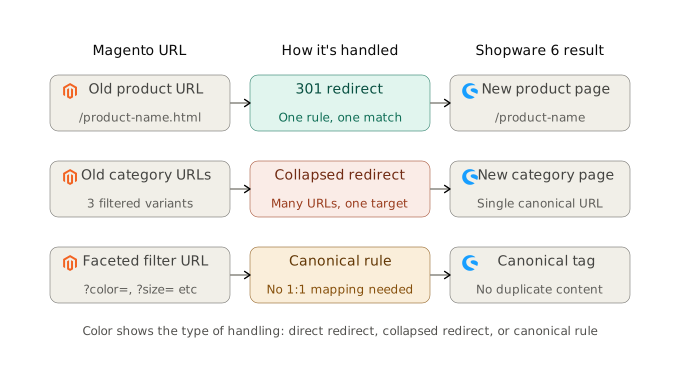
SEO losses happen when URL structure changes without a proper 301 redirect strategy. Your goal is to preserve:
- Category and product URL paths (or map them 1:1 via 301 redirects)
- Indexable content that earns traffic (guides, categories, top products)
- Internal linking structure and breadcrumbs
Minimum SEO migration deliverables:
- Full URL export from Magento, including your current URL rewrite and affix settings (products, categories, CMS pages)
- Redirect mapping sheet (old URL → new URL)
- Rules for parameters and faceted navigation URLs
- Plan for canonical tags, sitemap, robots, hreflang (if multi-language)
- Analytics continuity: GA4 events, conversions, server-side tracking (if used)
Step 3: Set up Shopware 6 (target environment)
- Install Shopware 6 and set up environments: dev, staging, production.
- Configure sales channels, languages, currencies, tax rules.
- Set up core operational modules: shipping, payment, emails, legal pages.
- Confirm hosting requirements before you install anything. Shopware 6 needs PHP 8.2 or higher, a supported database version, and enough resources to handle your catalog size and traffic, so check this against your current Magento hosting plan rather than assuming it carries over.
Shopware 6 Community Edition is offered as an open-source, MIT-licensed core that can be downloaded and used for free.
Step 4: Data mapping and migration runs
In practice, this is where migrations succeed or fail. Typical mapping work includes:
- Magento attributes → Shopware properties and custom fields
- Configurable products → variants
- Category trees and navigation
- Customer groups and pricing logic (especially B2B)
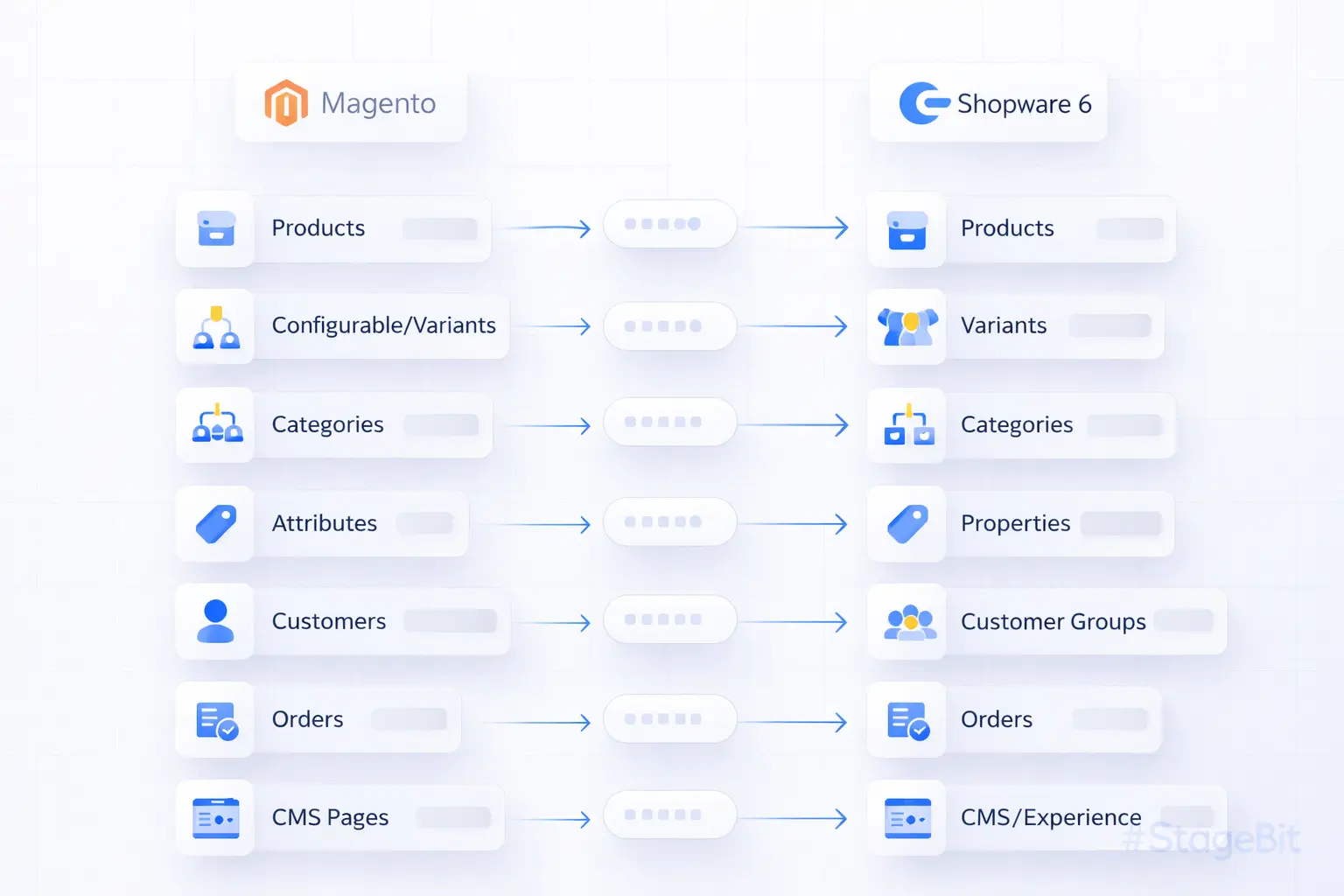
Shopware provides an official Migration Assistant to connect systems and guide migration for supported sources and scenarios.
Step 5: Plugin replacement and integrations
Make a “must-have” list first:
- Payments (PayPal, Klarna, Stripe depending on your market)
- Shipping (DHL and local carriers for DACH/EU if applicable)
- Tax and invoicing requirements
- Marketing: feed management, email flows, consent management
- ERP/PIM sync and stock rules
Do not recreate Magento’s extension stack blindly. In practice, most stores end up needing far fewer plugins on Shopware than they had on Magento, once you stop replicating legacy logic one for one and start using what Shopware handles natively.
Step 6: QA that actually matters (not just clicking around)
Test the flows that affect revenue and trust:
- Search, filters, sorting, category navigation
- Add-to-cart, checkout, payments, order confirmation
- Shipping cost rules, taxes, invoice and email templates
- Account pages, address edits, reorders (if used)
- Mobile speed and Core Web Vitals targets (LCP, INP, CLS)
Step 7: Cutover and go-live (SEO-safe launch)
- Freeze period (short): content and catalog changes are controlled
- Final delta migration
- Deploy Shopware 6 production
- Apply redirects and verify status codes at scale
- Submit sitemaps and monitor Google Search Console
Step 8: Post-launch hypercare (first 14 days)
- Fix 404s and redirect gaps daily
- Watch conversion funnels (checkout drop-offs, payment errors)
- Monitor performance, error logs, and slow queries
- Validate feed exports and tracking events
Case example: Macrovet.nl (Magento 1 → Shopware 6)
Macrovet.nl is a long-term Stagebit client. Our team migrated Macrovet from Magento 1 to Shopware 6 Evolve. The goal was to modernize the platform, reduce technical risk, and improve performance without sacrificing SEO or conversion stability.
- Store type: mixed B2C/B2B business in Dutch (NL) and Belgian market
- Catalog size: ~5100+ products, ~45+ categories
- Languages:1 NL
- Orders migrated: ~37800+ historical orders
- Customers migrated: ~22000+ customer accounts
Integrations and key rebuild work
- ERP: AFAS Profit sync (products, stock, orders)*
- Search / personalization: Clerk.io*
- Address validation: Postcode.eu*
- Payments: ChannablePayment, Mollie Payments
- Shipping: DHL
*Pre-existing integration from the legacy Magento 1 store, carried over and reconnected to Shopware 6 rather than rebuilt from scratch.
Timeline (what it actually took)
| Phase | Duration | What happened |
|---|---|---|
| Discovery and mapping | 4 days | Module inventory, data model review, SEO URL export, integration spec |
| Shopware build and theme | 6 to 8 weeks | Storefront build, template work, plugin selection and configuration |
| Migration runs and QA | 1 week | Multiple import passes, validation, delta sync |
| Client review | 1 week | Client review and content freeze |
| SEO cutover and launch | 2 days | Redirects applied, sitemaps submitted, monitoring in place |
| Total | 10 to 12 weeks |
Results (first 30 to 60 days post-launch)
Post-launch outcome
- SEO stability
- Rankings and organic traffic held steady after launch, with minor fluctuation in the first weeks.
- Conversion stability
- Checkout and conversion flow stayed stable through the cutover window.
- Operational win
- Fewer manual fixes, thanks to cleaner automation and improved admin workflows.
We expected the migration to be stressful. Instead, it felt controlled. Our customers never saw a maintenance page, they just got a faster store.

Want a migration plan like this for your Magento store?
Request a migration roadmapWhat should DACH and EU stores consider in a Magento to Shopware 6 migration?
If you sell in Germany, Austria, Switzerland, or across the EU, the migration plan must account for local realities:
- Languages and content: real translations, not auto-only, plus hreflang strategy if you run multiple languages.
- EU VAT logic: B2B vs B2C flows, VAT ID validation where needed, invoice requirements.
- Compliance: cookie consent, GDPR-friendly tracking, legal pages (Imprint, Privacy, Returns).
- Shipping expectations: DHL and local carriers, pick-up points, delivery time messaging.
- Payment preferences: ensure the mix matches your market (PayPal plus local methods depending on country).
For DACH stores in particular, these items are not “nice-to-have.” They directly influence conversion rate and customer support load.
Magento to Shopware 6 migration timeline and cost drivers (what decides your budget)
There is no fixed price for a Magento to Shopware 6 migration. Cost is driven by integration count and custom business logic, not catalog size or product count, and a short discovery sprint is the only reliable way to get a real number for your specific store.
Timeline: A clean, single-language catalog with three or four integrations can go live in six to eight weeks. A multi-market B2B store with an ERP, a PIM, and custom checkout logic, like Macrovet, realistically needs ten to twelve. Product count almost never moves that number. Integration count does.
Main cost drivers:
- Number of custom Magento modules that must be rebuilt
- Complex product types, attribute mess, and data cleanup
- B2B requirements (customer-specific pricing, catalogs, workflows)
- ERP/PIM/WMS integrations and their data quality
- SEO scope (redirects, content rebuild, multi-language)
- Frontend requirements (custom theme, headless, performance targets)
Overall, if you want a realistic estimate, you need a short discovery sprint. Guessing from product count is how projects blow up.
Common Magento to Shopware 6 migration mistakes (and how to avoid them)
- Skipping redirects: you lose rankings and paid traffic efficiency. Build the redirect matrix early.
- Copying Magento’s architecture: you carry old complexity into a new platform.
- No data cleanup: messy attributes create messy filters, messy UX, and messy SEO.
- Testing only “happy paths”: real users trigger edge cases. Test the ugly scenarios.
- Launching without monitoring: the first 2 weeks decide whether migration is a win or a revenue dip.
Need help migrating from Magento to Shopware 6?
If you want a migration like Macrovet’s, one that protects your rankings and keeps checkout stable while the platform changes underneath it, Stagebit can scope it with you.
Request a Migration RoadmapExplore Shopware Services
Recap: the migration path in one pass
Here is the whole Magento to Shopware 6 migration path compressed into one paragraph, in case you skipped straight to this point. Discovery comes first: inventory every extension and business rule before touching anything. Locking down your SEO and URL strategy early is what lets rankings survive the move. Once the Shopware 6 target environment is set up, data mapping and migration happen in stages rather than one big leap, a pilot batch first, then the full catalog, then a delta sync right before launch. Plugins get replaced deliberately instead of copying Magento’s stack one for one, and the flows that actually touch revenue get tested, not just the happy path. Cutover happens with a short freeze window and redirects verified at scale. The two weeks right after launch matter most, because that window decides whether the migration was a win or a quiet revenue leak.
The one thing that decides most of it
Integration count and custom business logic decide your timeline and your budget, not catalog size. A single-language store with three integrations moves in six to eight weeks. A multi-market B2B store with an ERP and a PIM realistically needs ten to twelve, the way Macrovet did.
FAQs
Is Magento 1 still supported in 2026?
No. Magento 1 support ended in June 2020, which means no official security patches after that.
How long does a Magento to Shopware 6 migration take?
It depends on integrations and custom logic. Simple stores can take weeks, complex stores often take a few months. Plan discovery, migration runs, QA, and a controlled cutover.
Will my SEO drop after migrating to Shopware 6?
It can if URLs change without 301 redirects and if internal linking and indexable content are not preserved. A redirect matrix, canonical strategy, and post-launch monitoring reduce risk.
Can I migrate orders and customers from Magento?
Yes, typically products, customers, and orders can be migrated, but data mapping and cleanup matter. The approach depends on Magento version and how your data and extensions are structured.
Does Shopware provide official migration tooling?
Shopware provides a Migration Assistant for certain migration scenarios and supported sources.
Is Shopware 6 open-source?
Shopware Community Edition is available as open-source under the MIT license.
How much does a Shopware 6 migration cost?
Cost depends mainly on integration count and custom business logic, not catalog size. A simple single-integration store costs far less than a multi-market B2B store with ERP and PIM sync. A short discovery sprint gives you a real number for your specific case.
Can Magento extensions be migrated directly to Shopware plugins?
Not directly. Magento extensions and Shopware plugins run on different codebases, so each item on your must-have list gets replaced with a Shopware-native plugin or custom development rather than copied over. An extension audit during discovery separates what has a direct plugin equivalent from what needs a custom rebuild.
Is Shopware 6 good for B2B ecommerce?
Yes, but B2B Suite, which covers customer-specific pricing, quote workflows, budgets, and rights and roles, is only available on Shopware’s Evolve tier and above, not on the free Community Edition. If your Magento store runs B2B logic today, confirm which Shopware tier covers it before scoping your migration.

Rohit founded Stagebit in 2017 and leads its engineering across Magento 2, Adobe Commerce, Shopware, and Shopify. His focus is performance work: Core Web Vitals, Hyvä theme builds, and headless architecture for DTC and B2B brands across Europe and North America.